
1. Introduction
Welcome to the instruction manual for your Selieve Kids Walkie Talkies, Model T-388. This two-way radio system is designed for clear communication over distances up to 3 miles in open areas, making it suitable for various outdoor activities. Each unit features 22 channels, a backlit LCD display, and a built-in flashlight for enhanced usability. Please read this manual thoroughly to ensure proper setup and operation.
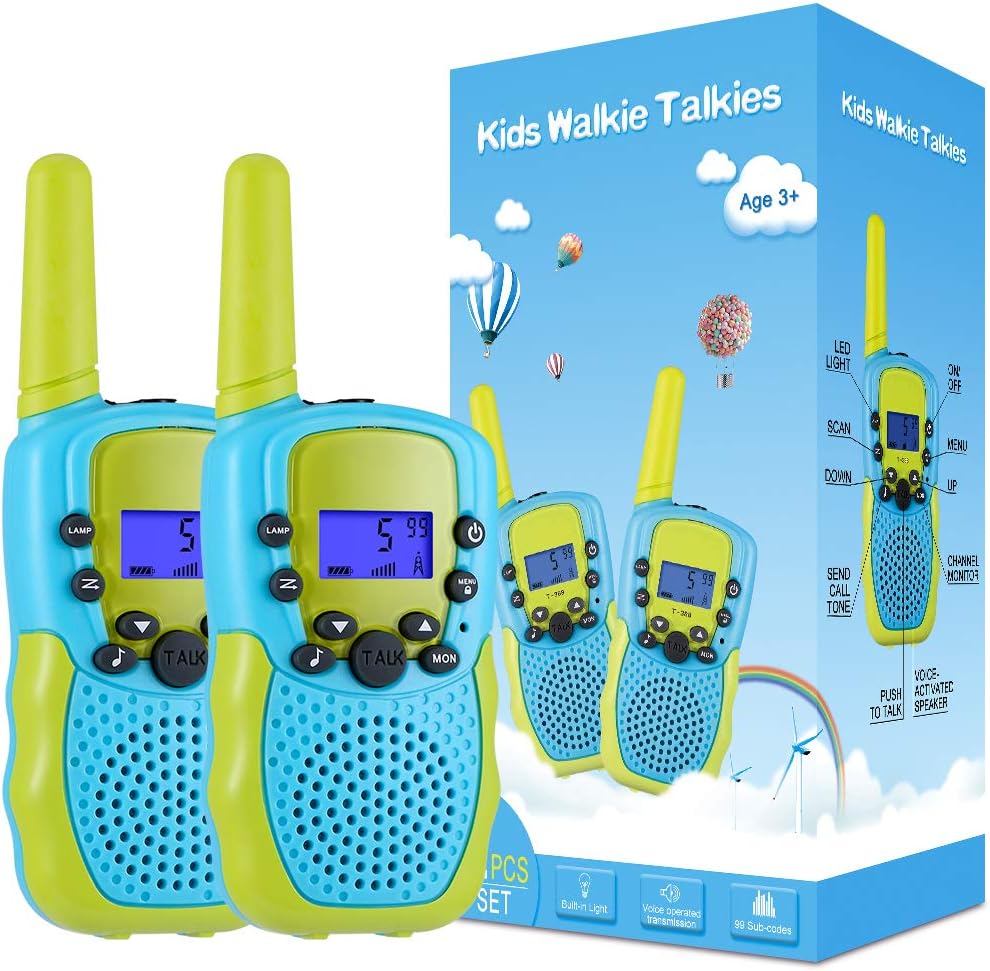
Image: Two Selieve Kids Walkie Talkies (Model T-388) in blue and green, shown with their product packaging.
2. Package Contents
- 2 x Selieve Kids Walkie Talkies (Model T-388)
- 1 x User Manual
3. Product Overview
The Selieve Kids Walkie Talkies are ergonomically designed for comfortable handling by children. Key features include a backlit LCD display for visibility in various lighting conditions, a built-in flashlight for nighttime use, and a simple push-to-talk button for easy communication. The units also offer 22 channels and a key lock function to prevent accidental channel changes.

Image: A close-up view of the walkie talkies, illustrating their main features such as 22 channels, LED flashlight, auto power save, 10 call ring tones, HD voice, and keypad lock.
4. Setup
4.1 Battery Installation
Each walkie talkie requires 4 AAA batteries (not included). Ensure batteries are inserted with correct polarity.
- Locate the battery compartment cover on the back of the walkie talkie.
- Use a small screwdriver (not included) to loosen the screw on the battery cover.
- Remove the battery cover.
- Insert 4 AAA batteries, matching the + and - symbols inside the compartment.
- Replace the battery cover and tighten the screw to secure it.

Image: The rear of a walkie talkie with the battery cover removed, indicating the placement for four AAA batteries.
5. Operating Instructions
5.1 Power On/Off
- To power on: Press and hold the Power button (
 ) until the LCD screen illuminates.
 - To power off: Press and hold the Power button until the LCD screen turns off.
5.2 Channel Selection
Your walkie talkies have 22 available channels. Both units must be on the same channel to communicate.
- Press the Menu button (
 ) once. The channel number on the LCD will flash.
 - Use the Up (
 ) or Down (
 ) buttons to select your desired channel.
 - Press the Talk button (
 ) or Menu button again to confirm the selection.
5.3 Key Lock Function
To prevent accidental channel changes, you can lock the keypad.
- To lock: Press and hold the Menu button until a key icon appears on the LCD.
- To unlock: Press and hold the Menu button again until the key icon disappears.
5.4 Talking
- Ensure both walkie talkies are on the same channel.
- Press and hold the Talk button.
- Speak clearly into the microphone (located above the Talk button).
- Release the Talk button when finished speaking to allow the other party to respond.
5.5 Call Tone
To send a call alert to the other walkie talkie:
- Press the Call Tone button (
 ). The other unit will receive an audible alert.
5.6 Flashlight
Each walkie talkie includes a built-in flashlight.
- To turn on/off: Press the Lamp button (
 ) located on the side of the unit.
5.7 Product Demonstration Video
Video: A brief demonstration of the Selieve Kids Walkie Talkies, showcasing their compact design and ease of use for children.
6. Maintenance
- Clean the walkie talkies with a soft, damp cloth. Do not use harsh chemicals or abrasive cleaners.
- Avoid exposing the units to water or excessive moisture, as they are not water resistant.
- Remove batteries if the walkie talkies will not be used for an extended period to prevent leakage.
- Store in a cool, dry place away from direct sunlight.
7. Troubleshooting
7.1 No Power
- Check if batteries are inserted correctly with proper polarity.
- Replace old or depleted batteries with new AAA batteries.
7.2 Cannot Communicate
- Ensure both walkie talkies are powered on and have sufficient battery life.
- Verify that both units are set to the same channel.
- Check if the key lock function is active; unlock if necessary to change channels.
- Ensure you are within the effective communication range (up to 3 miles in open areas). Obstacles like buildings and dense foliage can reduce range.
7.3 Poor Sound Quality
- Move closer to the other walkie talkie to improve signal strength.
- Adjust the volume level using the Up/Down buttons.
- Ensure there are no obstructions between the two units.
8. Specifications
| Feature | Specification |
|---|---|
| Model Number | T-388 |
| Brand | Selieve |
| Number of Channels | 22 |
| Frequency Range | 462.5625- 462.7125 MHz |
| Talking Range Maximum | 3 Kilometers (approx. 1.86 miles) |
| Power Source | 4 x AAA Batteries per unit (1.5 Volts each) |
| Product Dimensions | 5.5 x 2.5 x 1 inches (1"D x 2.5"W x 5.5"H) |
| Item Weight | 7 ounces |
| Special Feature | Adjustable, Backlit LCD, Flashlight, Key Lock |
| Water Resistance Level | Not Water Resistant |
9. Warranty and Support
For warranty information or technical support, please refer to the product packaging or contact Selieve customer service through the retailer where the product was purchased. Keep your purchase receipt for warranty claims.
