1. Product Overview
The Master Lock 850031 is a durable, padlock-style key safe designed to securely store keys and access cards. It features a convenient push-button keypad for setting and entering a personalized combination. The robust metal construction and vinyl-coated shackle protect both the safe and the surfaces it attaches to.
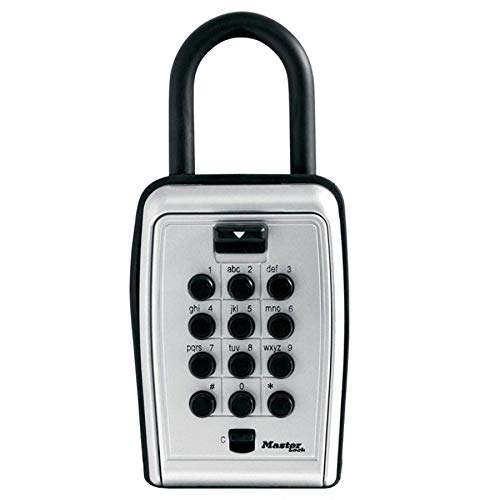
Figure 1: Master Lock 850031 Push Button Key Safe. This image displays the front view of the key safe, highlighting its push-button keypad and sturdy shackle.
While designed to resist dust and rain, this unit is not completely waterproof and should not be submerged. It is suitable for outdoor use in protected areas.
2. Setting Your Combination
The Master Lock 850031 allows you to set a custom combination of 1 to 12 digits. Each button can only be used once per combination sequence.
- Open the Safe: Use the factory default combination (if any, typically found on packaging or a sticker inside) or the current combination to open the key safe.
- Locate the Reset Mechanism: Inside the safe, usually on the back of the door or within the compartment, find the small reset lever or button.
- Engage Reset Mode: Move the lever to the "SET" position or press and hold the reset button.
- Enter New Combination: While in reset mode, press the desired buttons on the keypad in your chosen sequence. Your combination can be 1 to 12 digits long.
- Disengage Reset Mode: Return the reset lever to the "LOCK" position or release the reset button.
- Test the Combination: Close the safe door and scramble the buttons. Then, enter your new combination to ensure it opens correctly. Perform this test several times before securing the safe with valuables.
Important: Write down your combination and store it in a secure, memorable location away from the safe. There is no master key or override for forgotten combinations on most push-button key safes.
3. Operating Instructions
3.1 Opening the Key Safe
- Enter Combination: Press the buttons corresponding to your set combination in the correct sequence.
- Open Door: Once the combination is entered, the latch mechanism will disengage. Pull the door open.
3.2 Closing and Locking the Key Safe
- Close Door: Push the door firmly shut until it latches.
- Scramble Buttons: To secure the safe, scramble the buttons on the keypad by pressing a few random buttons. This ensures the combination is reset and the safe is locked.
4. Maintenance
- Cleaning: Periodically wipe the exterior of the key safe with a soft, damp cloth to remove dust and dirt. Avoid abrasive cleaners or solvents.
- Shackle Inspection: Inspect the vinyl coating on the shackle for any signs of wear or damage. This coating helps prevent scratches to mounting surfaces.
- Weather Protection: Although designed to resist dust and rain, prolonged exposure to extreme weather conditions may affect performance. Consider placing the safe in a sheltered location for optimal longevity.
- Lubrication: If the door mechanism becomes stiff, a small amount of silicone-based lubricant can be applied to the moving parts, avoiding the keypad buttons.
5. Troubleshooting
| Problem | Possible Cause | Solution |
|---|---|---|
| Safe will not open with combination. | Incorrect combination entered. Buttons not fully pressed. Combination forgotten. | Ensure the correct combination is entered precisely. Press each button firmly until it clicks. If the combination is forgotten, there is no override. The safe may need to be replaced or professionally opened. |
| Door is stiff or difficult to close. | Dirt or debris in the mechanism. Lack of lubrication. | Clean the interior and latch mechanism. Apply a small amount of silicone-based lubricant to moving parts. |
| Shackle is difficult to open/close. | Debris or corrosion. | Clean the shackle and its housing. Apply a small amount of lubricant if necessary. |
6. Specifications
- Model: 850031
- Dimensions (Width x Height): 79mm x 117mm (approx. 3.1 x 4.6 inches)
- Weight: Approximately 952g (2.1 lbs)
- Materials: Body: Aluminum; Shackle: Steel
- Lock Type: Push-button combination
- Combination Length: 1 to 12 digits (each button used once per sequence)
- Weather Resistance: Designed to resist dust and rain (not fully waterproof)
- Outdoor Use: Yes
- Country of Manufacture: China
7. Warranty and Support
Specific warranty information for the Master Lock 850031 Push Button Key Safe is typically provided with the product packaging or can be found on the official Master Lock website. Please retain your purchase receipt for warranty claims.
For further assistance, technical support, or to inquire about warranty details, please visit the official Master Lock website or contact their customer service department. Contact information can usually be found on the product packaging or their website.
Official Master Lock Website: www.masterlock.com


