1. Product Overview
The Toho Metal Industries GATEMAN J20/WV-40 Remote Control Module is designed to enhance the functionality of your GATEMAN J20/WV-40 digital door lock. This module acts as a receiver, allowing the door lock to respond to unlock signals from a compatible remote control. It is constructed from durable ABS resin and integrates seamlessly into the door lock's internal chamber.
1.1. Package Contents
- 1 x GATEMAN J20/WV-40 Remote Control Module
2. Safety Information
- Ensure the module is installed correctly to prevent damage to the door lock or module.
- Do not attempt to modify or disassemble the module. This may void the warranty and cause malfunction.
- Keep the module away from water and excessive moisture.
- This module is specifically designed for the GATEMAN J20/WV-40 digital door lock. Verify your door lock model before installation.
- Compatibility with parallel import GATEMAN products cannot be guaranteed.
3. Installation Guide
Follow these steps to install the Remote Control Module into your GATEMAN J20/WV-40 digital door lock.
- Prepare the Door Lock: Locate the battery cover on the interior side of your GATEMAN J20/WV-40 digital door lock.
- Remove Battery Cover: Carefully remove the battery cover to expose the battery compartment and the internal components.
- Locate Module Slot: Identify the designated slot for the remote control module within the door lock's internal chamber. This slot is typically located near the battery compartment.
- Insert Module: Gently insert the GATEMAN J20/WV-40 Remote Control Module into the identified slot. Ensure it snaps securely into place. The module is designed to fit in only one orientation.
- Replace Battery Cover: Once the module is securely installed, replace the battery cover, ensuring it is properly closed and fastened.
- Test Functionality: After installation, test the module's functionality with a compatible GATEMAN remote control to ensure it receives unlock signals correctly.

Image 3.1: The Remote Control Module (translucent orange component at the bottom) correctly installed within the battery compartment of a GATEMAN digital door lock, alongside four AA batteries.

Image 3.2: A close-up view of the GATEMAN J20/WV-40 Remote Control Module, showing its translucent orange casing and internal circuitry.
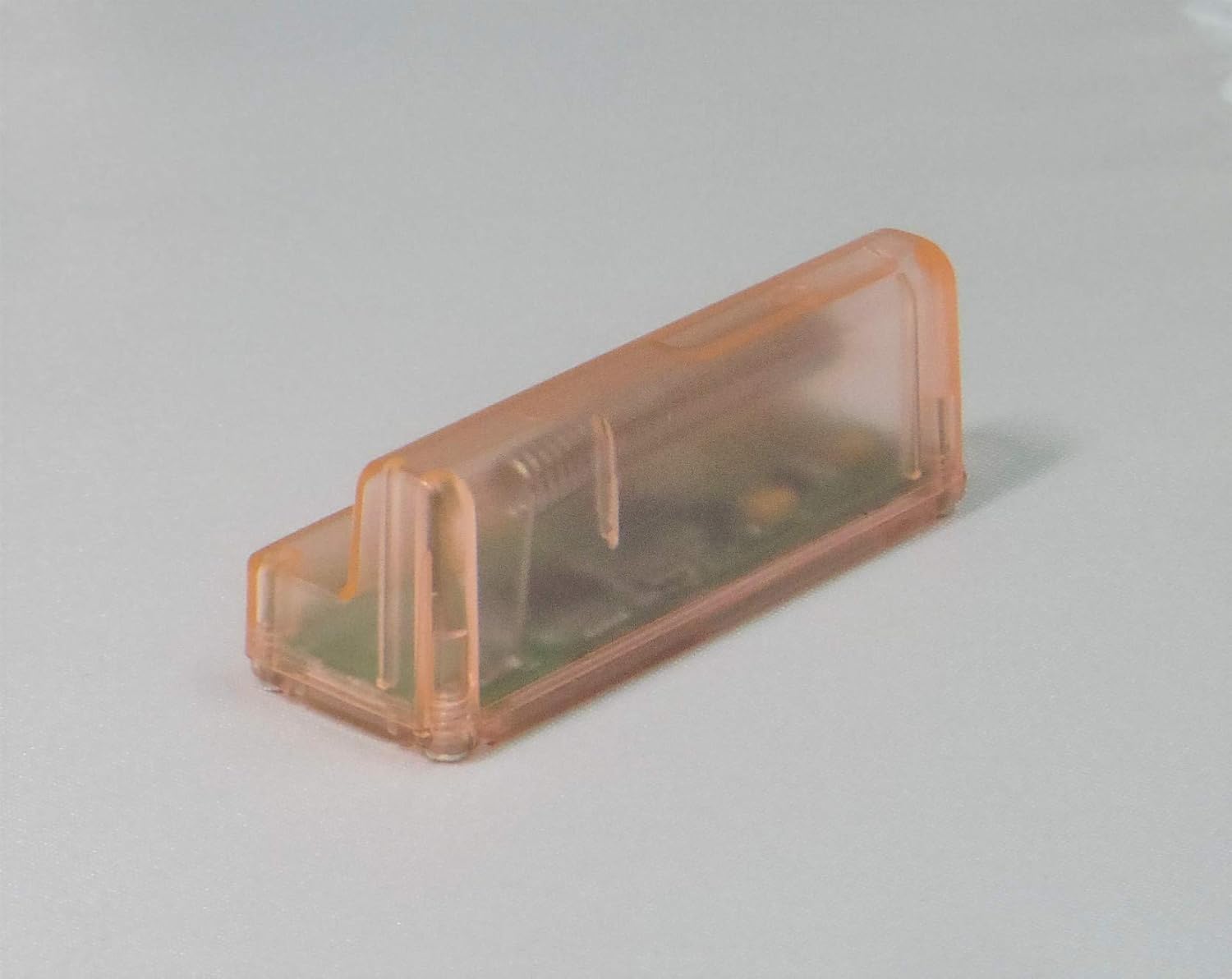
Image 3.3: An angled perspective of the GATEMAN J20/WV-40 Remote Control Module, highlighting its compact design and connector pins.
4. Operating Instructions
Once the Remote Control Module is correctly installed, your GATEMAN J20/WV-40 digital door lock will be able to receive wireless unlock signals.
- Remote Control Pairing: Refer to your GATEMAN J20/WV-40 digital door lock's main instruction manual for specific steps on how to pair a compatible remote control with the lock. The module enables the wireless communication, but the pairing process is handled by the main lock unit.
- Unlocking: After successful pairing, pressing the unlock button on your GATEMAN remote control will send a signal to the module, which then instructs the door lock to unlock.
- Locking: The module primarily facilitates wireless unlocking. For locking, typically the door lock's auto-locking feature or manual locking via the remote control (if supported by the remote) will be used.
5. Maintenance
The GATEMAN J20/WV-40 Remote Control Module requires minimal maintenance.
- Cleaning: If the module needs cleaning, gently wipe its exterior with a dry, soft cloth. Do not use liquid cleaners or abrasive materials.
- Environment: Ensure the door lock and module are kept in a dry environment, free from extreme temperatures.
- Inspection: Periodically check that the module remains securely seated within its slot inside the door lock.
6. Troubleshooting
6.1. Module Not Responding to Remote Control
- Check Installation: Ensure the module is correctly and fully inserted into its designated slot within the door lock.
- Remote Control Battery: Verify that the remote control has fresh batteries and is functioning correctly.
- Remote Control Pairing: Confirm that the remote control is properly paired with your GATEMAN J20/WV-40 door lock. Refer to your door lock's manual for pairing instructions.
- Compatibility: Double-check that your door lock is indeed a GATEMAN J20/WV-40 model, as this module is specific to that model.
- Interference: Ensure there are no strong radio frequency interference sources nearby that could disrupt the signal.
6.2. Physical Damage
- If the module appears physically damaged, discontinue use and contact customer support.
7. Specifications
| Feature | Detail |
|---|---|
| Product Name | GATEMAN J20/WV-40 Remote Control Module |
| Brand | Toho Metal Industries |
| Model Number | J20/WV-40 (Item Model Number: 4905841800221) |
| Material | ABS resin |
| Application | Remote Control Receiver for GATEMAN J20/WV-40 digital door locks |
| Installation Location | Interior of the door lock chamber (behind battery cover) |
| Connectivity Technology | Radio Frequency |
| Controller Type | Button Control (via compatible remote) |
| Package Dimensions | 5.8 x 3 x 1.8 cm |
| Item Weight | 40 g |
8. Warranty and Support
For warranty information and technical support, please refer to the documentation provided with your original GATEMAN J20/WV-40 digital door lock or contact Toho Metal Industries customer service directly. Keep your purchase receipt as proof of purchase.
For further assistance, please visit the official Toho Metal Industries website or contact their authorized distributors.


