
1. Introduction and Overview
The BEVA Tower Surge Protector Power Strip, Model PowerStrip001, is designed to provide a centralized and efficient power solution for multiple electronic devices. Featuring a vertical tower design, it maximizes space utilization while offering extensive connectivity. This manual provides essential information for the safe and effective use of your power strip.

Image 1.1: The BEVA Tower Surge Protector Power Strip in use, demonstrating its compact design and multiple connections.
2. Safety Instructions
Your safety is paramount. Please read and adhere to the following safety guidelines:
- Overload Protection: Do not exceed the maximum power rating of 1250W (10A). Overloading can cause the unit to shut off automatically to prevent damage.
- Surge Protection: The unit includes 900J surge protection to safeguard connected devices from power surges.
- Fire Safety: Constructed with ABS + PC fireproof casing, capable of withstanding temperatures up to 1382℉ (750℃).
- Certifications: This product has passed FCC, RoHS, and CE certifications, ensuring compliance with safety standards.
- Indoor Use Only: This device is intended for indoor use in dry locations. Avoid exposure to moisture or liquids.
- Proper Placement: Ensure the power strip is placed on a stable surface. The non-slip base helps prevent accidental movement.
- Ventilation: Do not cover the power strip or obstruct its ventilation openings.
- Children and Pets: Keep out of reach of children and pets.
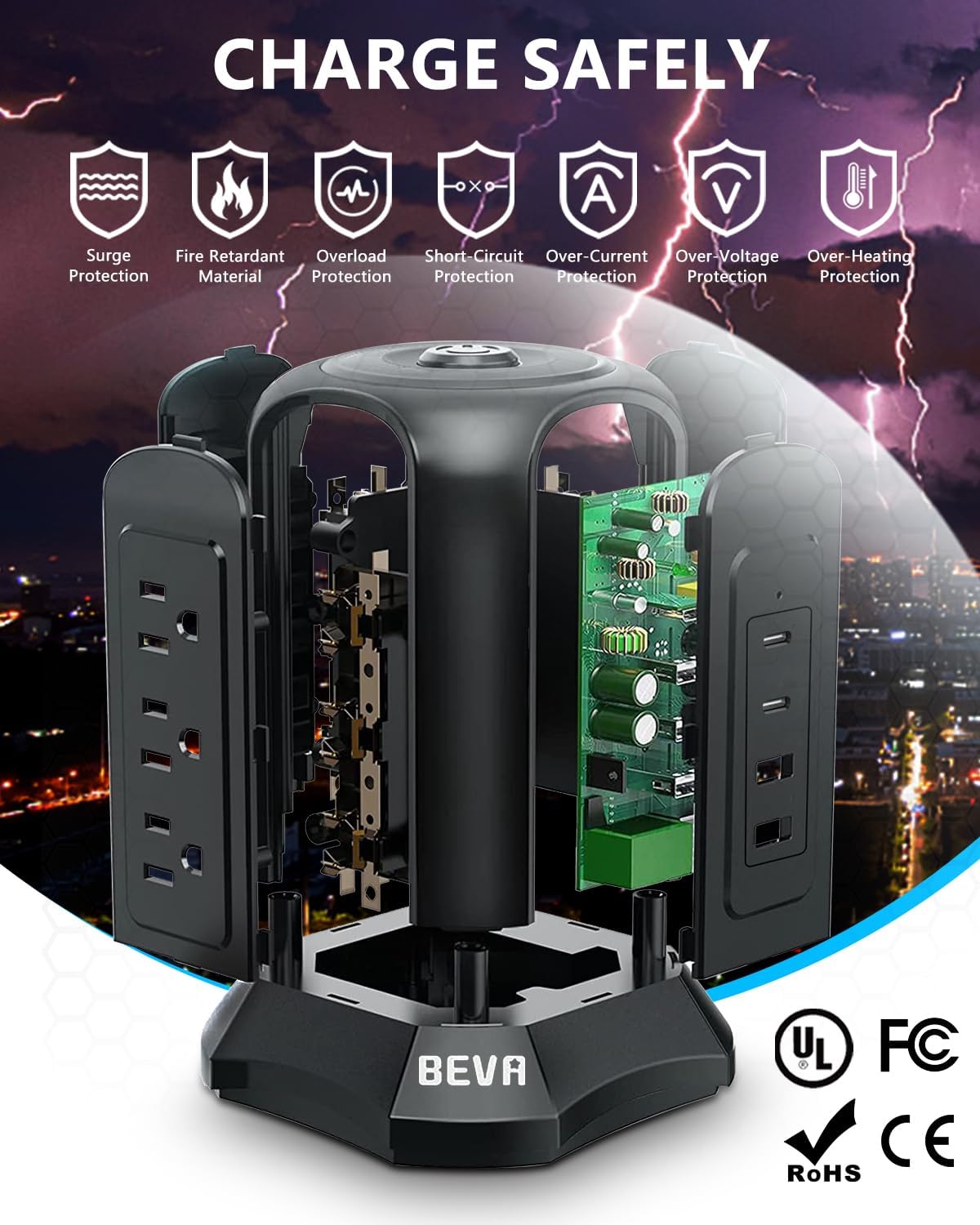
Image 2.1: Visual representation of the surge, fire retardant, overload, short circuit, over-current, over-voltage, and over-heating protection features.
3. Product Features
The BEVA Tower Surge Protector Power Strip is equipped with a range of features designed for convenience and safety:
- 13-in-1 Connectivity: Provides 9 AC outlets (1250W, 10A) and 4 smart USB ports (5V/3.1A total output), allowing simultaneous charging of up to 13 devices.
- Space-Saving Tower Design: Its vertical orientation minimizes desktop footprint, making it ideal for offices, dorms, and apartments.
- Smart USB Fast Charging: Integrated IC technology automatically detects connected devices to deliver optimal charging efficiency.
- Master Power Switch: A convenient switch on top controls power to all connected devices, eliminating the need for frequent plugging and unplugging.
- Non-Slip Base: Features 5 rubber feet for enhanced stability on various surfaces.
- 45° Flat Plug: The angled plug design allows for easy access in tight spaces behind furniture.
- Long Extension Cord: Comes with an 18AWG 6.5 ft (2M) extension cord for flexible placement.

Image 3.1: The vertical tower design efficiently organizes cables and provides power to multiple devices on a desk.

Image 3.2: The 45-degree flat plug allows the power strip to be used in confined spaces without blocking other outlets.

Image 3.3: The smart USB ports provide efficient charging for mobile devices like smartphones and tablets.
4. Setup
- Unpack: Carefully remove the power strip from its packaging.
- Placement: Place the BEVA Tower Surge Protector on a flat, stable surface. The integrated rubber feet will help secure it.
- Connect to Power: Plug the 6.5 ft extension cord's 45° flat plug into a standard 3-prong wall outlet. Ensure the connection is secure.
- Power On: Press the master power switch located on the top of the tower. A light indicator will confirm the unit is powered on.
5. Operating Instructions
Using your BEVA Tower Surge Protector is straightforward:
- AC Outlets: Plug your AC-powered devices directly into any of the 9 available AC outlets. The vertical design and wide spacing accommodate larger power adapters without blocking adjacent outlets.
- USB Ports: Connect your USB-powered devices (e.g., smartphones, tablets, smartwatches) to any of the 4 smart USB ports using their respective USB cables. The smart IC technology will automatically detect and deliver the optimal charging current.
- Master Switch: Use the master switch on the top to turn the entire unit on or off. This allows you to easily power down all connected devices when not in use, conserving energy.
Video 5.1: An official BEVA video demonstrating the features and usage of the Power Strip Tower, including the master switch, AC outlets, and USB ports.
6. Maintenance
To ensure the longevity and optimal performance of your BEVA Tower Surge Protector, follow these maintenance tips:
- Cleaning: Disconnect the power strip from the wall outlet before cleaning. Use a dry, soft cloth to wipe the exterior. Do not use liquid cleaners or abrasive materials.
- Inspection: Periodically inspect the power cord and the unit for any signs of damage, such as frayed wires, cracks, or loose connections. If damage is found, discontinue use and contact customer support.
- Storage: When not in use for extended periods, store the power strip in a cool, dry place away from direct sunlight and extreme temperatures.
7. Troubleshooting
If you encounter issues with your BEVA Tower Surge Protector, refer to the following common problems and solutions:
| Problem | Possible Cause | Solution |
|---|---|---|
| No power to devices | Master switch is off. | Press the master switch on top to turn the unit on. |
| No power to devices | Overload protection activated. | Unplug some devices to reduce the load. Press the reset button (usually on the bottom or side) to restore power. |
| No power to devices | Wall outlet issue. | Test the wall outlet with another device to ensure it is functioning correctly. |
| USB devices not charging | Faulty USB cable or device. | Try a different USB cable or test the device with another charger. |
| Unit feels warm | Normal operation under load. | A slight warmth is normal. If it becomes excessively hot, unplug devices and reduce the load. Ensure proper ventilation. |
If the problem persists after trying these solutions, please contact BEVA customer support.
8. Specifications
| Feature | Detail |
|---|---|
| Model Number | PowerStrip001 |
| Total Power Outlets | 9 AC Outlets |
| Total USB Ports | 4 USB Ports (5V/3.1A total output) |
| Voltage | 125 Volts (Supports 110V-250V wide voltage) |
| Maximum Current | 10 Amps |
| Surge Protection Rating | 900 Joules |
| Extension Cord Length | 6.5 Feet (18AWG) |
| Plug Type | Type B - 3 pin (North American) with 45° Flat Plug |
| Dimensions (L x W) | 5.5"L x 5.5"W (approximate base dimensions) |
| Item Weight | 664 Grams |
| Material | ABS + PC Fireproof Casing, Rubber (base) |
| Color | Black |
9. Warranty and Support
The BEVA Tower Surge Protector Power Strip (Model: PowerStrip001) comes with a 2-year warranty from the date of purchase. This warranty covers manufacturing defects and ensures reliable performance under normal use conditions.
For warranty claims, technical assistance, or any questions regarding your product, please contact BEVA customer support through the retailer where the product was purchased or visit the official BEVA website for contact information.
Please retain your proof of purchase for warranty validation.