
Logic LINDHOB16
LOGIK LINDHOB16 Electric Induction Hob User Manual
Model: LINDHOB16 | Brand: Logic
1. Introduction
This user manual provides essential information for the safe and efficient operation of your LOGIK LINDHOB16 Electric Induction Hob. Please read this manual thoroughly before installation, operation, or maintenance to ensure proper use and to prevent damage or injury. Keep this manual for future reference.
The LOGIK LINDHOB16 is a built-in electric induction hob featuring a sleek black glass ceramic surface and touch controls, designed for modern kitchens. It utilizes induction technology for fast and efficient cooking.
2. Important Safety Information
Always adhere to the following safety precautions to reduce the risk of fire, electric shock, burns, or injury.
- Electrical Safety: This appliance must be installed by a qualified electrician in accordance with local wiring regulations. Ensure the voltage and frequency match the ratings on the appliance's data plate.
- General Use: This appliance is intended for domestic use only. Do not use it for purposes other than cooking.
- Children and Vulnerable Persons: Keep children away from the hob during operation and cooling. This appliance is not intended for use by persons with reduced physical, sensory, or mental capabilities unless supervised or instructed by a responsible person.
- Hot Surfaces: The hob surface will become hot during and after use. Do not touch hot surfaces. Use oven mitts or pot holders.
- Induction Specific: Do not place metallic objects such as knives, forks, spoons, or lids on the hob surface as they can become hot. Persons with pacemakers or similar medical implants should consult their doctor before using an induction hob.
- Cleaning: Disconnect the appliance from the power supply before cleaning. Allow the hob to cool completely before cleaning.
- Ventilation: Ensure adequate ventilation around the appliance as specified in the installation instructions.
3. Unpacking and Installation
Carefully unpack your new hob and inspect it for any damage. Report any damage to your supplier immediately.

Image: The packaging box for the LOGIK LINDHOB16 Electric Induction Hob, indicating it is a built-in induction hob with four zones and front-mounted touch controls.
3.1 What's in the Box
- LOGIK LINDHOB16 Electric Induction Hob unit
- User Manual (this document)
- Installation accessories (if applicable, refer to separate installation guide)
3.2 Installation Requirements
The LOGIK LINDHOB16 is a built-in appliance. Installation must be carried out by a qualified professional in accordance with all relevant local and national regulations. Ensure the countertop opening dimensions are correct and that there is adequate clearance for ventilation.
- Power Supply: Requires a 230 Volts (AC) electrical supply.
- Ventilation: Proper ventilation is crucial for the hob's performance and longevity.
- Countertop Material: Ensure the countertop material is heat-resistant.
4. Operating Instructions
The LOGIK LINDHOB16 features touch controls for easy operation of its four induction cooking zones.

Image: A top-down view of the LOGIK LINDHOB16 Electric Induction Hob, showing its four circular cooking zones and the touch control panel located at the front center.
4.1 Suitable Cookware
Induction hobs require cookware with a magnetic base. To check if your cookware is suitable, hold a magnet to the bottom of the pan. If it sticks, the pan is suitable for induction cooking.
- Suitable materials include cast iron, enameled steel, and stainless steel with a magnetic base.
- Unsuitable materials include glass, ceramic, copper, aluminum, and non-magnetic stainless steel.
4.2 Basic Operation
- Power On: Touch the power symbol (ⓘ) to turn on the hob. The display will show "0" or similar indicators for each zone.
- Select Cooking Zone: Place a suitable pan on the desired cooking zone. Touch the corresponding zone selection button.
- Adjust Power Level: Use the '+' and '-' touch controls to set the desired power level (typically 1-9).
- Power Off Zone: To turn off a single zone, select the zone and reduce the power level to "0" or touch the zone's power off button if available.
- Power Off Hob: To turn off the entire hob, touch the main power symbol (ⓘ) again.
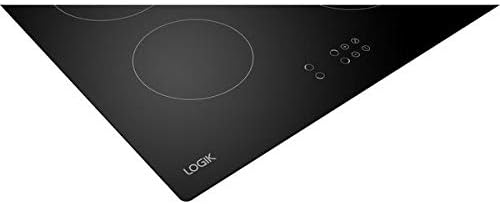
Image: An angled view of the LOGIK LINDHOB16 Electric Induction Hob, highlighting its black glass ceramic surface and the subtle markings for the cooking zones and touch controls.
4.3 Special Functions (if applicable)
- Booster Function: Some models have a booster function (P) for rapid heating. Activate by selecting the zone and pressing the booster button.
- Timer Function: Use the timer controls to set a cooking duration. The hob will switch off the selected zone(s) automatically when the time expires.
- Child Lock: To prevent accidental operation, activate the child lock by pressing and holding the lock symbol.
5. Cleaning and Maintenance
Regular cleaning and maintenance will ensure the longevity and optimal performance of your hob.
- Before Cleaning: Always ensure the hob is switched off and has cooled down completely before cleaning.
- Daily Cleaning: Wipe the glass ceramic surface with a damp cloth and a small amount of mild dish soap. Rinse with a clean damp cloth and dry thoroughly with a soft, clean cloth to prevent water marks.
- Stubborn Stains: For burnt-on food or stubborn stains, use a specialized hob scraper (plastic or metal designed for glass ceramic) and a ceramic hob cleaner. Follow the cleaner's instructions.
- Avoid: Do not use abrasive cleaners, scouring pads, harsh chemicals, or steam cleaners, as these can damage the hob surface.
6. Troubleshooting
Before contacting customer support, please refer to the following common issues and their solutions.
| Problem | Possible Cause | Solution |
|---|---|---|
| Hob does not turn on. | No power supply; Child lock activated. | Check circuit breaker/fuse. Deactivate child lock (refer to section 4.3). |
| Cooking zone not heating. | Unsuitable cookware; Pan not centered; Overheat protection. | Use magnetic cookware. Center the pan. Allow hob to cool down. |
| Display shows "E" or error code. | Internal fault; Overheat. | Turn off hob, wait a few minutes, then restart. If error persists, contact qualified service personnel. |
| Hob makes buzzing noise. | Normal operation of induction technology; Cookware type. | This is normal. Some cookware types may amplify the sound. |
7. Specifications
- Model: LOGIK LINDHOB16
- Brand: Logic
- Installation Type: Built-In
- Burner Type: Induction
- Number of Cooking Zones: 4 (based on visual inspection of product images)
- Control Type: Touch
- Voltage: 230 Volts (AC)
- Fuel Type: Electric
- Material: Glass Ceramic (Heater surface material)
- Colour: Black
- ASIN: B07PY4XNYL
- Date First Available: 25 March 2019
8. Warranty and Support
For detailed information regarding warranty coverage, terms, and conditions, please refer to the warranty card included with your appliance or visit the official Logic website. For technical support, spare parts, or service inquiries, please contact Logic customer service directly using the contact details provided in your purchase documentation or on the manufacturer's website.
Ask a question about this manual
Ask about setup, troubleshooting, compatibility, parts, safety, or missing instructions. Manuals+ will review the question and use this page’s manual context to help answer it.