
1. Introduction
Welcome to the user manual for your new CircuPool CORE55 Salt Chlorinator System. This electronic chlorine generator is designed to provide a reliable and efficient method for sanitizing your pool water, reducing the need for traditional chlorine products. The CORE55 system is suitable for pools up to 55,000 gallons and features a compact design for easy installation and advanced digital controls for simple operation. Please read this manual thoroughly before installation and operation to ensure safe and optimal performance of your system.
2. Safety Information
- Always disconnect power to the unit before performing any service or maintenance.
- Installation must comply with all local electrical and plumbing codes.
- Ensure proper grounding of the system.
- Keep all chemicals, including pool salt, out of reach of children and pets.
- Do not operate the system if the water temperature is below 50°F (10°C) or above 104°F (40°C).
- Maintain proper pool water chemistry (pH, alkalinity, calcium hardness, and stabilizer) as recommended by pool professionals.
- Never look directly into the cell during operation.
3. Product Overview
The CircuPool CORE55 system is a 4th-generation electronic chlorine generator designed for durability and ease of use. It features a compact, weather-proof design with IP-66 rated protection and a robust USA Titanium Cell.
Key Components:
- Control Unit: Houses the digital controls and status indicators.
- Electrolytic Cell: The component where salt water is converted into chlorine.
- Unions: For connecting the cell to your pool plumbing.




4. Setup and Installation
The CircuPool CORE55 is designed for incredibly easy DIY installation, often taking as little as 10-15 minutes. It requires minimal space, making it suitable for various pool setups.
Installation Steps:
- Site Selection: Choose a location on your pool's return plumbing line after the filter and heater (if applicable). Ensure sufficient space for the unit and future maintenance.
- Power Disconnection: Turn off all power to your pool pump and related equipment at the circuit breaker.
- Plumbing Integration: Cut a section of your existing PVC pipe to accommodate the CORE55 cell. The compact design requires minimal pipe length. Use PVC cement to glue the unions to the pipe, ensuring a watertight seal.
- Cell Insertion: Insert the electrolytic cell into the cell housing and secure it with the union nuts.
- Electrical Connection: Connect the power cord to a GFCI-protected outlet. Ensure the power supply matches the unit's requirements.
- Initial Water Chemistry: Before starting the system, ensure your pool water chemistry is balanced, especially the salt level. Refer to the specifications section for recommended salt levels.
- Power On: Restore power to your pool pump and the CORE55 system.


5. Operating Instructions
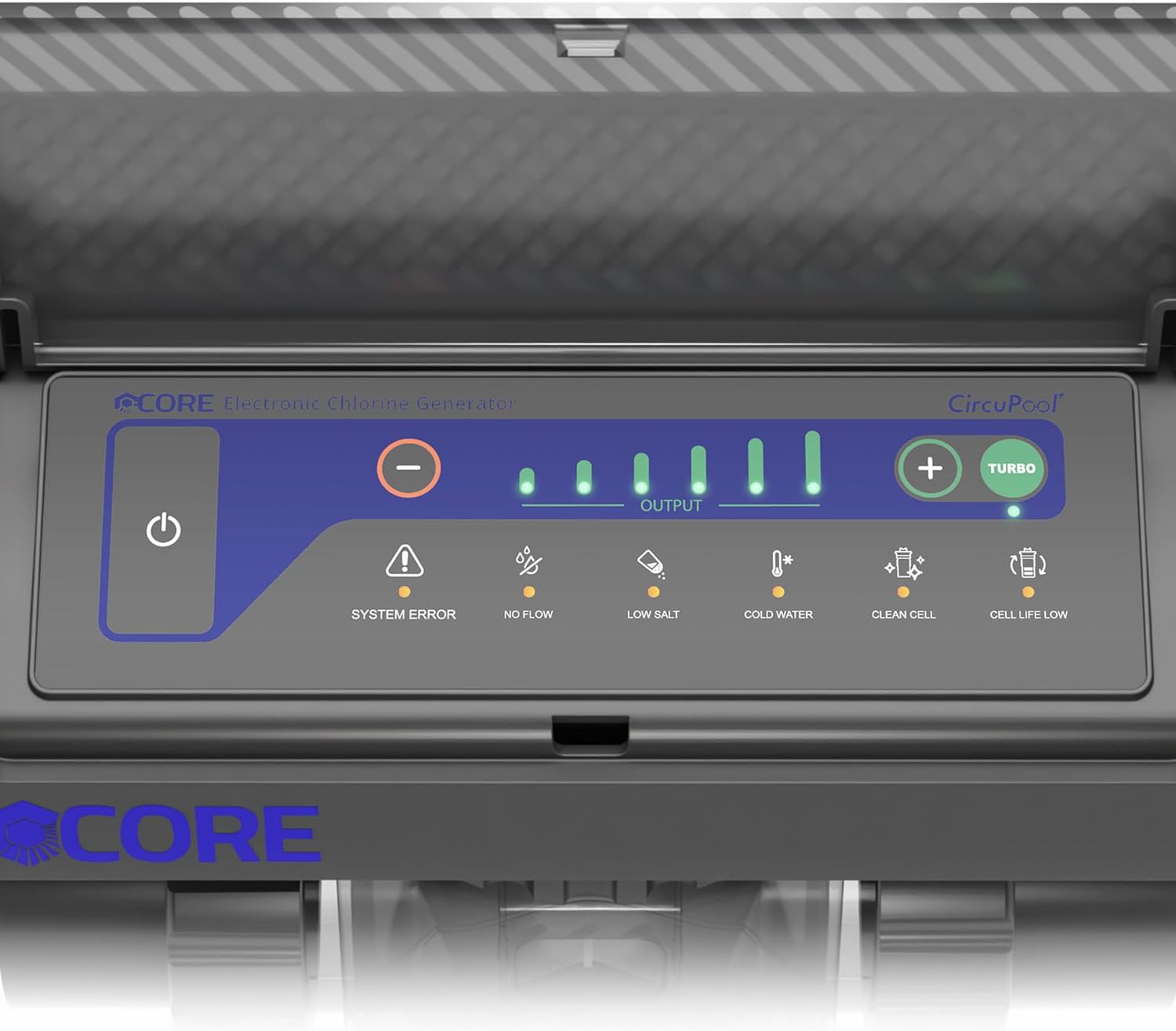
The CORE55 system features advanced digital controls for straightforward operation. The control panel provides clear status indicators to help you monitor the system's performance.
Control Panel and Indicators:
Refer to Figure 3.3 for a visual guide to the control panel.
- Power Button: Press to turn the unit ON or OFF.
- Output Level Indicators: A series of green lights indicating the current chlorine output percentage. Use the + and - buttons to adjust the output.
- TURBO Button: Activates a temporary boost mode for increased chlorine production, useful for shocking the pool or during periods of heavy use.
- SYSTEM ERROR (⚠): Illuminates if a general system malfunction is detected. Consult the troubleshooting section.
- NO FLOW (💦): Indicates insufficient water flow through the cell. Check pump, filter, and plumbing.
- LOW SALT (🥚): Alerts that the salt level in the pool water is too low for efficient chlorine production. Add salt as needed.
- COLD WATER (🌡): Indicates that the water temperature is too low for optimal operation. The system may reduce output or shut down to protect the cell.
- CLEAN CELL (📷): Suggests that the electrolytic cell may have scale buildup and requires cleaning.
- CELL LIFE LOW (🔋): Warns that the electrolytic cell is nearing the end of its operational lifespan and may need replacement soon.
6. Maintenance
Regular maintenance ensures the longevity and efficiency of your CircuPool CORE55 system.
Electrolytic Cell Cleaning:
When the CLEAN CELL indicator illuminates, it's time to inspect and clean the electrolytic cell. Scale buildup on the cell plates can reduce efficiency.
- Disconnect power to the unit.
- Remove the cell from the plumbing by unscrewing the union nuts.
- Inspect the cell plates for white, flaky deposits (scale).
- Prepare a cleaning solution of one part muriatic acid to four parts water in a plastic bucket. Always add acid to water, never water to acid. Wear appropriate safety gear (gloves, eye protection).
- Submerge the cell plates into the solution, ensuring the electrical connection is kept dry. Allow it to soak until the bubbling stops and scale is removed (typically 5-15 minutes).
- Rinse the cell thoroughly with fresh water.
- Reinstall the cell and restore power.
Winterization:
If you live in an area where temperatures drop below freezing, it is crucial to winterize your CORE55 system to prevent damage.
- Disconnect power to the unit.
- Drain all water from the cell and plumbing lines connected to the unit.
- Remove the electrolytic cell from the plumbing.
- Store the cell indoors in a dry, temperature-controlled environment during the off-season.
- Cap or plug the open plumbing lines to prevent debris entry.
7. Troubleshooting
This section provides solutions to common issues you might encounter with your CircuPool CORE55 system. Always disconnect power before inspecting the unit.
| Problem/Indicator | Possible Cause | Solution |
|---|---|---|
| SYSTEM ERROR light on | Internal malfunction, power issue. | Turn off power to the unit for 5 minutes, then restart. If error persists, contact CircuPool support. |
| NO FLOW light on | Insufficient water flow through the cell. | Check pool pump operation, ensure skimmer and pump baskets are clean, backwash/clean filter, check for closed valves or obstructions in plumbing. |
| LOW SALT light on | Salt level in pool water is too low. | Test pool salt level. Add pool-grade salt as needed according to manufacturer recommendations. Allow salt to dissolve and circulate before retesting. |
| COLD WATER light on | Water temperature is below optimal operating range. | Chlorine production will be reduced or stopped. This is normal. Production will resume when water temperature rises. |
| CLEAN CELL light on | Scale buildup on electrolytic cell plates. | Perform a manual cell cleaning as described in the Maintenance section. |
| CELL LIFE LOW light on | Electrolytic cell is nearing end of life. | The cell is still producing chlorine but its efficiency is decreasing. Plan for cell replacement in the near future. |
| No chlorine production | Incorrect salt level, low water flow, cold water, dirty cell, unit off, or system error. | Check all indicators on the control panel and address any illuminated lights. Ensure unit is powered on and output is set. |
8. Specifications
| Feature | Detail |
|---|---|
| Brand | Circupool |
| Model Number | CORE-SERIES |
| Max Pool Capacity | 55,000 Gallons |
| Chlorine Output | 2.0 lb CL Output (Daily) |
| Item Form | Electronic Device |
| Product Benefits | Maintains Clean Sanitized Water, Protects Against Skin Irritation, Reduces Chlorine Odor |
| UPC | 646437729666 |
| Product Dimensions | 11 x 11 x 6 inches |
| Item Weight | 10.85 pounds |
| Ingress Protection (IP) Rating | IP-66 (Heavy-Duty, Weather-Proof) |
| Cell Type | USA Titanium Cell |
| Recommended Salt Level | 3000-4000 ppm (parts per million) |
9. Warranty and Support
The CircuPool CORE55 Salt Chlorinator System comes with an industry-best 8-Year Limited Manufacturer Warranty. This warranty provides peace of mind, even if you choose to install the system yourself.
CircuPool is committed to providing exceptional customer support. For any questions, technical assistance, or warranty claims, please contact CircuPool's friendly expert support team. You can find contact information on the official CircuPool website or through your purchase documentation.
Visit the Official CircuPool Store on Amazon for more information and products.


