
1. Introduction
This manual provides essential instructions for the proper installation, operation, and maintenance of your Parts Express Electric Speedometer. Please read this manual thoroughly before installation and use to ensure correct functionality and longevity of the product. Retain this manual for future reference.
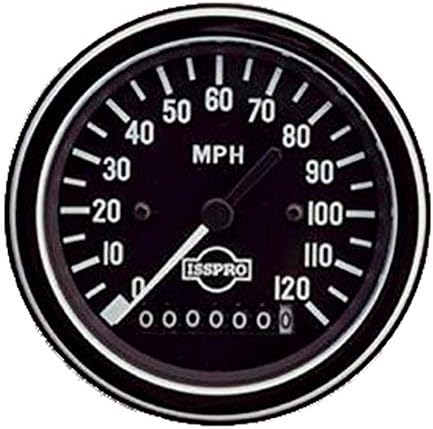
This image shows the front view of the Parts Express Electric Speedometer. It features a black dial with clear white numerals indicating speeds from 0 to 120 MPH. A white pointer needle indicates the current speed. Below the center, a digital odometer displays '0000000' with a tenths digit. The bezel is black, and the 'ISSPRO' logo is visible on the dial.
2. Safety Information
- Always disconnect the vehicle's battery before performing any electrical work to prevent short circuits or electrical shock.
- Ensure all wiring connections are secure and properly insulated to prevent electrical hazards.
- Mount the speedometer securely to avoid vibration damage or detachment during vehicle operation.
- If you are unsure about any installation steps, consult a qualified automotive technician.
- Do not attempt to modify the speedometer, as this may void the warranty and cause malfunction.
3. Setup and Installation
The speedometer includes a mounting bracket kit, adapter plug, and connector for installation. Professional installation is recommended.
- Mounting: Select a suitable location on your dashboard or panel. Ensure there is sufficient clearance behind the panel for the speedometer body and wiring. Use the provided mounting bracket kit to secure the speedometer firmly in place.
- Wiring Connections:
- Power (12V DC): Connect the positive wire (typically red) to a switched 12V ignition source.
- Ground: Connect the negative wire (typically black) to a reliable chassis ground point.
- Illumination: Connect the illumination wire (if present, typically white or orange) to your vehicle's dashboard lighting circuit for perimeter illumination.
- Speed Sensor Input: Connect the speed signal wire (refer to your vehicle's wiring diagram or sensor instructions) to the designated input on the speedometer. Use the provided adapter plug and connector as needed.
- Final Checks: Double-check all connections for security and proper insulation. Reconnect the vehicle's battery.
4. Operating Instructions
The Parts Express Electric Speedometer is designed for straightforward operation, providing real-time speed and distance information.
- Reading Speed: The white pointer needle indicates your current speed in Miles Per Hour (MPH) on the black dial, ranging from 0 to 120 MPH.
- Odometer: The digital display at the bottom of the dial tracks total distance traveled, up to a million miles, including tenths of a mile. This odometer is non-resettable.
- Illumination: The speedometer utilizes perimeter lighting for visibility in low-light conditions. This illumination activates when connected to the vehicle's lighting circuit.
5. Maintenance
Minimal maintenance is required for this electric speedometer.
- Cleaning: Clean the face of the speedometer with a soft, damp cloth. Avoid abrasive cleaners or solvents that could damage the dial or bezel.
- Inspection: Periodically check all wiring connections to ensure they remain secure and free from corrosion.
- Environmental Protection: Ensure the speedometer is protected from excessive moisture and extreme temperatures, as per its intended use in a vehicle dashboard.
6. Troubleshooting
If you encounter issues with your speedometer, consider the following common troubleshooting steps:
- No Power/No Illumination:
- Check the 12V power and ground connections. Ensure they are secure and receiving power.
- Verify that the vehicle's fuse for the accessory circuit is intact.
- For illumination, check the connection to the vehicle's lighting circuit.
- Incorrect Speed Reading:
- Ensure the speed sensor input wire is correctly connected and the sensor is functioning properly.
- Verify that the speedometer is compatible with your vehicle's speed sensor type.
- Odometer Not Advancing:
- This is typically linked to an incorrect or absent speed signal. Refer to the 'Incorrect Speed Reading' steps.
If these steps do not resolve the issue, contact Parts Express customer support or a qualified technician.
7. Specifications
| Brand | Parts Express |
| Model Number | 4S29-1502501 |
| Measurement Range | 0 - 120 MPH |
| Housing Size | 3.375 Inch |
| Odometer | Million Mile with Tenths |
| Illumination | Perimeter Lighting |
| Dial Color | Black |
| Numerals/Pointer Color | White |
| Bezel Color | Black |
| Item Weight | 14.6 ounces (0.91 lbs) |
| Product Dimensions (L x W x H) | 4.15 x 4.1 x 4.1 inches |
8. Warranty and Support
For warranty information, please refer to the documentation included with your purchase or visit the official Parts Express website. For technical support or further assistance, please contact Parts Express customer service directly.