
1. Introduction
This manual provides detailed instructions for the proper use and maintenance of your HOPESTAR H13 Bluetooth Speaker. Please read this manual thoroughly before operating the device to ensure optimal performance and longevity. Keep this manual for future reference.
2. Package Contents
Verify that all items are present in the package:
- HOPESTAR H13 Bluetooth Speaker
- Charging Cable
- User Manual
3. Product Overview
Familiarize yourself with the components and controls of your HOPESTAR H13 speaker.
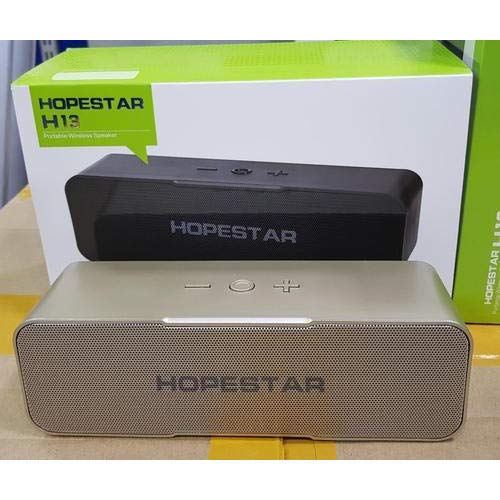
An image showing the HOPESTAR H13 portable wireless speaker in gold color, alongside its packaging box. The speaker features a mesh grille and control buttons on top, including power, volume down, and volume up.
Control Buttons:
- Power Button: Press and hold to turn the speaker ON/OFF. Press once to Play/Pause music or Answer/End calls.
- Volume Down (-): Press to decrease volume.
- Volume Up (+): Press to increase volume.
4. Setup
Initial Charging:
Before first use, it is recommended to fully charge the HOPESTAR H13 speaker. Connect the provided charging cable to the speaker's charging port and a compatible USB power adapter (not included). The charging indicator light will illuminate during charging and turn off once the battery is full.
Powering On/Off:
- To turn ON: Press and hold the Power Button until you hear an audible prompt.
- To turn OFF: Press and hold the Power Button again until you hear an audible prompt.
5. Operating Instructions
Bluetooth Pairing:
- Ensure the HOPESTAR H13 speaker is powered on and in pairing mode (indicated by a flashing LED light, if present).
- Activate Bluetooth on your source device (e.g., smartphone, tablet, computer).
- Search for 'HOPESTAR H13' in the list of available Bluetooth devices.
- Select 'HOPESTAR H13' to initiate the pairing process.
- A confirmation sound will indicate successful pairing. The LED light will typically become solid.
Once paired, the speaker will automatically connect to the last paired device when powered on, if the device's Bluetooth is active and within range.
Music Playback:
- Play/Pause: Press the Power Button once.
- Volume Adjustment: Use the Volume Down (-) and Volume Up (+) buttons on the speaker, or control volume directly from your connected device.
Call Handling:
- Answer/End Call: Press the Power Button once when a call comes in or to end an ongoing call.
6. Charging
The HOPESTAR H13 speaker is powered by a built-in Lithium Ion battery. To charge the speaker:
- Connect the small end of the charging cable to the speaker's charging port.
- Connect the USB end of the charging cable to a USB power source (e.g., computer USB port, USB wall adapter).
- The charging indicator light will show the charging status.
- Once fully charged, disconnect the charging cable.
7. Maintenance
- Clean the speaker with a soft, dry cloth. Do not use liquid cleaners, abrasive materials, or solvents.
- Do not immerse the speaker in water, as it is not waterproof.
- Store the speaker in a cool, dry place away from direct sunlight and extreme temperatures.
- Avoid dropping or subjecting the speaker to strong impacts.
8. Troubleshooting
| Problem | Possible Cause | Solution |
|---|---|---|
| Speaker does not power on | Battery is depleted | Charge the speaker fully using the provided cable. |
| No sound from speaker | Volume too low; Not paired; Device not playing | Increase volume on both speaker and source device. Ensure speaker is paired correctly. Check if music is playing on the source device. |
| Bluetooth connection unstable or disconnects | Too far from source device; Interference | Move the source device closer to the speaker (within 10 meters). Avoid obstacles between devices. Re-pair the speaker with your device. |
| Cannot pair with device | Speaker not in pairing mode; Bluetooth off on device | Ensure speaker is powered on and in pairing mode. Turn on Bluetooth on your source device and search again. |
9. Specifications
- Brand: HOPESTAR
- Model: H13
- Connectivity Technology: Bluetooth
- Power Source: Battery Powered (1 Lithium Ion battery included)
- Control Method: Touch
- Item Weight: 500 g
- Waterproof: No
- Included Components: Speaker, Charging Cable, User Manual
10. Warranty and Support
The HOPESTAR H13 Bluetooth Speaker comes with a 6-month warranty from the date of purchase. This warranty covers manufacturing defects under normal use.
For technical support, warranty claims, or further assistance, please contact your original retailer or visit the official HOPESTAR website for contact information.


