
1. Product Overview
This manual provides instructions for the AlveyTech replacement keypad designed for 4-Key VSI joystick controllers. This keypad is a component for various electric mobility power chairs, offering a cost-effective solution for joystick functionality issues.
Key Features:
- Easy to Use: Clearly marked keys for battery status, on/off, speed adjustment, horn, and maximum speed indicator.
- Wide Compatibility: Designed for 4-button VSI joystick controllers by PG Drives Technology, found on many power wheelchair brands.
- Simple Installation: Features a peel-and-stick adhesive backing for quick and easy replacement.
Compatibility:
This keypad is compatible with the 4-button VSI joystick controller used on a wide range of electric mobility power chairs, including models from:
- ActiveCare Medical: Catalina, Cobalt, Cobalt X23, Intrepid, Intrepid P22, Medalist, Medalist P22, Renegade, Renegade P24, Wildcat, Wildcat 450.
- Golden Technologies: Alante HD (GP202SS/GP202CC).
- Hoveround: MPV 4, MPV 5.
- Jazzy: 1101, 1103, 1103 Ultra, 1104, 1105, 1107, 1113, 1113 ATS, 1115, 1121, 1121 HD, 1122, 1133, 1143, Select 14, Select 14 XL.
- Jet: 1, 1 HD, 2, 2 HD, 3, 7.
- Merits: Travel-Ease Commuter (P101/MP-1), Travel-Ease Commuter (P171).
- Quickie: Aspire.
- Revolution Mobility: Liberty 116/118/120/122/124.
- Shoprider: 6Runner 10 (888WNLM), 6Runner 10 Deluxe (858WM), 6Runner 14 (888WNLLHD), Jetstream L (888WAL), Jetstream M (888WAM), WIZZ (888WNL).

Image 1.1: Front view of the AlveyTech 4-Key VSI Joystick Controller Keypad.
2. Setup and Installation
The AlveyTech keypad is designed for straightforward installation. Follow these steps to replace your existing keypad:
- Power Off: Ensure the power chair is completely turned off and disconnected from any power source before beginning installation.
- Remove Old Keypad: Carefully peel off the old, faulty keypad from the joystick controller. Note its orientation.
- Clean Surface: Clean the surface of the joystick controller where the keypad will be applied. Ensure it is free of dust, debris, and adhesive residue for optimal adhesion.
- Prepare New Keypad: Gently peel the protective backing from the adhesive side of the new AlveyTech keypad. Avoid touching the adhesive surface.
- Apply New Keypad: Align the new keypad precisely with the button cutouts and edges of the joystick controller. Press firmly and evenly across the entire surface to ensure secure adhesion.
- Verify Installation: Once installed, allow a few minutes for the adhesive to set. Reconnect power and test all keypad functions.
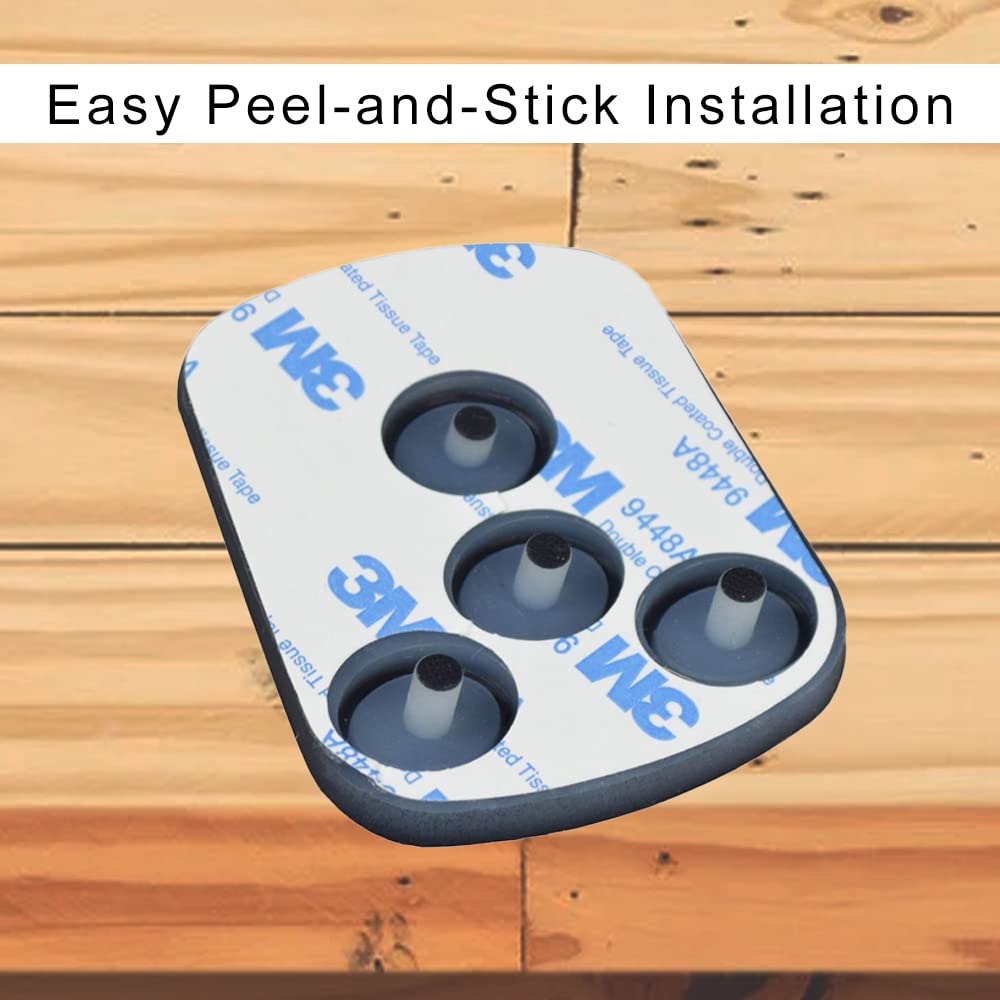
Image 2.1: The reverse side of the keypad features a peel-and-stick adhesive for easy installation.

Image 2.2: The keypad seamlessly integrates with the VSI joystick controller once installed.
3. Operating the Keypad
The keypad provides intuitive control over your power chair's basic functions. Refer to the diagram below for button identification:
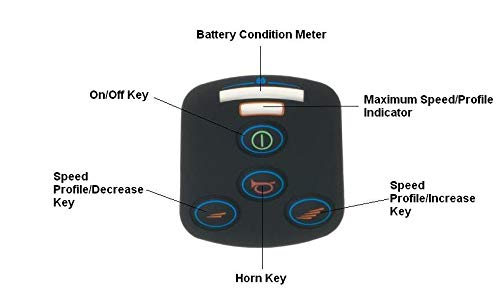
Image 3.1: Labeled diagram of the keypad functions.
- Battery Condition Meter: Displays the current battery charge level.
- On/Off Key: Powers the mobility device on or off.
- Maximum Speed/Profile Indicator: Shows the current speed setting or driving profile.
- Speed Profile/Decrease Key: Reduces the speed or cycles through lower speed profiles.
- Horn Key: Activates the device's horn.
- Speed Profile/Increase Key: Increases the speed or cycles through higher speed profiles.
4. Maintenance
To ensure the longevity and proper function of your AlveyTech keypad, follow these simple maintenance guidelines:
- Cleaning: Wipe the keypad surface periodically with a soft, damp cloth. Avoid using harsh chemicals or abrasive cleaners, as these can damage the keypad material or markings.
- Inspection: Regularly inspect the keypad for any signs of wear, damage, or peeling. If the keypad shows significant wear, consider replacement to maintain optimal functionality.
- Environmental Protection: While the keypad is designed for durability, avoid prolonged exposure to extreme temperatures, direct sunlight, or excessive moisture, which can degrade the material and adhesive over time.
5. Troubleshooting
If you experience issues with your AlveyTech keypad after installation, consider the following:
- Buttons Unresponsive: Ensure the keypad is securely adhered to the joystick controller. If buttons remain unresponsive, the underlying joystick electronics may require service.
- Keypad Peeling: If the keypad begins to peel, ensure the surface was clean and dry during installation. Re-adhere if possible, or consider replacing the keypad if the adhesive has failed.
- Incorrect Function: Verify that the keypad is correctly oriented on the joystick. If functions are incorrect, consult your power chair's main instruction manual or a qualified technician.
For persistent issues not resolved by these steps, please contact AlveyTech customer support or a certified mobility equipment technician.
6. Specifications
| Specification | Detail |
|---|---|
| Length | 2-11/16 inches (6.82 cm) |
| Width | 2-3/8 inches (6.03 cm) |
| Product Dimensions | 3 x 4 x 1 inches |
| Item Weight | 0.634 ounces |
| Manufacturer | AlveyTech |
| Date First Available | March 22, 2019 |
| Shoprider Part Number | P75736 |
| Invacare Part Number | 503049 |
| Pride Part Number | RECPART1071 |

Image 6.1: Detailed dimensions of the AlveyTech keypad.
7. Warranty and Support
For information regarding product warranty, returns, or technical assistance, please refer to the purchase documentation or contact AlveyTech customer service directly. AlveyTech is committed to providing reliable mobility solutions and support for its products.
You can find more information about AlveyTech and its product offerings by visiting the official AlveyTech Store.