
1. Introduction
Thank you for choosing the STF Joy Portable Wireless Speaker. This manual provides essential information for the proper setup, operation, and maintenance of your device. Please read it thoroughly before use and retain it for future reference.
2. Package Contents
Verify that all items listed below are included in your package:
- 1 x STF Joy Wireless Speaker
- 1 x USB to Micro USB Charging Cable
- 1 x 3.5mm Auxiliary Audio Cable
- 1 x User Manual (this document)
Image: The STF Joy speaker packaging, illustrating the included speaker, USB charging cable, auxiliary cable, and user manual.
3. Product Overview
The STF Joy Portable Wireless Speaker features a compact design with multiple connectivity options for versatile audio playback.
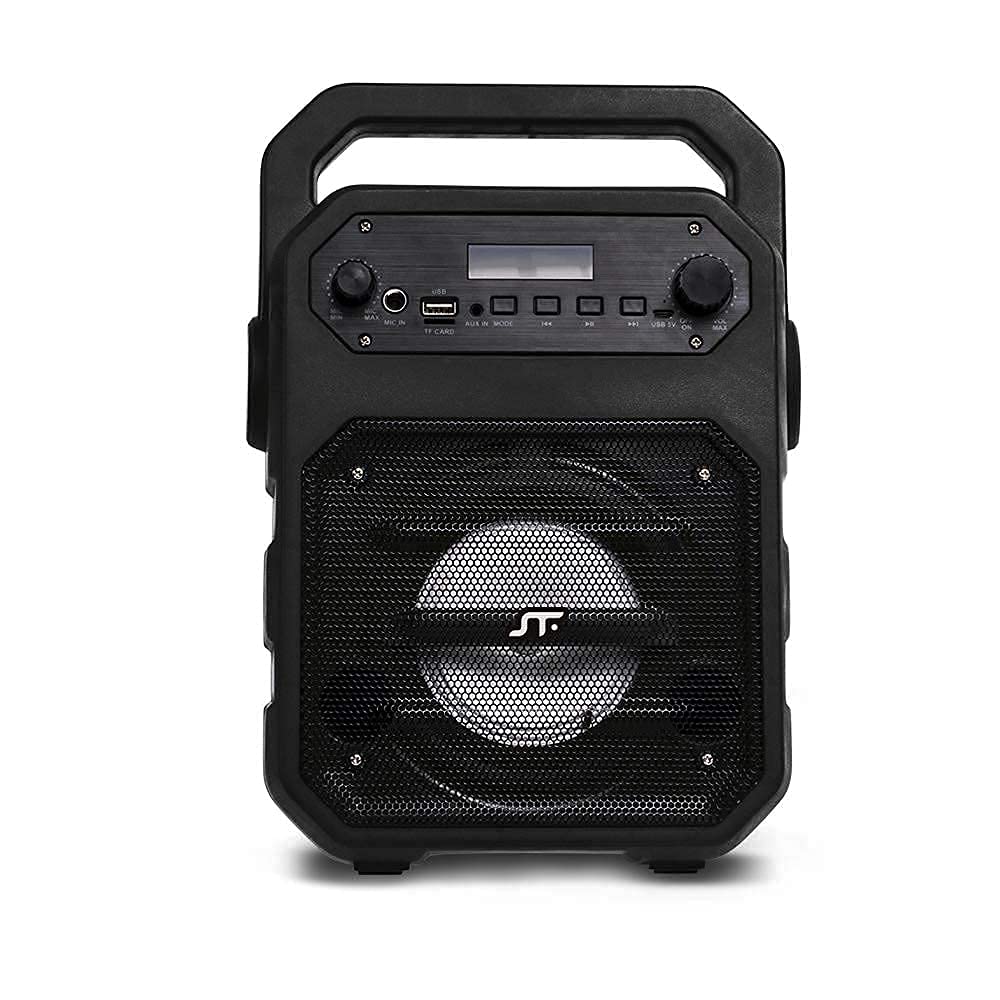
Image: Front view of the STF Joy Portable Wireless Speaker, highlighting its main components including the speaker grille, top-mounted control panel, and integrated carrying handle.

Image: A diagram illustrating the key features of the STF Joy speaker, such as wireless audio, rechargeable battery, Micro SD card slot, USB port, 3.5mm auxiliary input, LED lighting, approximately 3 hours of battery life, and FM Radio functionality.
4. Setup
4.1 Charging the Speaker
Before first use, fully charge the speaker. Use the provided USB to Micro USB cable to connect the speaker's charging port to a USB power source (e.g., computer, USB wall adapter). The charging indicator light will illuminate during charging and turn off when fully charged. A full charge takes approximately 3 hours.
4.2 Power On/Off
- To power on: Press and hold the Power button until the indicator light illuminates and you hear an audible prompt.
- To power off: Press and hold the Power button until the indicator light turns off and you hear an audible prompt.
5. Operating Instructions
5.1 Bluetooth Pairing
- Ensure the speaker is powered on and in Bluetooth mode. The Bluetooth indicator light will flash, indicating it is ready for pairing.
- On your device (smartphone, tablet, laptop), enable Bluetooth and search for available devices.
- Select "STF Joy" from the list of devices.
- Once paired, the Bluetooth indicator light will remain solid, and you will hear a confirmation tone.
- The speaker will automatically reconnect to the last paired device when powered on, if the device is within range and Bluetooth is enabled.
5.2 Micro SD / USB Playback
- Insert a Micro SD card or USB flash drive into the corresponding slot on the speaker.
- The speaker will automatically detect the storage device and begin playing audio files.
- Use the control buttons on the speaker to play/pause, skip tracks, or adjust volume.
5.3 Auxiliary Input (AUX)
- Connect one end of the 3.5mm auxiliary cable to the AUX port on the speaker.
- Connect the other end to the audio output jack of your external device.
- The speaker will automatically switch to AUX mode.
- Control playback and volume from your connected device.
5.4 FM Radio
- Press the Mode button to switch to FM Radio mode.
- Press and hold the Play/Pause button to automatically scan and save available FM stations.
- Use the Next/Previous track buttons to navigate between saved stations.
5.5 Microphone Usage
- Connect a microphone (not included) to the microphone input port on the speaker.
- Adjust the microphone volume using the dedicated knob on the control panel.
6. Troubleshooting
| Problem | Solution |
|---|---|
| Speaker does not power on. | Ensure the battery is charged. Connect the speaker to a power source using the USB cable. |
| No sound. | Check the volume level on both the speaker and the connected device. Ensure the correct input mode (Bluetooth, AUX, USB, SD) is selected. |
| Bluetooth pairing fails. | Ensure the speaker is in pairing mode (flashing indicator). Turn off and on Bluetooth on your device. Move the speaker closer to your device. |
| FM Radio reception is poor. | Move the speaker to an open area away from obstructions or other electronic devices that may cause interference. |
7. Specifications
| Model Name | Joy |
| Speaker Type | Subwoofer |
| Connectivity Technology | Bluetooth, USB, Auxiliary |
| Compatible Devices | Smartphone, Tablet, Laptop |
| Color | Black |
| Impedance | 2 Ohms |
| Control Method | Tactile Buttons |
| Speaker Size | 4 Inches |
| Power Source | Battery |
| Max Speaker Output Power | 9 Watts |
| Average Battery Life | 3 Hours |
| Battery Capacity | 1200 mAh |
| Input Voltage | 5 Volts |
| Audio Output Mode | Stereo |
8. Safety Information
- Do not expose the speaker to extreme temperatures, direct sunlight, or humidity.
- Avoid dropping or subjecting the speaker to strong impacts.
- Do not disassemble or attempt to repair the speaker yourself. This will void the warranty.
- Keep the speaker away from water and other liquids.
- Use only the provided charging cable or a certified equivalent.
- Clean the speaker with a soft, dry cloth. Do not use abrasive cleaners.
9. Warranty and Support
The STF Joy Portable Wireless Speaker comes with a 1-year limited warranty from the date of purchase. This warranty covers manufacturing defects and workmanship under normal use. It does not cover damage caused by misuse, accidents, unauthorized modifications, or normal wear and tear.
For warranty claims or technical support, please contact STF customer service through the official STF website or your retailer. Please have your proof of purchase ready.