
iClever BK10
iClever BK10 Bluetooth Keyboard User Manual
Model: BK10 | Brand: iClever
Introduction
This manual provides comprehensive instructions for the setup, operation, maintenance, and troubleshooting of your iClever BK10 Bluetooth Keyboard. Please read this manual thoroughly before using the product to ensure optimal performance and longevity.
Safety Information
- Keep the keyboard away from liquids and excessive moisture.
- Avoid extreme temperatures.
- Do not attempt to disassemble or repair the keyboard yourself. Contact qualified service personnel.
- Use only the provided or recommended charging cable.
Package Contents
Verify that all items are present in your package:
- iClever BK10 Bluetooth Keyboard
- USB-C Charging Cable
- Silicone Keyboard Cover
- User Manual (this document)
Product Overview
The iClever BK10 is a sleek, wireless Bluetooth keyboard designed for multi-device compatibility and ergonomic comfort. It features a full-size layout with a numeric keypad, low-profile scissor-switch keys for quiet and precise typing, and a durable stainless steel and ABS construction.

Figure 1: Top-down view of the iClever BK10 Bluetooth Keyboard, showcasing its full layout and slim design.
Key Features:
- Multi-Device Connectivity: Seamlessly switch between up to 3 devices using Bluetooth 5.1 technology.
- Ergonomic Design: Features a 10-degree tilt and low-profile keys for comfortable typing.
- Quiet Scissor-Switch Keys: Provides enhanced feedback and stability with minimal noise.
- Compact with Numeric Keypad: Full functionality in a space-saving design.
- Long Battery Life: Rechargeable battery offers extended use on a single charge.

Figure 2: Diagram illustrating the multi-device switching capability of the keyboard, connecting to a smartphone, laptop, and tablet via Channel 1, 2, and 3.

Figure 3: Close-up view of the low-profile keys and an illustration of the scissor-switch mechanism, highlighting quiet and comfortable typing.

Figure 4: Side and top views of the keyboard detailing its ultra-slim profile and precise dimensions (14 inches long, 4.9 inches wide, 0.48 inches high).

Figure 5: The iClever BK10 keyboard in an office setting, connected to a desktop monitor, laptop, and tablet, demonstrating its multi-device utility.
Setup
Charging the Keyboard:
Before first use, fully charge the keyboard. Connect the provided USB-C charging cable to the keyboard's charging port and the other end to a USB power source (e.g., computer USB port, USB wall adapter). The charging indicator light will illuminate during charging and turn off when fully charged. A full charge takes approximately 2 hours and provides up to 45 days of use (based on 8 hours/day usage).
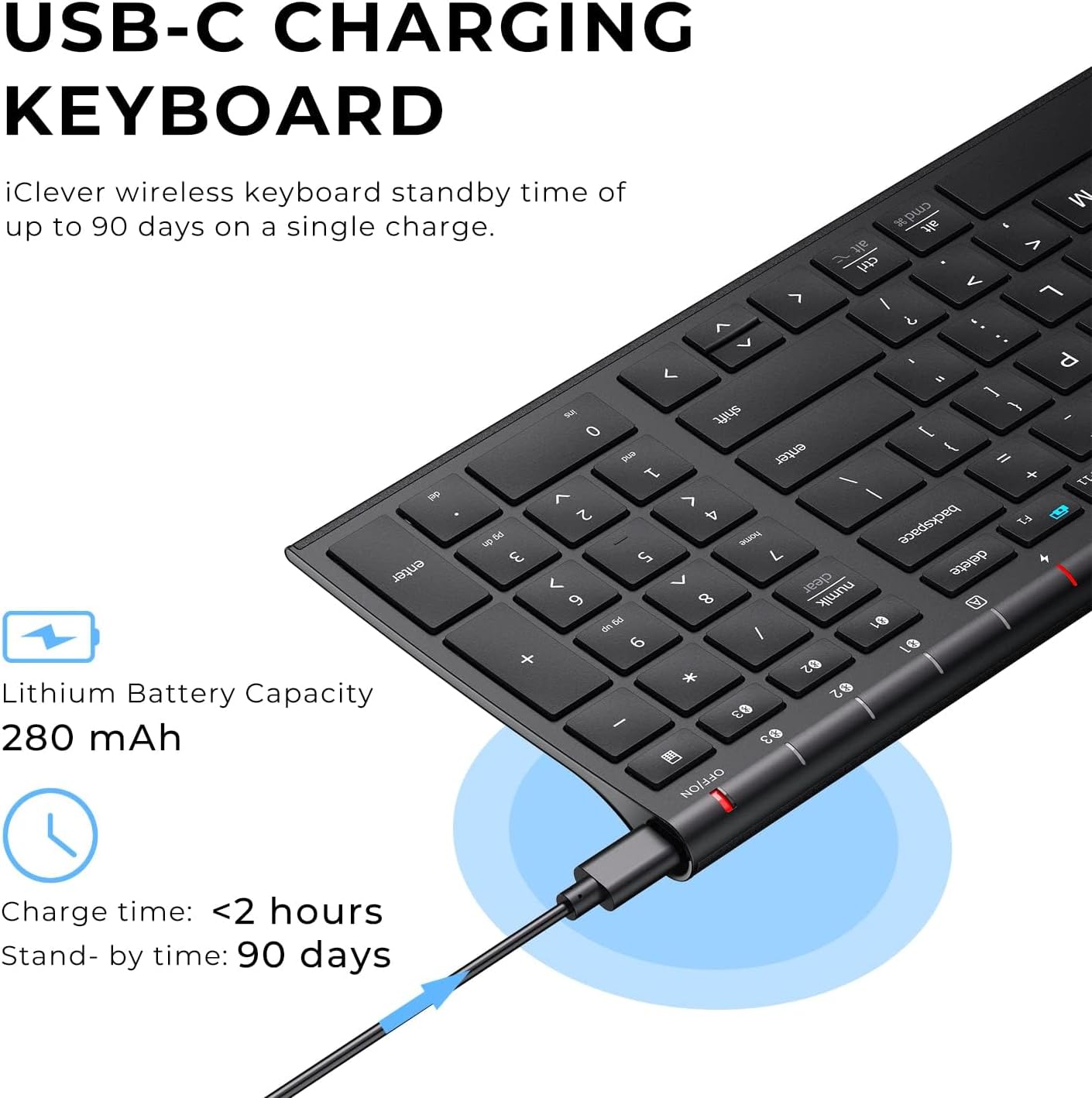
Figure 6: Image showing the USB-C charging port on the keyboard and a cable connected for charging, with details on battery capacity and charging time.
Pairing with Devices:
The iClever BK10 keyboard can connect to up to three devices simultaneously via Bluetooth. Follow these steps to pair your keyboard:
- Turn on the keyboard using the ON/OFF switch located on the top right edge.
- Press and hold one of the Bluetooth channel keys (BT1, BT2, or BT3) for 3-5 seconds until its indicator light starts blinking rapidly. This indicates the keyboard is in pairing mode.
- On your device (computer, tablet, smartphone), enable Bluetooth and search for available devices.
- Select "iClever BK10" from the list of found devices.
- If prompted, enter the pairing code displayed on your screen using the iClever BK10 keyboard and press Enter.
- Once paired, the indicator light for the selected channel will stop blinking and remain solid for a few seconds before turning off, indicating a successful connection.
- Repeat these steps for up to two additional devices using the other Bluetooth channel keys.
The keyboard automatically recognizes different operating systems (Windows, macOS, iOS, Android) and adjusts its layout accordingly.
Operating Instructions
Switching Between Devices:
To switch between paired devices, simply press the corresponding Bluetooth channel key (BT1, BT2, or BT3) once. The keyboard will quickly connect to the selected device.
Function Keys and Hotkeys:
The iClever BK10 features a row of function keys (F1-F12) that also serve as hotkeys for various system functions. To use the hotkey function, press the Fn key simultaneously with the desired function key. Some common hotkeys include:
- Fn + F1: Home
- Fn + F2: Search
- Fn + F3: Select All
- Fn + F4: Copy
- Fn + F5: Paste
- Fn + F6: Cut
- Fn + F7: Previous Track
- Fn + F8: Play/Pause
- Fn + F9: Next Track
- Fn + F10: Mute
- Fn + F11: Volume Down
- Fn + F12: Volume Up
- Fn + Esc: Fn Lock (toggles between standard F-key and hotkey functionality)
Power Saving Mode:
To conserve battery life, the keyboard will automatically enter sleep mode after 30 minutes of inactivity. To wake it up, simply press any key.
Maintenance
To ensure the longevity and optimal performance of your iClever BK10 keyboard, follow these maintenance guidelines:
- Cleaning: Use a soft, lint-free cloth slightly dampened with water or a mild cleaning solution to wipe the surface of the keyboard. Avoid harsh chemicals or abrasive materials.
- Silicone Cover: The included silicone cover can be used to protect the keys from dust, spills, and debris. Clean the cover regularly with soap and water.
- Storage: When not in use for extended periods, turn off the keyboard to save battery. Store it in a cool, dry place away from direct sunlight.
Troubleshooting
| Problem | Possible Cause | Solution |
|---|---|---|
| Keyboard does not turn on. | Low battery. | Charge the keyboard using the provided USB-C cable. |
| Unable to pair the keyboard. | Keyboard not in pairing mode; Bluetooth off on device; interference. |
|
| Keys are sticking or repeating characters. | Dust/debris under keys; software glitch; low battery. |
|
| Keyboard disconnects frequently. | Low battery; distance from device; interference. |
|
Specifications
| Feature | Detail |
|---|---|
| Model | BK10 |
| Connectivity Technology | Bluetooth 5.1 |
| Operating Range | Up to 33 feet (10 meters) |
| Multi-Device Support | Up to 3 devices |
| Compatible Devices | Windows 10/11, macOS 10.15+, iPadOS 13.4+, Android 9+, ChromeOS (BT 4.0+) |
| Number of Keys | 99 (US QWERTY layout) |
| Key Type | Scissor-switch |
| Noise Level | < 50 dB |
| Battery Type | Rechargeable Lithium Ion |
| Battery Capacity | 280 mAh |
| Charging Time | Approx. 2 hours |
| Standby Time | Up to 45 days (8 hours/day usage) |
| Auto-Sleep | After 30 minutes of inactivity |
| Product Dimensions | 14.37 x 4.92 x 0.71 inches (36.5 x 12.5 x 1.8 cm) |
| Item Weight | 13.1 ounces (371 grams) |
| Color | Black |
Warranty and Support
iClever products are designed and manufactured to the highest quality standards. For detailed warranty information, please refer to the warranty card included with your product or visit the official iClever website. If you encounter any issues or have questions regarding your iClever BK10 Bluetooth Keyboard, please contact iClever customer support for assistance.
You can often find support resources, FAQs, and contact information on the official iClever website: www.iclever.com
Related documentsBK10


Ask a question about this manual
Ask about setup, troubleshooting, compatibility, parts, safety, or missing instructions. Manuals+ will review the question and use this page’s manual context to help answer it.