
Introduction
This manual provides instructions for the safe and effective use of your DPI Gen IV 48 Volt Club Car PowerDrive Style Replacement Cord & Connector. This cord is designed to replace the original power cord for DPI 48 volt 15 amp Club Car PowerDrive style chargers, ensuring proper connection and power delivery to your golf cart's battery system.
Safety Information
WARNING:
- Always ensure the charger is unplugged from the AC power outlet before connecting or disconnecting the DC output cord to the golf cart.
- Do not use the cord if it appears damaged, frayed, or has exposed wires.
- Ensure connections are secure to prevent arcing or overheating.
- Keep the cord away from water, excessive heat, and sharp objects.
- This cord is designed for 48-volt systems only. Do not use with other voltage systems.
Setup and Installation
Follow these steps to properly connect the replacement cord to your DPI 48 Volt Club Car PowerDrive style charger and golf cart.
- Prepare the Charger: Ensure your DPI 48 volt 15 amp charger is turned off and unplugged from any AC power source.
- Connect to Charger: Locate the DC output port on your DPI charger. Insert the male end of the replacement cord into this port. Ensure it is fully seated and the connection is firm. Some chargers may have a locking mechanism or a threaded collar; ensure this is engaged if present.
- Connect to Golf Cart: Locate the charging receptacle on your 48-volt Club Car golf cart. Insert the PowerDrive style connector end of the replacement cord into the golf cart's receptacle. Push firmly until it clicks or is securely in place.
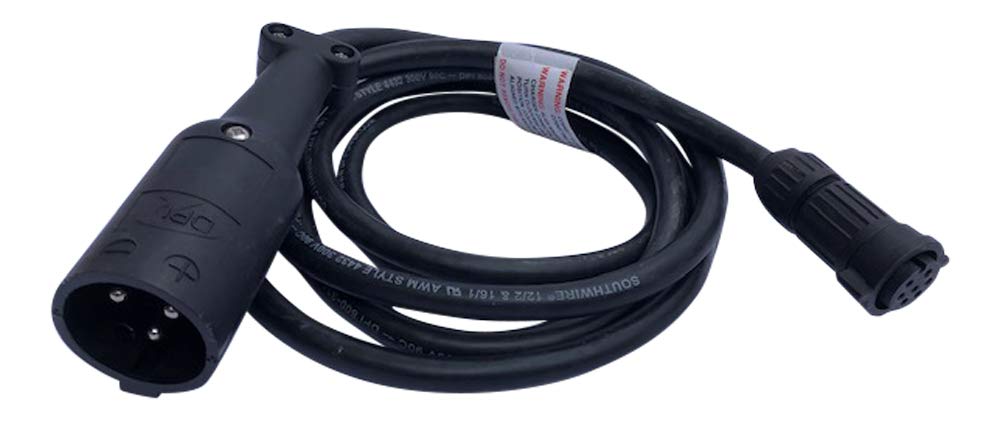
Image: The DPI Gen IV 48 Volt Club Car PowerDrive Style Replacement Cord & Connector, showing the male connector end designed for the charger and the PowerDrive style connector for the golf cart.
Operating Instructions
Once the cord is securely connected to both the charger and the golf cart, you can begin the charging process.
- Plug in Charger: Plug the DPI 48 volt 15 amp charger's AC power cord into a suitable wall outlet.
- Monitor Charging: Observe the charger's indicator lights or display to confirm that charging has begun. Refer to your specific charger's manual for details on charging indicators.
- Charging Completion: Once the batteries are fully charged, the charger will typically indicate completion or automatically shut off.
- Disconnect Safely: First, unplug the charger from the AC wall outlet. Then, disconnect the PowerDrive style connector from the golf cart. Finally, disconnect the cord from the charger if necessary for storage.
Maintenance and Storage
- Regular Inspection: Periodically inspect the cord and connectors for any signs of wear, damage, or corrosion. Replace the cord immediately if any damage is found.
- Cleaning: Keep the connectors clean and free of dirt, debris, and moisture. Use a dry cloth to wipe them if needed.
- Storage: When not in use, coil the cord neatly and store it in a dry, cool place, away from direct sunlight and extreme temperatures. Avoid kinking or bending the cord sharply.
Troubleshooting
If you encounter issues while using your replacement cord, consider the following:
- Charger Not Activating:
- Ensure both ends of the cord are fully and securely connected to the charger and the golf cart.
- Verify that the charger is plugged into a live AC outlet.
- Check the golf cart's battery system for any issues (e.g., low voltage, faulty batteries).
- Loose Connection at Charger:
- If the charger end of the cord feels loose or disconnects easily, ensure the connection is fully seated. Some charger ports may require a firm push or a twist to lock.
- Inspect the charger's port for any damage or debris that might prevent a secure connection.
- No Power to Golf Cart:
- Confirm the cord is correctly inserted into the golf cart's charging receptacle.
- Check for any visible damage to the cord or connectors.
- Consult your golf cart's manual for troubleshooting charging issues specific to the vehicle.
If problems persist, contact customer support or a qualified technician.
Specifications
| Product Type | Replacement DC Output Cord |
| Compatibility | DPI 48 Volt 15 Amp Club Car PowerDrive Style Chargers |
| Voltage | 48 Volts |
| Input Current (Charger) | 15 Amps |
| Connector Gender | Male-to-Male (Charger end to Golf Cart end) |
| Manufacturer | DPI |
Warranty Information
This product comes with a limited manufacturer's warranty. For specific details regarding warranty coverage, duration, and claims process, please refer to the documentation provided with your purchase or contact the manufacturer directly. Keep your proof of purchase for warranty purposes.
Customer Support
For technical assistance, troubleshooting guidance, or inquiries about your DPI Gen IV Replacement Cord, please contact the manufacturer or your authorized dealer. Contact information can typically be found on the product packaging or the manufacturer's official website.