
Wildgame Innovations ZeroTrace PureION Field Generator
WILDGAME INNOVATIONS ZeroTrace PureION Field Generator Instruction Manual
Model: ZeroTrace PureION Field Generator (WGIPG0001)
Product Overview
The Wildgame Innovations ZeroTrace PureION Field Generator is designed to neutralize human scent in hunting environments. It utilizes PureION technology to disperse ion molecules, safely dispelling unwanted scent particles without producing ozone. This compact, lightweight, and rechargeable device is intended for continuous use in various hunting setups.
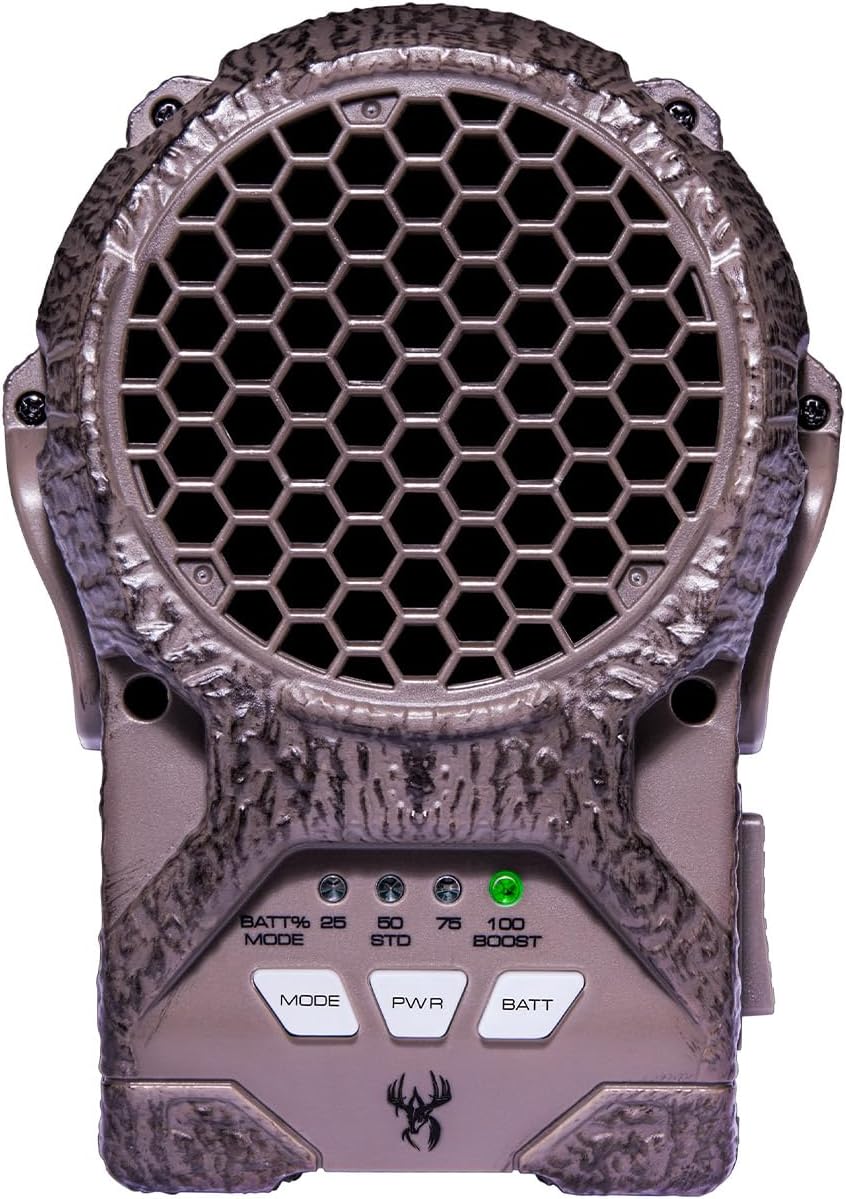
Front view of the Wildgame Innovations ZeroTrace PureION Field Generator, showing the main fan grille and control buttons.
Key Features:
- PureION Technology: Safely neutralizes human scent using ion molecules, without ozone production.
- Ultra-Quiet Fan: Spreads ion particles discreetly.
- Rechargeable Battery: Provides approximately 6 hours of operation.
- USB Port: For convenient charging.
- Durable TRUBark Texture: Designed for concealment in natural environments.
- Mounting Options: Includes a collar lock mounting bracket for versatile placement.

Illustration of the PureION technology, showing how positive and negative ions attach to and neutralize scent molecules.
Package Contents
The ZeroTrace PureION Field Generator package includes:
- ZeroTrace PureION Field Generator Unit
- Rechargeable Battery Pack (approx. 6 hours battery life)
- USB Charging Cable
- Collar Lock Mounting Bracket
Setup
1. Charging the Battery
- Locate the battery compartment on the side of the unit.
- Open the compartment and insert the rechargeable battery pack. Ensure it is seated correctly.
- Connect the provided USB charging cable to the unit's USB port and to a compatible USB power source (e.g., wall adapter, computer USB port).
- The battery indicator lights will show charging status. Charge until all indicator lights are solid, indicating a full charge.

Image showing the battery compartment open for battery insertion or removal.
2. Mounting the Unit
The ZeroTrace Field Generator can be mounted using the included collar lock mounting bracket.
- Attach the collar lock mounting bracket to the back of the ZeroTrace unit.
- Secure the unit to a tree or blind using the bracket and a strap (strap not explicitly listed as included, but implied by reviews and images). Ensure the unit is stable and positioned to allow for optimal scent dispersion.

The ZeroTrace unit mounted on a tree, demonstrating typical field placement.
Operating Instructions
Powering On/Off
- Press the PWR button to turn the unit on.
- Press and hold the PWR button to turn the unit off.
Selecting Operating Mode
The unit features different operating modes to control ion dispersion intensity.
- Press the MODE button to cycle through available modes (e.g., Standard, Boost).
- Refer to the indicator lights (STD, BOOST) to confirm the selected mode.
Checking Battery Status
- Press the BATT button to view the current battery charge level.
- Indicator lights (25%, 50%, 75%, 100%) will illuminate to show the remaining battery capacity.

Close-up of the control panel with MODE, PWR, and BATT buttons, and battery/mode indicators.
Maintenance
- Cleaning: Wipe the unit with a dry, soft cloth. Do not use harsh chemicals or abrasive cleaners.
- Battery Care:
- Fully charge the battery before initial use.
- For long-term storage, charge the battery to approximately 50% and store in a cool, dry place.
- Avoid fully discharging the battery frequently to prolong its lifespan.
- Storage: Store the unit in a dry environment, away from extreme temperatures and direct sunlight.
Troubleshooting
| Problem | Possible Cause | Solution |
|---|---|---|
| Unit does not power on. | Battery is not charged or not properly inserted. | Ensure battery is fully charged and correctly seated in the compartment. |
| Short battery life. | Battery not fully charged; operating in Boost mode; aging battery. | Fully charge the battery. Use Standard mode for longer operation. Consider replacing the battery if it's old. |
| Fan is louder than expected. | Operating in Boost mode; minor debris in fan. | Switch to Standard mode. Gently inspect fan for obstructions (ensure unit is off). |
| Difficulty ejecting battery. | Battery may be slightly stuck or misaligned. | Apply gentle, even pressure when removing. Ensure no debris is obstructing the compartment. |
Specifications
| Feature | Detail |
|---|---|
| Model Name | ZeroTrace PureION Field Generator |
| Model Number | WGIPG0001 |
| Brand | Wildgame Innovations |
| Power Source | Battery Powered |
| Battery Life | Approx. 6 hours |
| Item Weight | 1.5 Pounds |
| Product Dimensions (L x W x H) | 6" x 3" x 8" |
| Material | Plastic |
| Special Feature | Lightweight, Super Quiet (fan noise may vary by mode) |
| UPC | 616376511813 |

Diagram showing the dimensions of the ZeroTrace PureION Field Generator.
Warranty and Support
The Wildgame Innovations ZeroTrace PureION Field Generator comes with a 1 Year Warranty.
For technical support, warranty claims, or further assistance, please contact Wildgame Innovations customer service. Refer to the official Wildgame Innovations website for current contact information.
Manufacturer: Wildgame Innovations
Important Safety Information
Proposition 65 Warning:
This product contains chemicals known to the State of California to cause cancer and birth defects or other reproductive harm.
Always follow all safety guidelines provided by the manufacturer. Do not attempt to modify or repair the device yourself. Use only manufacturer-approved accessories and replacement parts.
Ask a question about this manual
Ask about setup, troubleshooting, compatibility, parts, safety, or missing instructions. Manuals+ will review the question and use this page’s manual context to help answer it.