
Important Safety Information
Please read all instructions carefully before using the shredder. Keep this manual for future reference.
- Keep children and pets away from the shredder.
- Keep loose clothing, jewelry, hair, and other foreign objects away from the shredder opening.
- Do not insert fingers or hands into the shredder opening.
- Unplug the shredder when not in use or before cleaning.
- Do not shred metal objects, large paper clips, or hard plastic (other than credit cards/CDs in the designated slot).
- Do not use aerosol products near the shredder.
- Do not operate the shredder if the power cord is damaged.
Product Overview
The Amazon Basics AU862MA is a high-security micro-cut shredder designed for shredding paper, CDs, and credit cards. It features a pull-out waste bin and multiple indicator lights for safe and efficient operation.

Image: Front view of the Amazon Basics Micro-Cut Shredder, showcasing its compact design and black finish.
Setup
- Unpacking: Carefully remove the shredder from its packaging. Retain packaging materials for future transport or storage.
- Placement: Place the shredder on a flat, stable surface. Ensure there is adequate space around the unit for ventilation and access to the waste bin. The shredder is equipped with casters for easy movement.
- Waste Bin: Ensure the 4-gallon pull-out waste bin is correctly inserted into the shredder housing. The shredder will not operate if the bin is not properly closed.
- Power Connection: Plug the Type-A power cord into a standard electrical outlet.
Operating Instructions
The shredder features a 4-mode switch for various operations.

Image: Close-up of the shredder's control switch, showing the four operational modes: Reverse, Off, Auto, and Forward.
- Auto Mode (I): This is the normal operating mode. The shredder will automatically start when paper is inserted into the feed slot and stop when shredding is complete.
- Off Mode (O): The shredder is powered off. Always switch to Off mode when emptying the waste bin or when the shredder is not in use.
- Reverse Mode (<<): Use this mode to clear paper jams. The shredder blades will rotate in reverse, allowing you to pull out jammed paper.
- Forward Mode (>>): This mode can be used to manually force paper through the shredder or to clear minor jams.
Shredding Paper
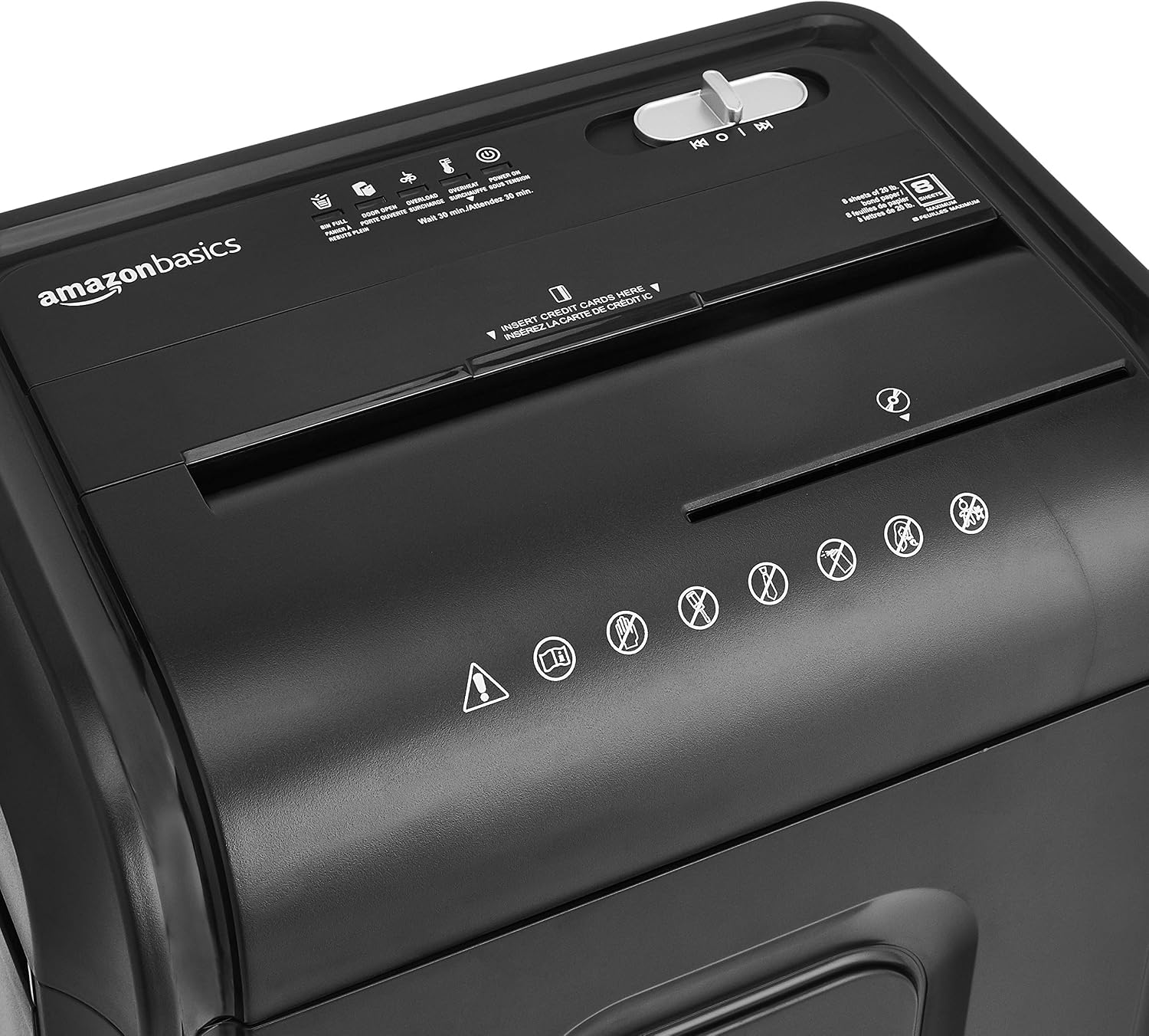
Image: Top view of the shredder, highlighting the main paper feed slot and the separate slot for CDs and credit cards.
- Set the control switch to Auto (I).
- Insert up to 8 sheets of 20-pound paper into the main paper feed slot. Do not exceed the maximum sheet capacity to prevent jams.
- The shredder will automatically start and shred the paper into micro-cut particles.
- The shredder has a continuous run time of 5 minutes. After 5 minutes of continuous use, it requires a 30-minute cool-down period to prevent overheating.
Shredding CDs and Credit Cards

Image: Detailed view of the dedicated slot for shredding CDs and credit cards, separate from the paper feed.
- Set the control switch to Auto (I).
- Insert one CD or credit card into the separate slot designated for media.
- The shredder will automatically start and shred the item.
Indicator Lights
The shredder is equipped with several indicator lights to provide operational status.

Image: Close-up of the shredder's indicator panel, showing lights for Bin Full, Door Open, Overload, Overheat, and Power On.
- Power On: Illuminates when the shredder is connected to power and ready for operation.
- Bin Full: Illuminates when the waste bin is full and needs to be emptied. The shredder will stop operating until the bin is emptied and reinserted.
- Door Open: Illuminates if the pull-out waste bin is not properly closed or is open. The shredder will not operate until the bin is securely closed.
- Overload: Illuminates if too much paper is inserted, causing a jam. Refer to the Troubleshooting section.
- Overheat: Illuminates if the shredder has been used continuously for too long and needs to cool down. The shredder will automatically shut off. Allow it to cool for 30 minutes before resuming operation.
Maintenance
- Emptying the Waste Bin: When the 'Bin Full' indicator light illuminates, switch the shredder to Off (O) mode, pull out the waste bin, and empty its contents. Reinsert the bin securely.
- Oiling the Blades: To maintain optimal performance and extend the life of your shredder, regularly oil the cutting blades. Apply shredder oil (sold separately) to a sheet of paper and shred it. Repeat this process periodically, especially after heavy use.
- Cleaning: Unplug the shredder before cleaning. Wipe the exterior with a soft, dry cloth. Do not use abrasive cleaners or solvents.
Troubleshooting
| Problem | Possible Cause | Solution |
|---|---|---|
| Shredder does not turn on. | No power; Waste bin not closed; Overheat protection active. | Check power connection; Ensure waste bin is fully inserted; Allow 30 minutes for cool-down if Overheat light is on. |
| Paper jam. | Too many sheets inserted; Paper inserted incorrectly. | Switch to Reverse (<<) mode to clear the jam. If unsuccessful, switch to Off (O), unplug, and carefully remove paper manually. Reduce sheet count for future shredding. |
| Shredder stops during operation. | Overheat protection; Waste bin full; Door open. | Allow 30 minutes for cool-down; Empty waste bin; Ensure waste bin is securely closed. |
| Shredder is noisy or slow. | Blades need oiling; Overload. | Oil the shredder blades as per Maintenance section; Reduce the amount of material being shredded. |
Specifications
| Feature | Detail |
|---|---|
| Model Number | AU862MA |
| Cut Type | Micro Cut (P4 Security Level) |
| Sheet Capacity | 8 sheets (20-pound paper) |
| Media Shredding | Separate slot for CDs and Credit Cards |
| Waste Bin Capacity | 4 Gallons (approx. 15.1 Liters) / 3.8 Liters (as per specification) |
| Continuous Run Time | 5 minutes |
| Cool-down Time | 30 minutes |
| Operation Mode | Automatic |
| Audible Noise | 70 Decibels |
| Dimensions (L x W x H) | 13" x 8.9" x 19.5" (33 cm x 22.6 cm x 49.5 cm) |
| Item Weight | 7.82 Kilograms |
| Color | Black |
| Special Feature | Casters for mobility |
| UPC | 038572190829 |
Warranty Information
This Amazon Basics shredder is backed by an Amazon Basics 1-year limited warranty. For detailed terms and conditions, please refer to the warranty documentation included with your purchase or visit the official Amazon Basics website.
Customer Support
For any questions, troubleshooting assistance, or warranty claims, please contact Amazon Basics customer support. You can typically find contact information on the Amazon website under the 'Help' or 'Customer Service' sections, or by visiting the Amazon Basics Store.


