
1. Introduction
This manual provides instructions for the USARMT RMT-23 V2 Remote Control. This remote is designed as a replacement or secondary control unit for various Westinghouse TV models, including DW32H1G1, EU40F1G1, DWM40F1G1, EW40F1G1, DWM40F2G1, and CW50T9XW. It offers direct functionality without the need for programming.
2. Setup: Battery Installation
The RMT-23 V2 remote control requires two (2) AAA batteries for operation. Batteries are not included with the remote control.
- Locate the battery compartment on the back of the remote control.
- Press down on the latch and slide the battery cover downwards to open it.
- Insert two AAA batteries, ensuring the positive (+) and negative (-) terminals align correctly with the markings inside the compartment. Incorrect insertion can prevent the remote from functioning.
- Slide the battery cover back into place until it clicks securely.
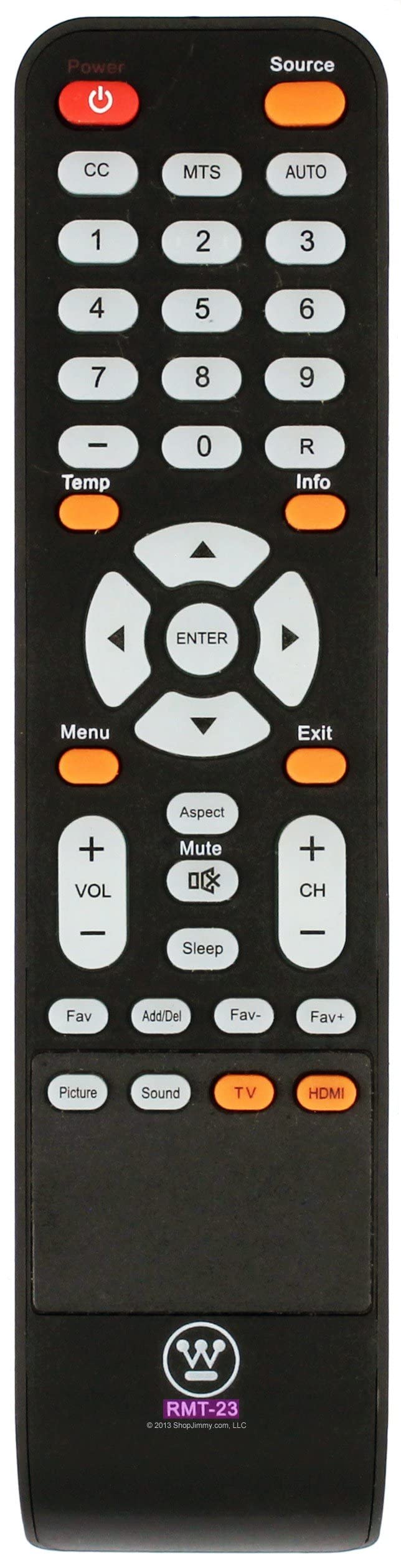
Figure 2.1: Front and back view of the USARMT RMT-23 V2 Remote Control. The battery compartment is located on the back, typically at the bottom section.
3. Operating the Remote Control
Once batteries are installed, the remote control is ready for use with your compatible Westinghouse TV. Point the remote directly at the TV's infrared sensor.
Common Button Functions:
- POWER: Turns the TV on or off.
- MUTE: Mutes or unmutes the TV audio.
- VOL +/-: Increases or decreases the volume level.
- CH +/-: Changes the TV channel up or down.
- NUMBER BUTTONS (0-9): Directly select a channel.
- INPUT/SOURCE: Cycles through available input sources (HDMI, AV, Component, etc.).
- MENU: Accesses the TV's main menu.
- NAVIGATION BUTTONS (Up, Down, Left, Right, OK/ENTER): Used to navigate menus and confirm selections.
- EXIT: Exits the current menu or on-screen display.
- GUIDE: Displays the program guide (if available).
- INFO: Displays information about the current program.
Note: Specific button labels and functions may vary slightly depending on your Westinghouse TV model.
4. Maintenance
Proper care will extend the life of your remote control.
- Cleaning: Use a soft, dry cloth to clean the remote control. Do not use liquid cleaners or abrasive materials.
- Battery Replacement: Replace batteries when the remote's response becomes sluggish or stops working. Always replace both batteries at the same time with new ones of the same type (AAA).
- Storage: If the remote will not be used for an extended period, remove the batteries to prevent leakage and potential damage.
- Environment: Avoid exposing the remote to extreme temperatures, direct sunlight, or high humidity.
5. Troubleshooting
If you experience issues with your remote control, try the following steps:
- Check Batteries: Ensure batteries are inserted correctly with the correct polarity (+/-). Replace old batteries with new AAA batteries.
- Line of Sight: Make sure there are no obstructions between the remote control and the TV's infrared sensor. Point the remote directly at the TV.
- Remote Sensor: Ensure the TV's remote sensor is not blocked or dirty.
- TV Power: Confirm the TV is powered on and not in standby mode.
- Test Functionality: If possible, test the remote with another compatible Westinghouse TV to determine if the issue is with the remote or the TV.
If problems persist after trying these steps, contact customer support.
6. Specifications
| Model Number | RMT-23 V2 |
| Brand | USARMT |
| Compatible Devices | Westinghouse Televisions (Models: DW32H1G1, EU40F1G1, DWM40F1G1, EW40F1G1, DWM40F2G1, CW50T9XW) |
| Power Source | 2 x AAA Batteries (not included) |
| Dimensions | 7 x 1.5 x 0.5 inches (17.78 x 3.81 x 1.27 cm) |
| Item Weight | 3 ounces (85 grams) |
| Special Feature | Ergonomic design |
7. Warranty and Support
For warranty information or technical support regarding your USARMT RMT-23 V2 Remote Control, please refer to the retailer's return policy or contact the manufacturer directly. Keep your purchase receipt for any warranty claims.
Manufacturer: USARMT