
Welcome to Your Jura Z8
Congratulations on your purchase of the Jura Z8 Aluminum Automatic Espresso & Cappuccino Machine. This manual provides essential information for the safe and efficient operation, maintenance, and care of your new appliance. Please read all instructions carefully before first use and keep this manual for future reference.
Important Safety Information
To prevent injury or damage, always observe the following safety precautions:
- Ensure the machine is placed on a stable, level surface away from heat sources and direct sunlight.
- Do not immerse the machine, power cord, or plug in water or other liquids.
- Keep children and unauthorized persons away from the appliance during operation.
- Unplug the machine from the power outlet before cleaning, maintenance, or if it will not be used for an extended period.
- Only use original Jura spare parts and accessories.
- Do not operate the machine if the power cord or plug is damaged, or if the machine malfunctions or has been damaged in any way. Contact customer support for assistance.
Initial Setup
1. Unpacking
- Carefully remove all packaging materials from the machine.
- Check that all components are present and undamaged.
- Dispose of packaging materials responsibly.
2. Water Tank Installation
Remove the water tank, rinse it thoroughly with fresh water, and fill it with cold, fresh tap water. Insert the water tank back into the machine, ensuring it is securely seated.
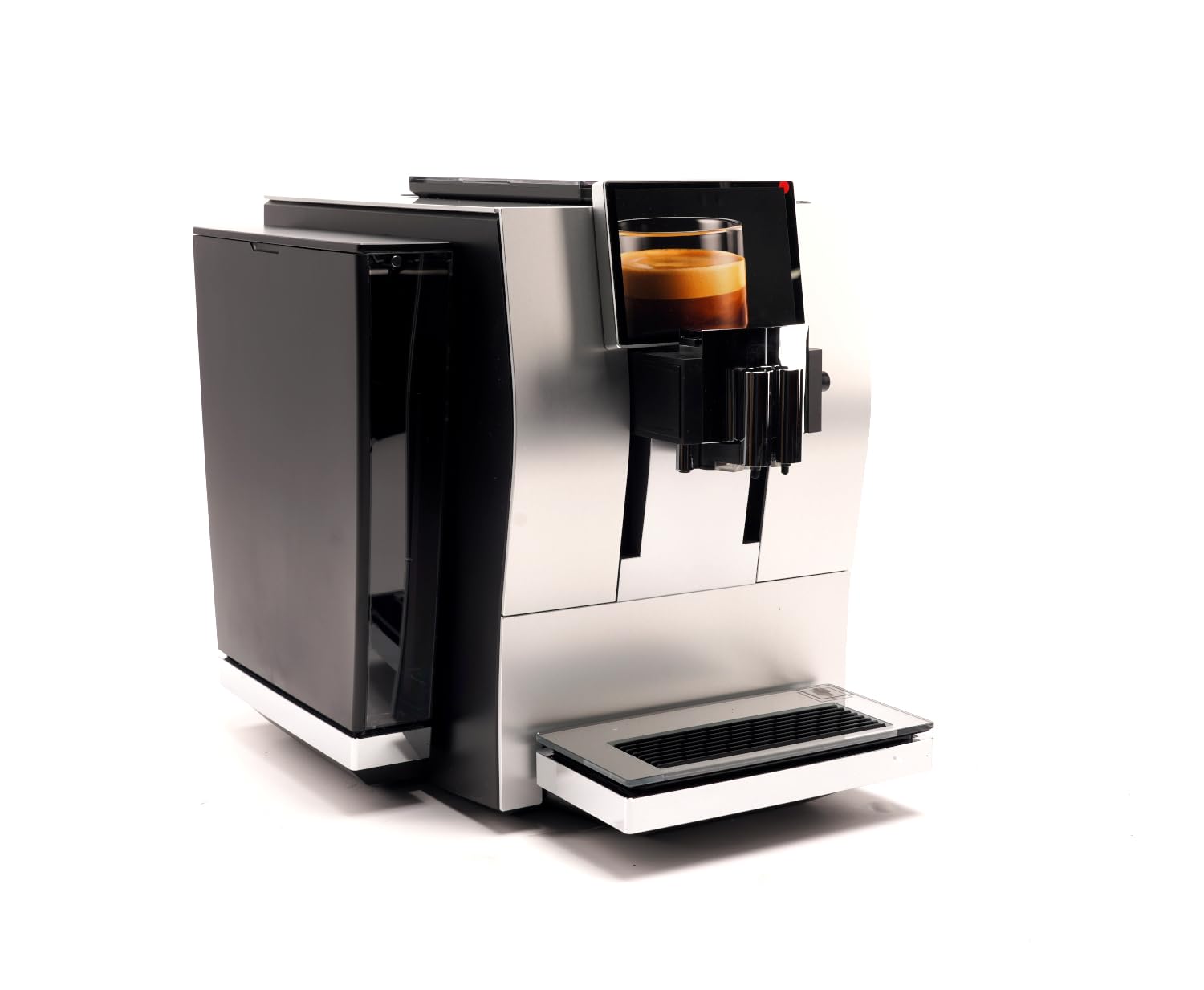
Image: The Jura Z8 Aluminum Automatic Espresso & Cappuccino Machine, showcasing its sleek design and touchscreen interface. The water tank is visible on the left side of the machine.
3. Bean Container
Open the aroma preservation cover and fill the bean container with fresh coffee beans. Close the cover to maintain bean freshness.
4. Power Connection
Plug the power cable into the machine and then into a suitable power outlet. The machine will automatically begin its initial startup sequence.
Daily Operation
1. Turning On/Off
Press the power button located on the top of the machine to turn it on or off. The machine will perform an automatic rinse cycle upon startup and shutdown.
2. Navigating the Touchscreen
The Jura Z8 features an intuitive touchscreen display. Swipe left or right to browse through various coffee specialties and settings. Tap an icon to select a drink or access a menu.
3. Preparing Espresso
- Place a cup under the coffee spout.
- Select 'Espresso' from the touchscreen menu.
- Adjust coffee strength and water volume if desired using the on-screen options.
- Press the start button to begin brewing.
Video: An official Jura Z8 video demonstrating the machine's operation, including bean grinding and espresso preparation. This video highlights the automated process of brewing a perfect cup.
4. Preparing Cappuccino
- Ensure the milk system is connected and the milk container is filled with cold milk.
- Place a cup under the milk and coffee spouts.
- Select 'Cappuccino' from the touchscreen menu.
- Adjust milk and coffee settings as desired.
- Press the start button to begin preparation.
5. Adjusting Settings
The Jura Z8 allows for customization of various settings:
- Coffee Strength: Select from multiple levels to suit your preference.
- Water Volume: Adjust the amount of water for each drink.
- Milk Foam Temperature: Customize the temperature of your milk foam.
- Grinder Adjustment: The grinder can be adjusted to fine-tune the grind for optimal extraction. Refer to the on-screen prompts for guidance.
Care and Cleaning
Regular cleaning and maintenance are crucial for the longevity and performance of your Jura Z8.
1. Daily Cleaning
- Empty and rinse the drip tray and coffee grounds container daily.
- Wipe down the exterior of the machine with a soft, damp cloth.
2. Milk System Cleaning
The machine will prompt you to clean the milk system after each milk preparation. Follow the on-screen instructions using Jura milk system cleaner to ensure hygiene and optimal milk foam quality.
3. Descaling
If you are not using a CLARIS water filter, the machine will prompt you to descale it periodically. Use only Jura descaling tablets and follow the instructions provided on the display.
4. Filter Replacement
If using a CLARIS water filter, the machine will indicate when it needs to be replaced. Replace the filter promptly to ensure optimal water quality and prevent limescale buildup.
Common Issues and Solutions
| Problem | Possible Cause | Solution |
|---|---|---|
| No coffee is dispensed. | Water tank empty, bean container empty, or brewing unit blocked. | Fill water tank/bean container. Perform a cleaning cycle or contact support if brewing unit is blocked. |
| Milk foam is not consistent. | Milk system dirty, milk not cold enough, or milk type unsuitable. | Clean milk system thoroughly. Use cold, fresh milk. Try a different type of milk. |
| Machine displays 'Descale' message. | Limescale buildup detected. | Perform a descaling cycle using Jura descaling tablets as per on-screen instructions. |
| Touchscreen unresponsive. | Temporary software glitch or power issue. | Turn off the machine, unplug it for 30 seconds, then plug it back in and restart. If the issue persists, contact customer support. |
Technical Specifications
- Brand: Jura
- Model: Z8
- Product Dimensions: 17.7"D x 12.6"W x 15"H
- Item Weight: 1 pounds
- Voltage: 230 Volts
- Capacity: 1200 Milliliters (Water Tank)
- Coffee Input Type: Whole Beans
- Operation Mode: Fully Automatic
- Human Interface Input: Touchscreen
- Special Feature: Water Filter
Warranty and Support
Warranty Information
Your Jura Z8 machine comes with a manufacturer's warranty covering defects in materials and workmanship under normal use. Please refer to the separate warranty card included with your purchase for specific terms, conditions, and duration of coverage.
Customer Support
For technical assistance, spare parts, or warranty claims, please contact Jura customer support:
- Website: www.jura.com
- Phone: Refer to your regional Jura website for local contact numbers.


