
1. Introduction
Thank you for choosing the BONTEC Dual Monitor Stand. This product is designed to enhance your workspace by providing a flexible and ergonomic solution for mounting two monitors. It helps free up valuable desk space and allows for optimal viewing angles, reducing strain on your neck and shoulders.
This manual provides detailed instructions for the safe and proper installation, operation, and maintenance of your new monitor stand. Please read it thoroughly before beginning installation and keep it for future reference.

Image 1.1: The BONTEC Dual Monitor Stand in a typical office setup, supporting two monitors and optimizing desk space.
2. Safety Information
Please observe the following safety precautions to prevent injury or damage to your equipment:
- Do not exceed the maximum weight capacity of 8 kg (18 lbs) per arm.
- Ensure your monitors are within the supported size range of 13-27 inches.
- Verify that your monitors have VESA mounting patterns of 75x75 mm or 100x100 mm.
- Always use two people for installation if the monitors are heavy or cumbersome.
- Tighten all screws firmly, but do not overtighten to avoid stripping threads.
- Keep small parts away from children.
- If any parts are missing or damaged, do not attempt to install. Contact customer support.
3. Package Contents
Before installation, please check that all components are present and undamaged:
- Main Pole
- Dual Monitor Arms
- Desk Clamp Assembly
- Grommet Base Assembly
- VESA Plates (2x)
- Hardware Kit (screws, washers, spacers for VESA mounting)
- Allen Keys (various sizes)
- Cable Management Clips
- Instruction Manual
4. Specifications
| Feature | Specification |
|---|---|
| Model Number | B07PN8XQ78 |
| Material | Alloy Steel |
| Color | Black |
| Screen Size Compatibility | 13-27 inches |
| Weight Capacity (per arm) | Up to 8 kg (18 lbs) |
| VESA Compatibility | 75x75 mm, 100x100 mm |
| Tilt Angle | ±90 degrees |
| Swivel Angle | 180 degrees |
| Rotation Angle | 360 degrees |
| Max Arm Length | 420 mm |
| Height Adjustment | Up to 420 mm |
| Desk Clamp Thickness | 10 mm - 90 mm |
| Grommet Base Desk Thickness | 10 mm - 80 mm |
| Grommet Hole Diameter | 10 mm - 95 mm |

Image 4.1: Key specifications for monitor compatibility and weight capacity.
5. Setup and Installation
The BONTEC Dual Monitor Stand offers two installation methods: Desk Clamp and Grommet Base. Choose the method that best suits your desk.
5.1. Choose Installation Method

Image 5.1: Visual representation of the two available installation methods.
5.2. Desk Clamp Installation
This method is suitable for desks with a thickness between 10 mm and 90 mm.
- Attach the desk clamp assembly to the bottom of the main pole.
- Position the clamp on the edge of your desk.
- Tighten the clamp screw until the stand is securely fastened to the desk. Ensure it is stable and does not wobble.

Image 5.2: Detailed view of the desk clamp installation.
5.3. Grommet Base Installation
This method requires a pre-drilled hole in your desk with a diameter between 10 mm and 95 mm, and is suitable for desk thicknesses between 10 mm and 80 mm.
- Disassemble the desk clamp if it's already attached to the main pole.
- Attach the grommet base assembly to the bottom of the main pole.
- Insert the main pole through the grommet hole in your desk.
- From underneath the desk, secure the grommet base with the provided washer and nut. Tighten firmly.
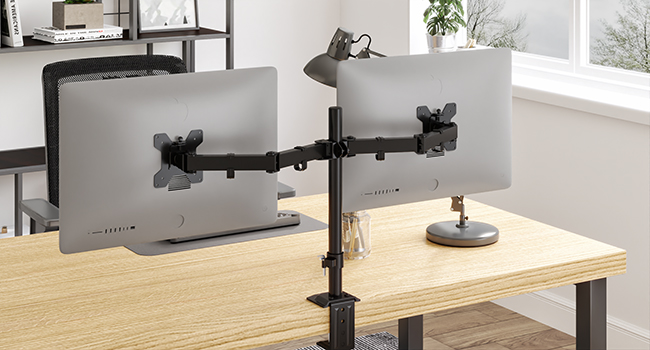
Image 5.3: Detailed view of the grommet base installation.
5.4. Attaching Monitor Arms and VESA Plates
- Slide the monitor arms onto the main pole at your desired height. Secure them using the provided screws.
- Attach the VESA plates to the back of your monitors using the appropriate screws from the hardware kit. Ensure the VESA pattern (75x75mm or 100x100mm) matches.
- Slide the monitors (with VESA plates attached) onto the monitor arms. The detachable VESA design allows for easy attachment and removal.
- Secure the monitors to the arms using the locking screws or clips.

Image 5.4: Illustration of the detachable VESA plate for easy monitor attachment.
6. Operating Instructions
Once installed, your BONTEC Dual Monitor Stand offers a wide range of adjustments for optimal viewing comfort.
6.1. Adjusting Monitor Position
The stand allows for tilt, swivel, rotation, and height adjustments:
- Height Adjustment: Loosen the screw on the main pole to slide the monitor arms up or down. Retighten to secure. The maximum height adjustment is 420 mm.
- Tilt: Adjust the monitor screen ±90 degrees vertically to reduce glare or find your preferred angle.
- Swivel: Pivot the monitor arms 180 degrees horizontally to share your screen or adjust viewing angles.
- Rotation: Rotate the monitor 360 degrees from landscape to portrait orientation.

Image 6.1: Comprehensive view of the stand's adjustability features.
6.2. Cable Management
The integrated cable management system helps keep your workspace tidy and organized.
- Route your monitor cables through the clips located on the underside of the monitor arms.
- Guide the cables down the main pole using the integrated cable clips.
- Secure any excess cable length with cable ties (not included) if necessary.

Image 6.2: Illustration of the cable management system and Allen key storage.
7. Maintenance
To ensure the longevity and proper functioning of your BONTEC Dual Monitor Stand, follow these maintenance guidelines:
- Cleaning: Wipe the stand with a soft, damp cloth. Avoid using abrasive cleaners or solvents that could damage the finish.
- Tightness Check: Periodically check all screws and bolts to ensure they remain tight. Retighten if necessary, but do not overtighten.
- Lubrication: No lubrication is typically required for the moving parts. If you notice any stiffness, contact customer support.
8. Troubleshooting
If you encounter any issues with your monitor stand, refer to the following common problems and solutions:
| Problem | Possible Cause | Solution |
|---|---|---|
| Stand is wobbly or unstable. | Clamp/grommet not tightened sufficiently. | Ensure the desk clamp or grommet base is securely tightened to the desk. |
| Monitors sag or tilt downwards. | Monitor weight exceeds capacity; Tilt mechanism not tight enough. | Verify monitor weight is within 8 kg per arm. Tighten the tilt adjustment screws on the VESA plate. |
| Cannot adjust monitor height. | Height adjustment screw is too tight. | Loosen the height adjustment screw on the main pole, adjust, then retighten. |
| VESA plate does not fit monitor. | Incorrect VESA pattern. | Confirm your monitor has a 75x75 mm or 100x100 mm VESA pattern. |
| Missing parts. | Packaging error. | Do not proceed with installation. Contact BONTEC customer support immediately. |
9. Warranty and Support
BONTEC products are manufactured to high-quality standards. For warranty information, technical support, or to report missing/damaged parts, please contact BONTEC customer service through the retailer where you purchased the product or visit the official BONTEC website.
Please have your model number (B07PN8XQ78) and purchase details ready when contacting support.


