
Introduction
This instruction manual provides essential information for the setup, operation, and maintenance of your Superior Electronics Universal Remote Control, model SUPTRB016. This remote is designed as a direct replacement for Telefunken televisions, including Smart TV models, and requires no programming for immediate use. Its ergonomic design and durable construction ensure comfortable and reliable control of your TV.
Setup
1. Inserting Batteries
The remote control requires two (2) AAA batteries (not included). Follow these steps to insert them:
- Locate the battery compartment cover on the back of the remote control.
- Slide the cover downwards or press the latch to open it.
- Insert two AAA batteries, ensuring the positive (+) and negative (-) terminals align correctly with the markings inside the compartment.
- Replace the battery compartment cover, sliding it back into place until it clicks securely.

Figure 1: Inserting AAA batteries into the remote control.
2. Initial Use
Once batteries are inserted, the remote control is ready for immediate use. No additional programming or code entry is required. Simply point the remote at your Telefunken TV and begin operating it.
Operating Instructions
The Superior Electronics SUPTRB016 remote control replicates the functions of your original Telefunken TV remote. Ensure a clear line of sight between the remote control and your TV's infrared receiver for optimal performance.

Figure 2: Remote control layout with streaming service buttons.
Key Functions:
- Power Button: Turns the TV on or off.
- Number Buttons (0-9): For direct channel selection.
- Volume Up/Down: Adjusts the TV volume.
- Channel Up/Down: Changes TV channels.
- Mute Button: Mutes or unmutes the TV audio.
- Navigation Pad (OK, Up, Down, Left, Right): Used for menu navigation and selection.
- Back/Exit: Returns to the previous screen or exits a menu.
- Smart TV Buttons: Dedicated buttons provide quick access to popular streaming applications such as Netflix, YouTube, and Prime Video (functionality depends on your TV model and internet connection).
- Source/Input: Selects the input source (HDMI, AV, etc.).
- Menu/Info: Accesses TV menus and displays information.
The remote operates effectively within a maximum range of 10 meters, provided there are no obstructions between the remote and the TV's infrared sensor.
Maintenance
To ensure the longevity and optimal performance of your remote control, follow these simple maintenance guidelines:
- Cleaning: Wipe the remote control with a soft, dry cloth. Avoid using liquid cleaners or abrasive materials, as these can damage the surface or internal components.
- Battery Replacement: Replace batteries when the remote's response becomes sluggish or stops working. Always replace both batteries at the same time with new AAA batteries. Do not mix old and new batteries, or different types of batteries.
- Storage: Store the remote in a cool, dry place away from direct sunlight and extreme temperatures.
- Avoid Drops: While constructed with durable materials, excessive drops or impacts can cause damage.
Troubleshooting
If you experience issues with your remote control, please refer to the following common solutions:
| Problem | Possible Cause | Solution |
|---|---|---|
| Remote does not work at all. | Dead or incorrectly inserted batteries. | Check battery orientation. Replace with fresh AAA batteries. |
| Remote works intermittently. | Weak batteries, obstruction, or remote too far from TV. | Replace batteries. Ensure clear line of sight to TV. Move closer to the TV (within 10 meters). |
| Specific buttons do not respond. | Button malfunction or TV not supporting the function. | Ensure your TV model supports the specific function (e.g., Smart TV apps). If other buttons work, the specific button might be faulty. |
| TV does not respond to remote. | TV's IR sensor blocked or TV is not a Telefunken model. | Clear any obstructions in front of the TV's IR sensor. Verify that your TV is a Telefunken brand. |
Specifications
- Model: SUPTRB016
- Brand: Superior Electronics
- Dimensions: 5 x 1.5 x 19 cm
- Weight: 90 grams
- Batteries Required: 2 x AAA (1.5V)
- Batteries Included: No
- Connectivity Technology: Infrared
- Maximum Range: 10 meters
- Compatible Devices: Telefunken Televisions (LED, LCD, OLED, Smart TV models)
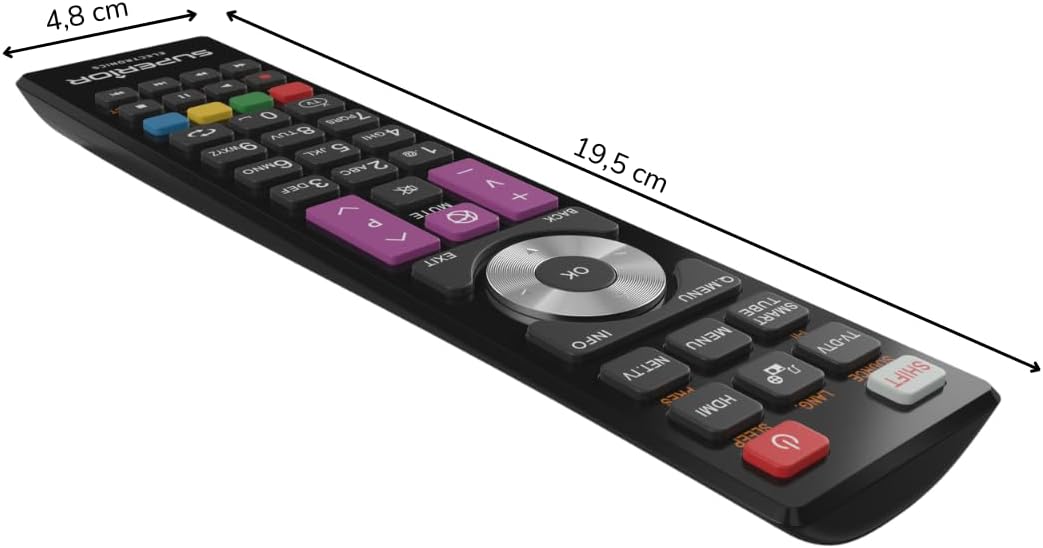
Figure 3: Remote control dimensions.
Warranty and Support
For warranty information, please refer to the terms and conditions provided by your retailer at the time of purchase or contact Superior Electronics directly. For additional support or inquiries, you may visit the official Superior Electronics store on Amazon:


