
1. Overview
The Walfront MESTEK SL620 is a digital sound level meter designed for measuring noise levels in various environments. It features a wide measurement range, a clear LCD backlight display, and functions for data retention, minimum/maximum value tracking, and automatic shutdown. This device is suitable for quality control in factories, offices, homes, schools, and construction sites.
Key features include:
- Measurement range of 35 to 135 dB.
- LCD display with backlight for clear readings.
- Data hold, MIN/MAX value tracking.
- Automatic and manual power-off options.
2. Safety Information
Please read and understand all safety instructions before operating the device. Failure to follow these instructions may result in injury or damage to the device.
- Do not attempt to open or modify the device. There are no user-serviceable parts inside.
- Keep the device away from water, moisture, and extreme temperatures.
- Use only the specified battery type (3 x 1.5V AAA). Ensure correct polarity during installation.
- Remove batteries if the device will not be used for an extended period to prevent leakage.
- Avoid dropping the device or subjecting it to strong impacts.
- Clean the device with a soft, dry cloth. Do not use abrasive cleaners or solvents.
3. Product Components and Layout
Familiarize yourself with the different parts of your sound level meter:
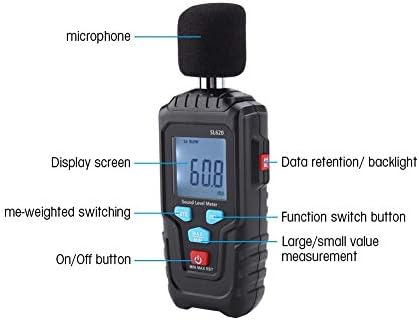
Figure 3.1: Labeled diagram of the MESTEK SL620 Sound Level Meter, showing the microphone, display screen, data retention/backlight button, function switch button, time-weighted switching button, and on/off button.
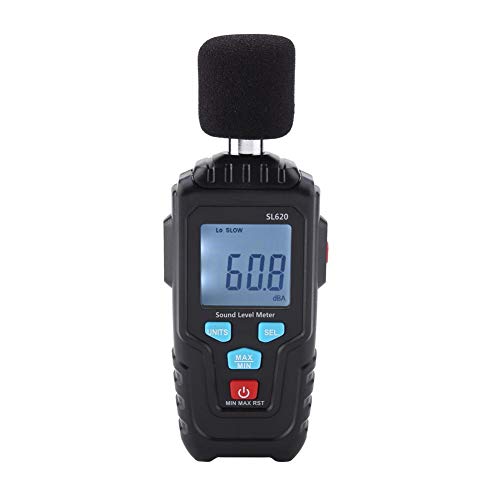
Figure 3.2: The MESTEK SL620 Sound Level Meter with its approximate dimensions: 150mm length, 55mm width, and 30mm height.
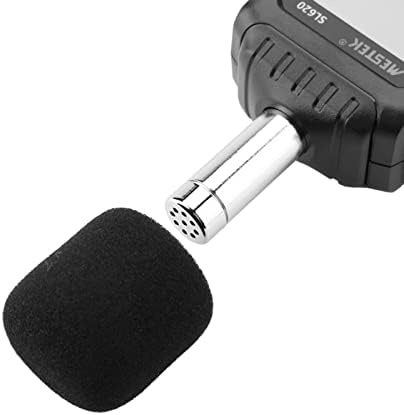
Figure 3.3: Close-up of the device's microphone, protected by a foam windscreen.
4. Setup
4.1 Battery Installation
- Locate the battery compartment cover on the back of the device.
- Slide or unclip the cover to open the compartment.
- Insert three (3) 1.5V AAA batteries, ensuring correct polarity (+/-) as indicated inside the compartment.
- Replace the battery compartment cover securely.
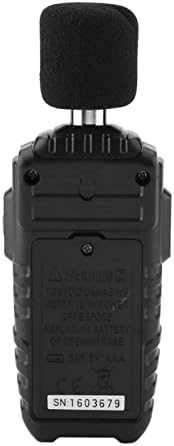
Figure 4.1: Rear view of the sound level meter, showing the battery compartment where three AAA batteries are installed.
5. Operating Instructions
5.1 Powering On/Off
- To power on the device, press the On/Off button.
- To power off the device, press and hold the On/Off button for a few seconds. The device also features an automatic shutdown function to conserve battery power.
5.2 Taking a Measurement
- Turn on the device. The current sound level will be displayed on the LCD screen.
- Position the microphone towards the sound source you wish to measure.
- Read the decibel (dB) value displayed on the screen.

Figure 5.1: The sound level meter held in hand, showing a reading of 60.8 dBA on its LCD screen.
5.3 Function Buttons
- UNITS Button: Press to switch between different measurement units or modes if available (e.g., dBA, dBC). For this model, it primarily controls time weighting.
- SEL Button: This button is used for selecting functions or confirming settings.
- MIN/MAX Button: Press this button to cycle through current, minimum, and maximum recorded sound levels.
- Data Hold / Backlight Button: A dedicated button (often on the side or labeled 'H/BL') allows you to hold the current reading on the display. Pressing it again may release the hold. Long-pressing this button typically activates or deactivates the display backlight.
5.4 Time Weighting (FAST/SLOW)
The device supports two time weighting modes:
- FAST (125 ms): Used for measuring rapidly changing noise levels. This is the default setting.
- SLOW (1 second): Used for measuring average noise levels where the sound value changes significantly.
To switch between FAST and SLOW modes, use the designated button (often labeled 'F/S' or integrated with 'UNITS').
5.5 Frequency Weighting (A-Weighting)
The MESTEK SL620 uses A-weighting (A characteristic) for its measurements. A-weighting is commonly used for environmental noise measurements and is designed to approximate the human ear's response to sound.
6. Maintenance
6.1 Cleaning
Wipe the device with a soft, dry cloth. Do not use liquid cleaners, solvents, or abrasive materials, as these can damage the casing or internal components.
6.2 Storage
When not in use for extended periods, store the device in a cool, dry place, away from direct sunlight and extreme temperatures. Remove the batteries before storage to prevent potential leakage and damage.
6.3 Battery Replacement
When the battery indicator appears on the display, replace all three AAA batteries promptly to ensure accurate measurements and proper device function. Refer to Section 4.1 for battery installation instructions.
7. Troubleshooting
If you encounter issues with your MESTEK SL620 Sound Level Meter, refer to the following common problems and solutions:
- Device does not power on:
- Check if batteries are installed correctly with the right polarity.
- Replace with new batteries if current ones are depleted.
- Inaccurate readings:
- Ensure the microphone is clean and unobstructed.
- Verify that the device is not exposed to strong electromagnetic fields.
- Check battery level; low batteries can affect accuracy.
- Display is dim or not working:
- Check battery level and replace if necessary.
- Ensure the backlight function is activated if operating in low light conditions.
If the problem persists after attempting these solutions, please contact customer support.
8. Specifications
| Parameter | Specification |
|---|---|
| Model | SL620 |
| Noise Measurement Range | 35-135dB |
| Noise Accuracy | 2.0dB (reference sound pressure level, 94dB@1kHz) |
| Frequency Response | 31.5Hz-8kHz |
| Time Weighting | FAST (125ms), SLOW (1 second) |
| Frequency Weighting | A-weighting |
| Digital Display | 4-digit LCD |
| Resolution | 0.1dB |
| Measurement Gears | Low (<100dB), High (>100dB) |
| Data Hold | Yes |
| MAX/MIN Measurement | Yes |
| Ambient Temperature Measurement | 0-60°C |
| Battery Type | 3 x 1.5V AAA batteries (not included) |
| Working Temperature/Humidity | 0-40°C / 10%-80% RH |
| Storage Temperature/Humidity | 10-60°C / 10-70% RH |
| Dimensions | 150 x 55 x 30 mm |
| Weight | 162g |
9. Warranty and Support
Specific warranty information for the Walfront MESTEK SL620 Sound Level Meter is not provided in this manual. Please refer to the product packaging or the retailer's website for warranty details.
For technical support or inquiries, please contact your point of purchase or the Walfront customer service department.