1. Product Overview
The XIHADA Universal Garage Door Remote ML999-11 is a multi-frequency duplicator designed to clone existing garage door and gate opener remotes. It supports a wide range of frequencies from 280MHz to 868MHz, allowing it to replace many major brands' remotes. This compact device features four programmable buttons for controlling up to four different devices.

Image: Front view of the XIHADA Universal Garage Door Remote ML999-11, showing its four buttons.

Image: Close-up view of the XIHADA remote, indicating the four programmable buttons (Key 1, Key 2, Key 3, Key 4).
Package Contents:
- 1 x XIHADA Universal Garage Door Remote ML999-11 (with CR2032 battery pre-installed)
2. Compatibility Information
This universal remote is compatible with a wide range of fixed code and rolling code remotes operating within the frequency ranges of 280MHz-350MHz, 380MHz-450MHz, and 867MHz-868MHz. It is crucial to verify compatibility with your existing remote before attempting to program.
Compatible Brands and Models:
Refer to the detailed compatibility chart below to confirm if your original remote's brand and model are supported. Your original remote must be present and functional for programming.

Image: Detailed chart showing compatible brands and models for duplication with the XIHADA remote.
Non-Compatible Brands and Models:
The XIHADA Universal Remote is not compatible with the following brands and models. Attempting to program with these systems will not be successful:

Image: Chart listing brands and models that are not compatible with the XIHADA Universal Remote.
- Liftmaster Security 2.0 garage opener
- Chamberlain MYQ garage opener
- LiftMaster 8500W garage Opener
- Liftmaster 892LT, 811LMX, 893LM
- Chamberlain B 6713T, B 6753T Smart Garage Opener
- Condo's garage door opener
- Ryobi, Softens Doors, Blue Sea, Allister, Amarr, Atoms, Doorking, Lynx, Merik, Stanley, Skylink, Wayne Dalton, Martin, SACO Gate Opener
3. Setup and Programming
The XIHADA Universal Remote allows you to duplicate codes from your existing remote. You must have a working original remote to perform the duplication process.
Duplication Process:
- Clear Existing Codes: Hold down button 1 and press button 2 four times. Release both buttons. The LED on the universal remote will emit a quick flash every 2 seconds, indicating it's ready for programming.
- Position Remotes: Place your original remote control directly in front of the XIHADA universal remote, approximately 2-3 cm apart.
- Copy Code: Press and hold a button on your original remote. Simultaneously, press and hold the desired button on the XIHADA universal remote where you want to store the code. Continue holding both until the LED on the universal remote starts flashing quickly, then turns off. This indicates the code has been successfully copied.
- Duplicate Additional Buttons: To copy a second, third, or fourth button, repeat steps 2 and 3 for each desired button.

Image: Illustration of positioning the original remote and the XIHADA remote for code duplication.
Automatic Matching Code (Receiver Learning):
If the codes are copied from the original remote but the universal remote does not operate the garage door or gate, an additional step may be required to match the code with the receiver unit. This process typically involves activating the receiver's learning mode.
- Access Receiver: Go to your garage door or gate opener's receiver unit.
- Activate Learning Mode: Follow the instructions for your specific garage door or gate opener to put its receiver into learning mode (this often involves pressing a "Learn" or "Program" button on the receiver itself).
- Transmit Code: While the receiver is in learning mode, press the button on your XIHADA universal remote that you wish to match. Hold the button until the receiver indicates successful learning (e.g., an LED flashes, a click is heard). The LED on the XIHADA remote may flash quickly and then turn off.
For a visual guide on the duplication process, you may refer to the following external resource: Duplication Process Video Guide
4. Operation
Once programmed, the XIHADA Universal Remote operates like your original remote. Each button can control a different device (e.g., garage door, gate, alarm system) depending on how it was programmed.
Using the Remote:
- Press the corresponding button (Key 1, Key 2, Key 3, or Key 4) to activate the linked device.
- Ensure you are within range of the receiver for proper operation.

Image: The XIHADA remote being used to open a garage door.

Image: The XIHADA remote being used to open an automatic gate.
5. Maintenance
The XIHADA Universal Remote requires minimal maintenance. The primary maintenance task is battery replacement.
Battery Replacement:
The remote uses a CR2032 lithium battery. When the remote's range decreases or the LED indicator becomes dim, it is time to replace the battery.
- Carefully open the remote casing.
- Remove the old CR2032 battery.
- Insert a new CR2032 battery, ensuring correct polarity (+/-).
- Close the remote casing securely.
No other user-serviceable parts are inside the remote.
6. Troubleshooting
If you encounter issues with your XIHADA Universal Remote, refer to the following common problems and solutions:
| Problem | Possible Cause | Solution |
|---|---|---|
| Remote does not program. |
|
|
| Remote programmed but does not open door/gate. |
|
|
| LED indicator is dim or does not light up. | Low battery. | Replace the CR2032 battery. |
If problems persist after following these steps, please contact customer support.
7. Specifications
| Feature | Detail |
|---|---|
| Model Number | ML999-11 |
| Dimensions | 6.0 x 3.5 x 1.0 cm (2.36 x 1.38 x 0.39 inches) |
| Weight | 18 g |
| Working Frequency Range | 280MHz-350MHz / 380MHz-450MHz / 867MHz-868MHz |
| Battery Type | CR2032 Lithium (included) |
| Number of Buttons | 4 |
| Compatibility | Multi-frequency fixed code and rolling code remotes (refer to compatibility charts) |
| Use Environment | Outdoor |
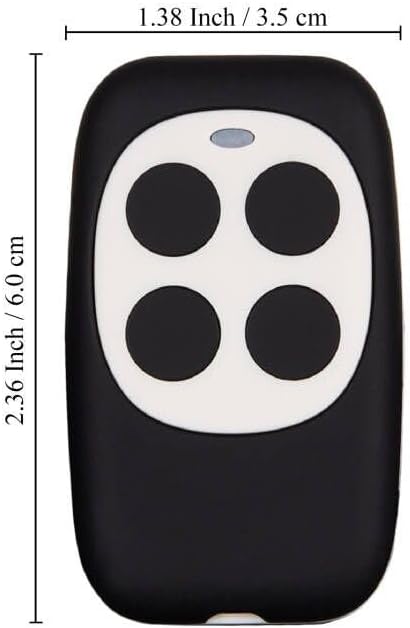
Image: Dimensions of the XIHADA Universal Garage Door Remote.
8. Customer Support
For further assistance, questions regarding compatibility, or troubleshooting not covered in this manual, please contact XIHADA customer support through the Amazon email system. We aim to respond within 24 hours.
Manufacturer: Xiamen Xihada Information Technology Co., Ltd