
1. Introduction
The Fanimation Celano V2 ceiling fan is designed to provide efficient air circulation and integrated lighting for indoor spaces. This 52-inch fan features a dark bronze finish with cherry/dark walnut blades, an 18-watt LED light kit, and is operated via a handheld remote control. It offers three forward and reverse speeds for year-round comfort.
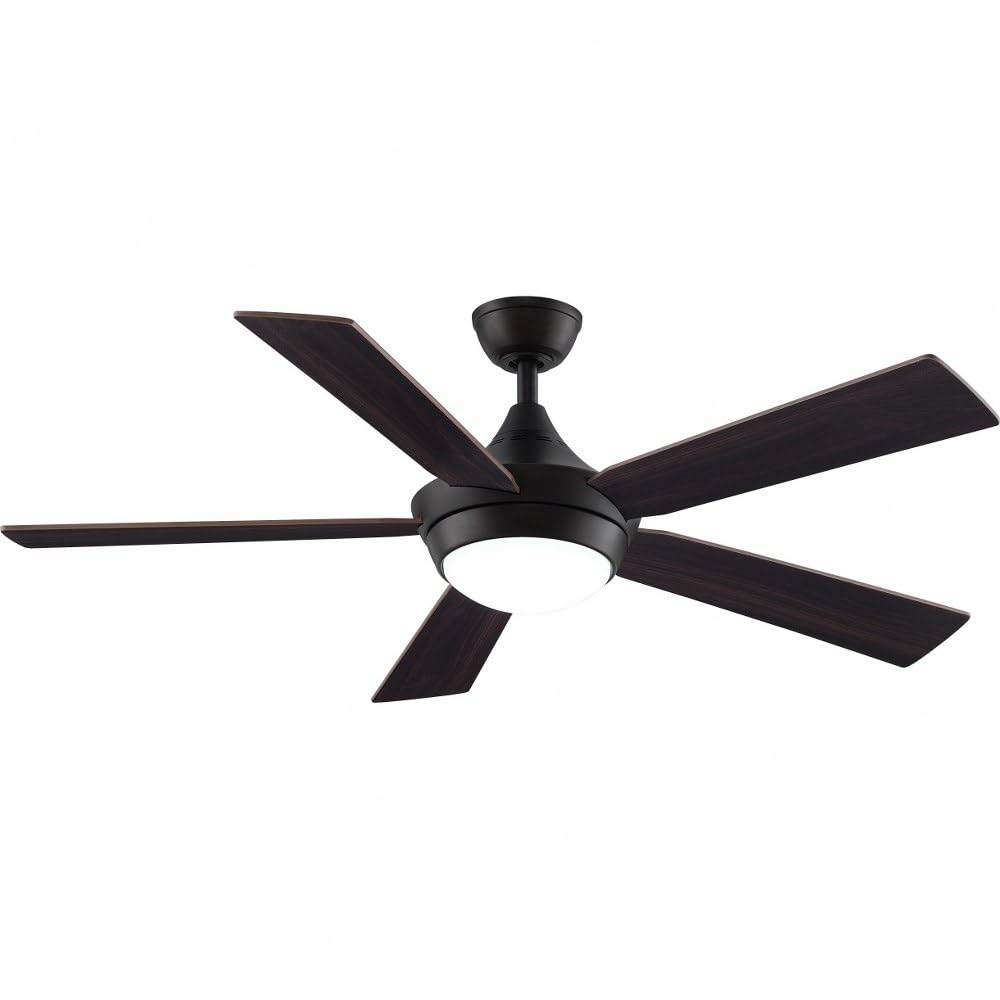
Image 1.1: Fanimation Celano V2 Ceiling Fan (Dark Bronze finish with Cherry/Dark Walnut blades)
2. Safety Information
Read all instructions carefully before installation and use. Failure to follow these instructions may result in electric shock, fire, or personal injury.
- Electrical Safety: Always disconnect power at the main circuit breaker before attempting any installation, repair, or cleaning. Ensure all electrical connections comply with local codes and ordinances.
- Mounting: The fan must be mounted to a structurally sound ceiling joist or outlet box capable of supporting the fan's weight (approximately 17.86 pounds).
- Blade Clearance: Ensure there is adequate clearance between the fan blades and any obstacles, including walls and furniture.
- Liquid Exposure: Keep the fan and its electrical components away from liquids to prevent electric shock and damage.
- Professional Installation: If you are unfamiliar with electrical wiring or installation procedures, consult a qualified electrician.
3. Package Contents
Verify that all components are present before beginning installation:
- Ceiling Fan Motor Assembly
- 5 Fan Blades (Cherry/Dark Walnut)
- Light Kit with Opal Glass Diffuser
- TR500 Handheld Remote Control (battery included)
- Downrod (4.5 inches)
- Mounting Bracket and Hardware
- Instruction Manual
4. Setup and Installation
This section outlines the general steps for installing your Celano V2 ceiling fan. Specific details and diagrams are typically found in the detailed installation guide provided in the product packaging.
4.1 Pre-Installation
- Turn off power at the circuit breaker.
- Ensure the mounting location is suitable for a ceiling fan and can support its weight.
- Unpack all components and inspect for any damage.
4.2 Mounting the Fan
- Secure the mounting bracket to the ceiling outlet box and ceiling joist using appropriate hardware.
- Assemble the downrod to the fan motor assembly.
- Carefully lift the fan assembly and hang it from the mounting bracket.
4.3 Electrical Connections
- Connect the fan's electrical wires to the household wiring according to the wiring diagram in the full manual. Ensure all connections are secure.
- Proper grounding is essential for safety.
4.4 Attaching Blades and Light Kit
- Attach the five fan blades to the motor housing using the provided screws.
- Install the LED light kit to the bottom of the fan motor assembly.
- Secure the opal glass diffuser to the light kit.
Once installation is complete, restore power at the circuit breaker and test the fan's operation.
5. Operation
The Celano V2 fan is controlled using the included TR500 handheld remote control.
5.1 Fan Speed Control
- Use the remote control to select one of three fan speeds (low, medium, high).
- The fan delivers airflow up to 5,596 cubic feet per minute.
5.2 Reversible Airflow
- The fan features a reversible airflow function, typically controlled via a switch on the fan housing or the remote.
- Downward Airflow (Summer): Creates a cooling breeze.
- Upward Airflow (Winter): Circulates warm air trapped near the ceiling.
5.3 Light Kit Operation
- The remote control operates the integrated 18-watt LED light kit.
- The light provides warm 3000K illumination with a high Color Rendering Index (CRI) of 90.
- A sleep timer function may be available on the remote for the light or fan.
5.4 Smart Home Compatibility
The Celano V2 is compatible with WiFi and Bluetooth smart home systems. Control units for smart home integration are sold separately.
6. Maintenance
Regular maintenance ensures optimal performance and extends the life of your ceiling fan.
- Cleaning: Periodically clean the fan blades and motor housing with a soft, damp cloth. Do not use abrasive cleaners or solvents.
- Blade Inspection: Check fan blades for any cracks or damage. Ensure all blade screws are tight.
- Light Kit: The integrated LED light kit does not require bulb replacement. If the light fails, consult the troubleshooting section or contact support.
- Dust Accumulation: Dust can affect fan performance and appearance. Clean regularly.
7. Troubleshooting
If you experience issues with your Celano V2 ceiling fan, refer to the following common problems and solutions:
| Problem | Possible Cause | Solution |
|---|---|---|
| Fan does not start | No power; loose wiring; remote control issue | Check circuit breaker; verify wiring connections; replace remote battery. |
| Light does not work | Loose wiring; remote control issue; LED driver failure | Check light kit wiring; replace remote battery; contact support if LED is faulty. |
| Fan wobbles excessively | Loose blades; uneven blade balance; improper mounting | Tighten all blade screws; use a balancing kit (not included); ensure mounting bracket is secure. |
| Noisy operation | Loose screws; motor issue; interference | Check all screws; ensure no wires are rubbing; contact support if motor noise persists. |
8. Specifications
| Feature | Detail |
|---|---|
| Brand | Fanimation |
| Model Name | Celano V2 |
| Item Model Number | FP8062BDZ |
| Product Dimensions | 52"D x 52"W x 14.71"H |
| Item Weight | 17.86 Pounds |
| Number of Blades | 5 |
| Air Flow Capacity | 3402 Cubic Feet Per Minute |
| Speed (Max) | 5596 Cubic Feet Per Minute |
| Voltage | 120 Volts |
| Wattage | 38 watts |
| Type of Bulb | LED |
| Luminous Flux | 1400 Lumen |
| Control Method | Remote |
| Downrod Length | 4.5 Inches |
| Indoor/Outdoor Usage | Indoor |
| Motor Type | AC Induction |
| Finish Type | Painted (Dark Bronze) |
9. Warranty and Support
9.1 Warranty Information
The Fanimation Celano V2 ceiling fan comes with a 1 Year Manufacturer Warranty. Please refer to the warranty card included with your product for specific terms and conditions, including coverage details and limitations.
9.2 Customer Support
For technical assistance, replacement parts, or warranty claims, please contact Fanimation customer support. Contact information can typically be found on the manufacturer's official website or in the product packaging.
When contacting support, please have your model number (FP8062BDZ) and purchase date available.


