Introduction
Thank you for choosing the Ford 18V Cordless Impact Drill. This manual provides essential information for the safe and efficient operation, maintenance, and troubleshooting of your new tool. Please read this manual thoroughly before first use and keep it for future reference. This drill is designed for various drilling and fastening tasks, offering versatility and power in a compact design.

Image: The Ford 18V Cordless Impact Drill, showcasing its blue and black design with an 18V Lithium-Ion battery attached.
Safety Instructions
Always follow basic safety precautions to reduce the risk of fire, electric shock, and personal injury. Keep this manual for future reference.
- Work Area Safety: Keep your work area clean and well-lit. Cluttered or dark areas invite accidents. Do not operate power tools in explosive atmospheres, such as in the presence of flammable liquids, gases, or dust.
- Electrical Safety: Avoid body contact with earthed or grounded surfaces. Do not expose power tools to rain or wet conditions. Water entering a power tool will increase the risk of electric shock.
- Personal Safety: Always wear eye protection. Use hearing protection when operating for extended periods. Dress properly; avoid loose clothing or jewelry. Keep hair, clothing, and gloves away from moving parts.
- Power Tool Use and Care: Do not force the power tool. Use the correct power tool for your application. Disconnect the battery pack from the power tool before making any adjustments, changing accessories, or storing power tools.
- Battery Pack Use and Care: Recharge only with the charger specified by the manufacturer. Do not use battery packs with any other power tools. When the battery pack is not in use, keep it away from other metal objects.
Package Contents
Carefully unpack your Ford 18V Cordless Impact Drill and check that all items are present and in good condition. If any items are missing or damaged, please contact your retailer.
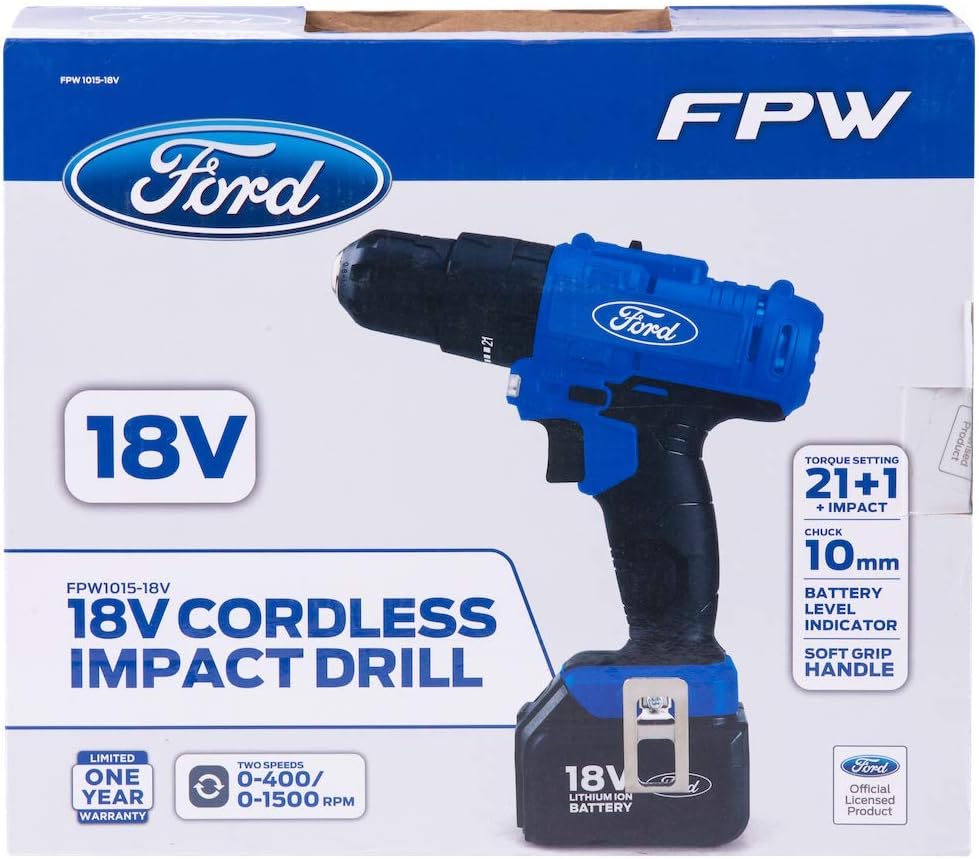
Image: The retail packaging for the Ford 18V Cordless Impact Drill, showing the drill, battery, and charger.
- 1 x Ford 18V Cordless Impact Drill
- 2 x 18V Lithium-Ion Battery Packs
- 1 x Battery Charger
- 1 x Belt Clip
- 1 x Magnetic Bit Holder
- 1 x Instruction Manual
- 1 x BMC (Blow Molded Case) Box
Product Features
The Ford 18V Cordless Impact Drill is engineered for performance and user comfort:
- Lightweight Design: Allows for easy handling and access in confined spaces.
- Comfortable Grip: Ergonomically designed handle for reduced fatigue during prolonged use.
- Variable Speed Trigger: Provides enhanced control for various drilling and fastening applications.
- Integrated LED Work Light: Illuminates the work area for improved visibility in dark conditions.
- High-Performance Motor: Equipped with a powerful motor for fast drilling and strong torque control.
- 21+1 Torque Settings: Offers precise torque adjustment for screwdriving, plus dedicated drill and hammer drill modes.
- 10mm Chuck Capacity: Keyless chuck for quick and easy bit changes.
- Lithium-Ion Battery: Provides consistent power and longer run-time.
- Automatic Spindle Lock: For single-hand bit changes.
- Belt Clip & Magnetic Bit Holder: For convenient storage and accessibility of bits and the tool.
Setup
1. Charging the Battery
Before first use, fully charge the battery pack. The battery can be charged independently or while attached to the drill.
- Connect the charger to a standard power outlet (220-240V ~ 50-60Hz).
- Insert the charger plug into the charging port on the battery pack.
- Allow 5-7 hours for a full charge. The charging indicator light on the charger will show the charging status.
- Once fully charged, disconnect the charger from the battery and the power outlet.
2. Attaching and Removing the Battery Pack
To attach the battery, align the battery pack with the base of the drill handle and slide it in until it clicks securely into place. To remove, press the battery release buttons on the sides of the battery pack and slide it out.
3. Inserting and Removing Drill Bits
The drill features a 10mm keyless chuck for easy bit changes.
- To open the chuck, rotate the front collar of the chuck counter-clockwise until the jaws are wide enough to accept the bit.
- Insert the drill bit or screwdriver bit into the chuck. Ensure the bit is centered.
- To secure the bit, rotate the front collar clockwise until the chuck jaws firmly grip the bit. Hand-tighten for best results.
- To remove the bit, rotate the front collar counter-clockwise.
Video: This video demonstrates the unboxing, battery attachment, and basic handling of the Ford 18V Cordless Impact Drill, including chuck operation.
Operating Instructions
1. Power On/Off and Variable Speed Control
The drill is activated by pressing the trigger switch. The speed is variable; the further the trigger is pressed, the faster the drill operates.
2. Forward/Reverse Rotation
A switch located above the trigger controls the direction of rotation. Push the switch to the left for forward rotation (drilling/tightening) and to the right for reverse rotation (removing screws). Ensure the switch is in the center position to lock the trigger and prevent accidental starting.
3. Torque Settings and Mode Selection
The torque collar allows you to select from 21 torque settings for screwdriving, plus a drill mode and an impact drill mode.
- Torque Settings (1-21): Use lower settings for smaller screws and softer materials, and higher settings for larger screws and harder materials. The clutch will disengage when the set torque is reached, preventing overtightening or stripping.
- Drill Mode (Drill Icon): For general drilling tasks without impact.
- Impact Drill Mode (Hammer Icon): For drilling into masonry or harder materials where impact action is required.
Rotate the torque collar to the desired setting or mode before operating the drill.
4. Gear Selection
A two-speed gear selector is located on top of the drill. Use '1' for lower speed and higher torque (e.g., screwdriving or large diameter drilling) and '2' for higher speed and lower torque (e.g., small diameter drilling).
Maintenance
Regular maintenance ensures optimal performance and extends the life of your tool.
- Cleaning: Keep the ventilation slots clean to prevent overheating. Use a soft, damp cloth to clean the tool casing. Do not use harsh chemicals or abrasive cleaners.
- Battery Care: Store batteries in a cool, dry place away from direct sunlight. Do not store fully discharged batteries for extended periods. Charge them periodically if not in use.
- Chuck Maintenance: Periodically clean the chuck jaws to ensure proper gripping of bits.
- Storage: When not in use, store the drill and its accessories in the BMC box in a dry, secure location out of reach of children.
Troubleshooting
If you encounter issues with your drill, refer to the following common problems and solutions:
| Problem | Possible Cause | Solution |
|---|---|---|
| Drill does not start | Battery not charged or improperly inserted. | Ensure battery is fully charged and securely attached. |
| Loss of power during operation | Battery charge is low. | Recharge the battery pack. |
| Bit slips in chuck | Chuck not tightened sufficiently or bit shank is dirty. | Retighten chuck firmly. Clean bit shank before insertion. |
| Drill overheats | Ventilation slots blocked or prolonged heavy use. | Clean ventilation slots. Allow tool to cool down. Reduce load. |
| Impact function not working | Incorrect mode selected. | Ensure the torque collar is set to the 'Impact Drill' mode. |
Specifications
Technical data for the Ford 18V Cordless Impact Drill FPW1015-18V:
| Feature | Detail |
|---|---|
| Manufacturer | Ford |
| Item Model Number | FPW1015-18V |
| Item Weight | 2.5 Kilograms |
| Product Dimensions | 10.4 x 32.2 x 25.8 cm (Length x Width x Height) |
| Batteries | 2 Lithium-Ion batteries required (included) |
| Battery Cell Type | Lithium-Ion |
| Battery Capacity | 1300 mAh |
| Chuck Size | 10 mm |
| Color | Multi-color (Blue/Black) |
| Material | Metal |
| Power Source Type | Battery Powered |
| Voltage | 18 Volts |
| Maximum Power | 600 Watts |
| Speed | 0-400 / 0-1500 RPM |
| Special Feature | Variable Speed |
Warranty and Support
Your Ford 18V Cordless Impact Drill comes with a manufacturer's warranty. Please refer to the warranty card included in your package for specific terms and conditions. For technical support, spare parts, or warranty claims, please contact your retailer or the official Ford tools service center.
Always ensure you have your model number (FPW1015-18V) and proof of purchase available when contacting support.