
1. Product Overview
The JBL TUNE 110 In-Ear Headphones are designed to deliver JBL Pure Bass Sound in a lightweight, comfortable, and compact form factor. These wired headphones feature 9mm drivers for powerful audio reproduction and include a convenient one-button remote with a built-in microphone for easy control of music playback and calls. The tangle-free flat cable ensures hassle-free use and storage.

Image 1.1: The JBL TUNE 110 In-Ear Headphones in Blue, showcasing their sleek design.
2. What's in the Box
Upon unboxing your JBL TUNE 110 In-Ear Headphones, you should find the following components:
- JBL TUNE 110 In-Ear Headphones
- Multiple sizes of ear tips (typically Small, Medium, Large) to ensure a comfortable and secure fit.
- A carrying pouch for convenient storage and portability.
Video 2.1: An official overview of the JBL TUNE 110 In-Ear Headphones, demonstrating key features and components.
3. Setup
Follow these steps to set up your JBL TUNE 110 In-Ear Headphones:
- Select Ear Tips: Choose the ear tips that provide the most comfortable and secure fit for your ears. A good seal is crucial for optimal sound quality and bass performance. Gently attach them to the earbuds.
- Insert Earbuds: Carefully insert the earbuds into your ear canals. Ensure they are seated snugly.
- Connect to Device: Plug the 3.5mm audio jack into the headphone port of your audio device (smartphone, tablet, laptop, etc.).

Image 3.1: Side view of the JBL TUNE 110 earbud, illustrating its in-ear design.
4. Operating Instructions
The JBL TUNE 110 features a convenient one-button remote for easy control:
- Play/Pause Music: Press the button once to play or pause your music.
- Answer/End Call: Press the button once to answer an incoming call or end an ongoing call.
- Reject Call: Press and hold the button for approximately 2 seconds to reject an incoming call.
- Next Track: Press the button twice quickly to skip to the next track.
- Previous Track: Press the button three times quickly to go back to the previous track.
- Voice Assistant: Press and hold the button for approximately 3 seconds to activate your device's voice assistant (if supported).
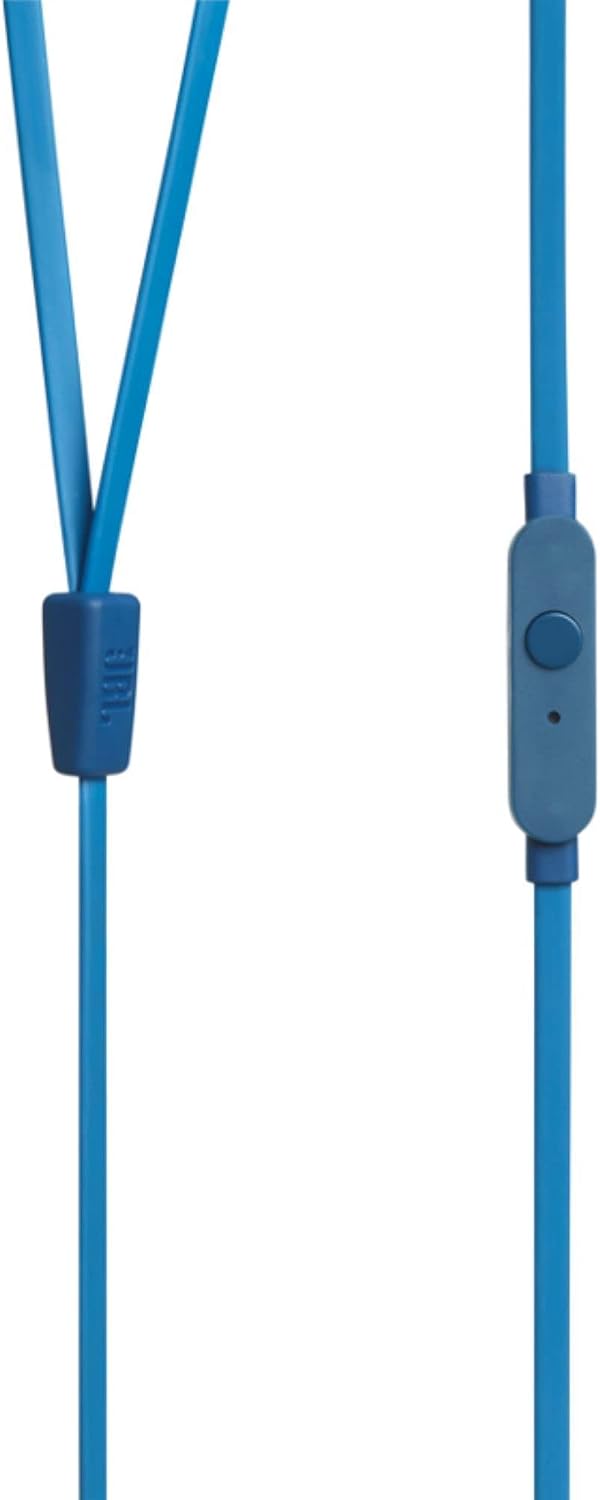
Image 4.1: Close-up of the one-button remote control and built-in microphone on the JBL TUNE 110 cable.
5. Features
- JBL Pure Bass Sound: Experience powerful and clear bass, a signature of JBL audio.
- 9mm Drivers: Equipped with dynamic 9mm drivers for high-quality sound reproduction.
- One-Button Remote with Microphone: Seamlessly manage music playback and hands-free calls.
- Tangle-Free Flat Cable: Designed to prevent tangles, making the headphones easy to store and use.
- Lightweight and Comfortable: Ergonomically designed for extended listening comfort.
- Passive Noise Cancellation: The in-ear design provides a degree of passive noise isolation.
6. Specifications
| Feature | Specification |
|---|---|
| Brand | JBL |
| Model Name | JBL TUNE 110 |
| Model Number | JBLT110BLUAM |
| Connectivity Technology | Wired |
| Headphones Jack | 3.5 mm Jack |
| Driver Size | 9mm Dynamic Driver |
| Impedance | 16 Ohms |
| Noise Control | Passive Noise Cancellation |
| Item Weight | 0.32 ounces (approx. 9 grams) |
| Product Dimensions | 2.36 x 1.18 x 6.89 inches |
| Material | Plastic |
| Color | Blue |
| Cable Feature | Tangle Free |
7. Maintenance
Proper care will extend the life and performance of your headphones:
- Cleaning Ear Tips: Regularly remove the silicone ear tips and wash them with mild soap and water. Ensure they are completely dry before reattaching.
- Cleaning Earbuds: Gently wipe the earbuds with a soft, dry cloth. Avoid using harsh chemicals or abrasive materials.
- Cable Care: Although the cable is tangle-free, avoid excessive pulling or sharp bends to prevent internal damage. When not in use, coil the cable neatly.
- Storage: Store your headphones in the provided carrying pouch to protect them from dust, dirt, and physical damage.
8. Troubleshooting
If you encounter any issues with your JBL TUNE 110 headphones, refer to the following common solutions:
- No Sound:
- Ensure the 3.5mm jack is fully inserted into your device's audio port.
- Check the volume level on your audio device.
- Test the headphones with another audio device to rule out a device-specific issue.
- Poor Sound Quality / Lack of Bass:
- Verify that the ear tips are correctly sized and provide a good seal in your ear canal.
- Ensure the ear tips are clean and free from debris.
- Microphone Not Working:
- Confirm the 3.5mm jack is fully inserted.
- Check your device's audio input settings to ensure the external microphone is selected.
- Test the microphone with another device or application.
9. Warranty and Support
JBL products are manufactured to high standards and undergo rigorous quality control. For detailed warranty information, product registration, and technical support, please visit the official JBL website or contact your local JBL customer service center. Keep your proof of purchase for warranty claims.


