
1. Introduction
The Tiptop Audio Mantis is a versatile Eurorack case designed to house and power your modular synthesizer modules. This manual provides essential information for setting up, operating, and maintaining your Mantis case, ensuring optimal performance and longevity.
2. Product Overview and Features
The Mantis case offers a total of 208HP (2 x 10⁴HP) of space, providing ample room for a wide array of Eurorack modules. Its innovative design includes a sophisticated bracing system and 3-position folding legs, allowing for flexible placement options: flat on a surface, propped at a 45-degree angle, or standing upright.
Key features include:
- 208HP (2 x 10⁴HP) module mounting space.
- 50mm depth to accommodate various module sizes.
- Integrated Zeus Universal Power Supply for reliable power distribution.
- Pre-installed Z-Rails for secure module mounting.
- 3-position folding legs for ergonomic setup.
3. Package Contents
Please verify that all items listed below are present in your package:
- 1 x Tiptop Audio Mantis 2x10⁴HP Eurorack Case
- 1 x Zeus Universal Power Supply (external power brick and cable)
- Z-Rails (pre-installed within the case)
- Folding Legs (pre-installed on the case)
4. Setup
4.1 Unpacking
Carefully remove the Mantis case and its components from the packaging. Retain the packaging for future transport or storage.
4.2 Power Connection
- Connect the external Zeus Universal Power Supply brick to the power input jack on the Mantis case.
- Plug the power supply's AC cable into a suitable wall outlet. Ensure the outlet provides the correct voltage for your region.
- The Mantis case is now ready to power your Eurorack modules.
4.3 Module Installation
Before installing any modules, ensure the Mantis case is powered OFF.
- Identify the Z-Rails within the case. These rails feature threaded strips for mounting modules.
- Align your Eurorack module with the Z-Rails. Carefully connect the module's power ribbon cable to one of the power headers on the Zeus power board. Crucially, ensure the red stripe on the ribbon cable aligns with the -12V pin on the power header. Incorrect orientation can damage your module.
- Once the power cable is connected, gently push the module into place, aligning its mounting holes with the threaded strips on the Z-Rails.
- Secure the module using appropriate M3 screws (typically supplied with your Eurorack modules, not included with the Mantis case). Do not overtighten.
4.4 Positioning the Case
The Mantis case features adjustable folding legs for various ergonomic setups:
- Flat Position: Fold all legs inward for a flat desktop setup.
- 45-Degree Angle: Extend the front legs to prop the case at a comfortable working angle.
- Upright Position: Extend both front and rear legs to stand the case vertically, ideal for a 'wall-of-synth' configuration.
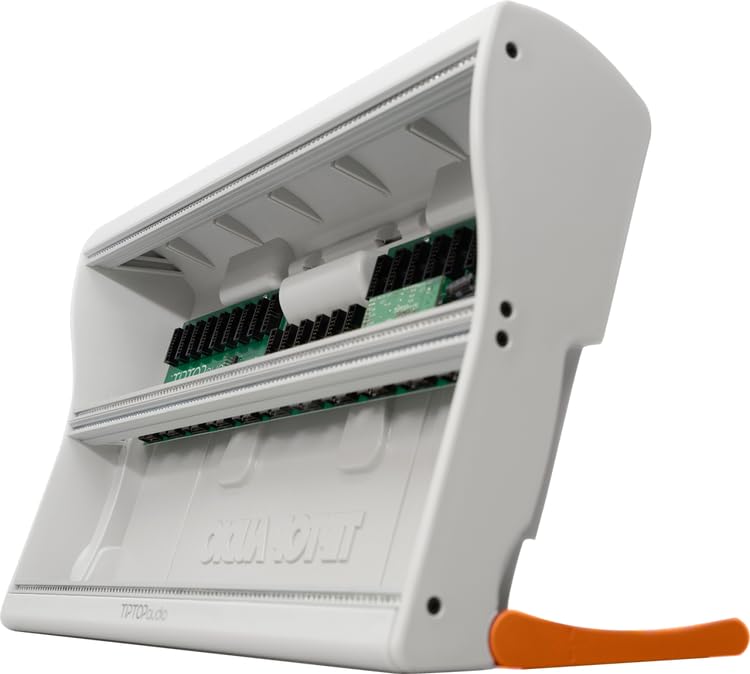
This image shows the Tiptop Audio Mantis Eurorack case, highlighting its compact design and the distinctive orange folding legs that allow for various ergonomic setups.
5. Operating Instructions
The Tiptop Audio Mantis case provides the power and housing for your Eurorack modules. Its operation is primarily dependent on the modules installed.
- After installing all desired modules and securing them, ensure all power ribbon cables are correctly connected.
- Flip the power switch on the Mantis case to the 'ON' position. The power indicator light (if present) should illuminate.
- Refer to the individual user manuals for each installed module for specific operating procedures, patching, and sound generation.
- To power down, flip the power switch to the 'OFF' position. Always power down the case before installing, removing, or re-positioning modules.
6. Maintenance
Proper maintenance ensures the longevity and reliable operation of your Mantis case.
- Cleaning: Use a soft, dry, lint-free cloth to clean the exterior of the case. Avoid abrasive cleaners or solvents.
- Environment: Keep the case in a dry environment, away from direct sunlight, extreme temperatures, and high humidity.
- Connections: Periodically check all power connections (AC cable, power brick to case, module ribbon cables) to ensure they are secure and free from damage.
- Dust: Prevent dust accumulation inside the case, especially around the power supply, as excessive dust can lead to overheating.
7. Troubleshooting
If you encounter issues with your Mantis case, refer to the following troubleshooting steps:
7.1 No Power to Case/Modules
- Check Power Connections: Ensure the AC cable is securely plugged into the wall outlet and the power brick. Verify the power brick is firmly connected to the Mantis case's power input.
- Power Switch: Confirm the power switch on the Mantis case is in the 'ON' position.
- Wall Outlet: Test the wall outlet with another device to ensure it is functioning correctly.
7.2 Module Not Functioning
- Power Ribbon Cable: Power off the case and carefully re-check the module's power ribbon cable connection. Ensure the red stripe on the cable aligns with the -12V pin on both the module and the power board.
- Bent Pins: Inspect the power header pins on both the module and the power board for any bent or damaged pins.
- Module Manual: Consult the specific module's manual for any unique power requirements or troubleshooting steps.
- Test with another module: If possible, try installing a known working module in the same slot to isolate the issue.
7.3 Hum or Noise
- Grounding: Ensure all audio equipment connected to your Eurorack system is properly grounded.
- Cable Quality: Use high-quality, shielded audio cables.
- Power Supply Isolation: Try moving the Mantis case's power supply away from other sensitive audio equipment or power cables to reduce interference.
- Module Placement: Some modules are more sensitive to electromagnetic interference; try re-arranging modules within the case.
8. Specifications
| Attribute | Specification |
|---|---|
| Model Name | Mantis |
| HP Capacity | 208HP (2 x 10⁴HP) |
| Module Depth | 50mm |
| Power Supply | Zeus Universal Power Supply |
| Dimensions (L x W x H) | 26.95 x 14.75 x 6.85 inches (approx.) |
| Item Weight | 9.6 Pounds (approx.) |
| Included Components | Zeus Power Supply, Z-Rails |
9. Warranty and Support
The Tiptop Audio Mantis 2x10⁴HP Eurorack Case is covered by a 2-year warranty from the date of purchase. This warranty covers defects in materials and workmanship under normal use.
For technical support, warranty claims, or further assistance, please contact Tiptop Audio customer service or your authorized dealer. Please have your proof of purchase and the product's serial number available when contacting support.
Contact Information: Please refer to the official Tiptop Audio website for the most current contact details and support resources.
