
Introduction
The Link Dream Bluetooth Earpiece Model RM is designed to provide clear, hands-free communication and audio playback. Featuring advanced noise-cancelling technology and extended battery life, this earpiece offers convenience and reliability for various uses, including driving and professional tasks. It supports connection to multiple devices and is compatible with a wide range of Bluetooth-enabled smartphones and computers.
Key Features
- Advanced Noise Cancellation: Equipped with CSR Stereo Bluetooth Processor and CVC 6.0 noise-cancelling technology for clear audio.
- Extended Battery Life: Up to 24 hours of talk time and 1440 hours of standby time on a single charge.
- Dual Device Connectivity: Connects to two mobile phones or computers simultaneously.
- Lightweight and Adjustable Design: Weighs only 0.35oz (10g) with a 60° adjustable earbud for comfortable wear on either ear.
- Long Connection Range: Maintains a stable connection up to 15 meters (49 feet).
- Mute Function: Supports mute during incoming calls.
What's in the Box
Verify that all items are present in your package:
- Link Dream Bluetooth Earpiece (Model RM)
- USB Charging Cable
- Protective Carrying Case
- Multiple Eartips (various sizes)
- Adjustable Ear Hooks

Image: The Link Dream Bluetooth Earpiece and its included accessories, neatly arranged.
Setup
1. Charging the Earpiece
Before first use, fully charge the earpiece. Connect the provided USB charging cable to the earpiece's charging port and a power source (e.g., computer USB port, wall adapter). The indicator light will show charging status. A full charge typically takes 2-3 hours.

Image: Close-up of the earpiece, highlighting the charging port.
2. Power On/Off
- To Power On: Slide the ON/OFF switch to the 'ON' position. You will hear a voice prompt and the indicator light will flash.
- To Power Off: Slide the ON/OFF switch to the 'OFF' position. You will hear a voice prompt and the indicator light will turn off.

Image: The earpiece with its ON/OFF switch clearly visible.
3. Pairing with a Device
- Ensure the earpiece is fully charged and powered off.
- Slide the ON/OFF switch to 'ON'. The earpiece will automatically enter pairing mode, indicated by alternating red and blue flashing lights.
- On your mobile phone or computer, enable Bluetooth and search for available devices.
- Select "Link Dream RM" from the list of devices.
- Once connected, the indicator light will flash blue slowly, and you will hear a voice prompt confirming the connection.
4. Connecting to Two Devices Simultaneously
The Link Dream Earpiece supports multi-point technology, allowing connection to two devices at once:
- Pair the earpiece with the first device as described above.
- Disable Bluetooth on the first device. The earpiece will re-enter pairing mode.
- Pair the earpiece with the second device.
- Re-enable Bluetooth on the first device. The earpiece should automatically connect to both devices.

Image: Illustration of the earpiece's ability to connect to two devices.
5. Wearing the Earpiece
The earpiece is designed for comfortable wear on either the left or right ear. Adjust the ear hook and earbud for a secure and comfortable fit. Ensure the microphone is positioned towards your mouth for optimal voice clarity.

Image: Visual guide for correctly wearing the earpiece.
Operating Instructions
Call Management
- Answer/End Call: Press the Multi-function Button once.
- Reject Call: Press and hold the Multi-function Button for 2 seconds.
- Mute/Unmute: During a call, press the Volume Down button for 2 seconds.
- Redial Last Number: Double-press the Multi-function Button when not on a call.
Voice Assistant (Siri/Google Assistant)
To activate your device's voice assistant (e.g., Siri for iPhone, Google Assistant for Android), press the Multi-function Button once when not on a call. This allows for voice commands such as making calls or checking information.
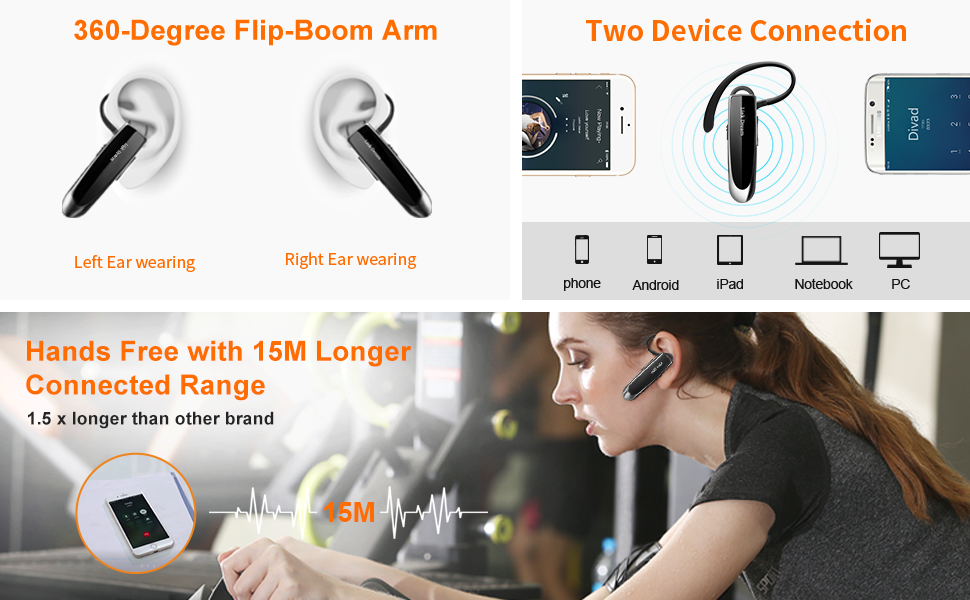
Image: User activating voice assistant for hands-free calling.
Music/Audio Playback
- Play/Pause: Press the Multi-function Button once.
- Next Track: Press and hold the Volume Up button for 2 seconds.
- Previous Track: Press and hold the Volume Down button for 2 seconds.
- Volume Up/Down: Press the Volume Up or Volume Down buttons.
Maintenance
- Cleaning: Use a soft, dry cloth to clean the earpiece. Do not use harsh chemicals or abrasive materials.
- Storage: When not in use, store the earpiece in its protective carrying case to prevent damage.
- Water Resistance: The earpiece is water-resistant, but not waterproof. Avoid submerging it in water or exposing it to heavy rain.
- Battery Care: To prolong battery life, avoid fully discharging the earpiece frequently. Charge it regularly, even if not in constant use.
Troubleshooting
| Problem | Possible Cause | Solution |
|---|---|---|
| Earpiece does not power on. | Low battery. | Charge the earpiece for 2-3 hours. |
| Cannot pair with device. | Bluetooth is off on device; earpiece not in pairing mode; too far from device. | Ensure Bluetooth is enabled. Power off and on the earpiece to enter pairing mode. Keep devices within 1 meter during pairing. |
| Frequent disconnections. | Out of range; interference; low battery. | Stay within 15 meters of the connected device. Avoid strong electromagnetic interference. Recharge the earpiece. |
| Poor sound quality during calls. | Microphone not positioned correctly; environmental noise; weak signal. | Adjust earpiece for optimal microphone placement. Move to a quieter environment. Ensure stable connection. |
| Voice assistant not responding. | Not activated correctly; device's voice assistant not enabled. | Ensure earpiece is connected and press the Multi-function Button once. Check device settings for voice assistant activation. |
Specifications
| Feature | Detail |
|---|---|
| Model Number | RM |
| Brand | Link Dream |
| Connectivity Technology | Wireless (Bluetooth) |
| Bluetooth Version | 4.0 (compatible with V5.0) |
| Bluetooth Range | Up to 15 meters (49 feet) |
| Battery Life (Talk Time) | Up to 24 hours |
| Standby Time | Up to 1440 hours |
| Charging Time | 2-3 hours |
| Noise Control Features | Noise Cancellation (CVC 6.0) |
| Item Weight | 0.41 ounces (10g) |
| Product Dimensions | 2.3 x 0.5 x 0.3 inches |
| Water Resistance Level | Water Resistant |
| Material | Plastic |
| Control Method | Touch, Voice |
Warranty and Support
Link Dream products are designed for durability and performance. We offer the following support for your earpiece:
- 1-Year Warranty: Your product is covered by a 1-year manufacturer's warranty against defects in materials and workmanship.
- 30-Day Return Policy: Enjoy a 30-day refund or replacement policy from the date of purchase.
- Customer Support: For any issues or questions, please contact our customer support team. We aim to provide a quick response within 24 hours.
