
Introduction
Thank you for choosing the IKOHS WIPE PRO Electric Window Cleaner. This device is designed to simplify your daily cleaning tasks, providing efficient and streak-free results on windows, mirrors, and tiles. Please read this manual carefully before first use to ensure proper operation, maintenance, and safety.
Product Components
The IKOHS WIPE PRO package includes the following items:
- IKOHS WIPE PRO Main Unit (Electric Window Vacuum)
- Spray Bottle with Microfiber Cloth Attachment
- Charging Adapter

Figure 1: All included components of the WIPE PRO system.
Important Safety Instructions
Always follow basic safety precautions when using electrical appliances to reduce the risk of fire, electric shock, and personal injury.
- Do not immerse the main unit in water or other liquids.
- Keep the appliance away from children.
- Use only the provided charging adapter.
- Do not operate the device if it is damaged or malfunctioning.
- Ensure the dirty water tank is properly secured before use.
- Do not use the device to vacuum flammable or combustible liquids.
Setup Guide
1. Device Overview
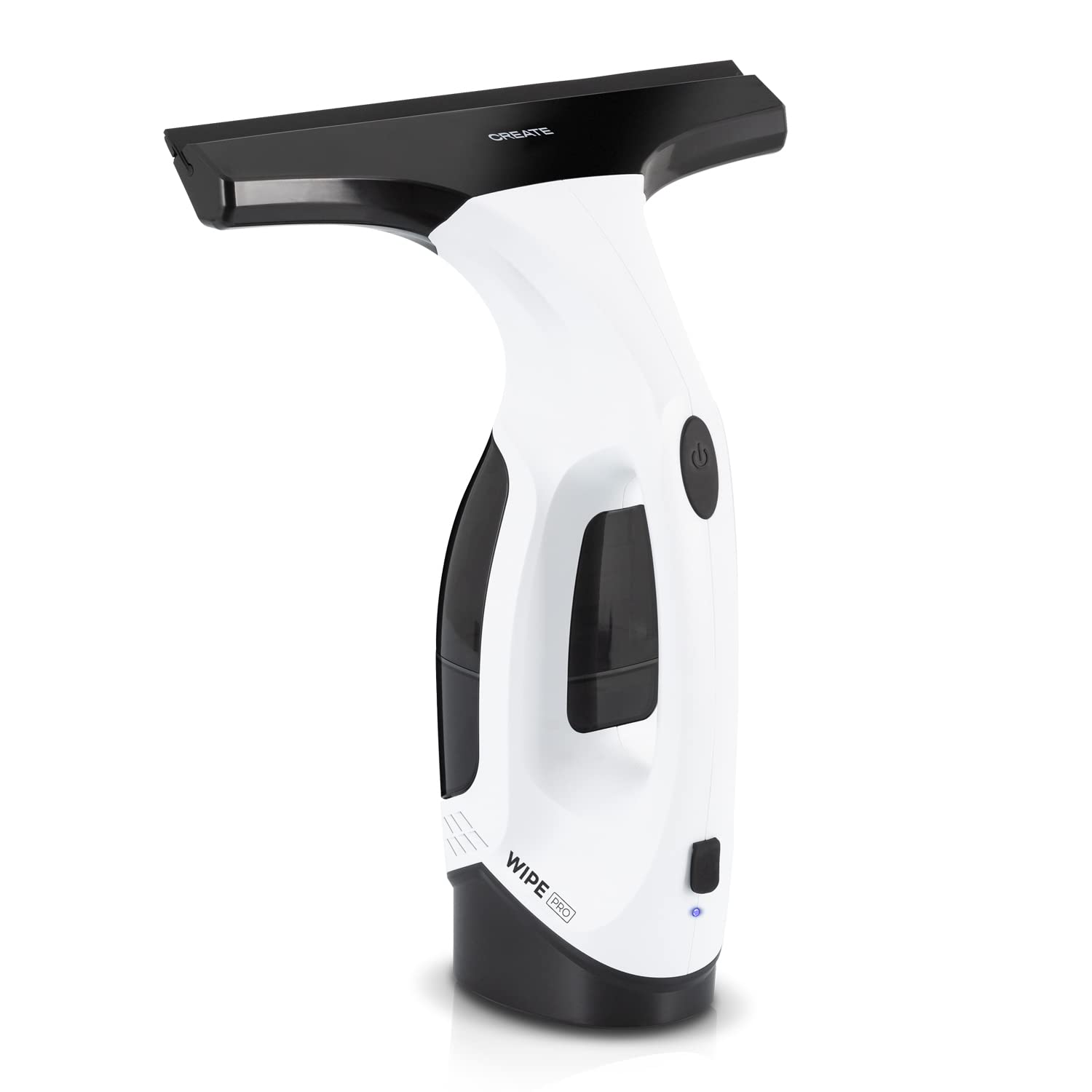
Figure 2: Front view of the WIPE PRO main unit.

Figure 3: Side view, showing the handle and dirty water tank.

Figure 4: Top view, indicating the power button.

Figure 5: Bottom view, illustrating the suction blade.
2. Charging the Device
Before first use, fully charge the WIPE PRO. Connect the charging adapter to the device's charging port and plug it into a power outlet. The charging indicator light will illuminate. A full charge typically takes several hours.

Figure 6: Power button and charging indicator light.
Operating Instructions
1. Preparing the Surface
- Fill the spray bottle with your preferred window cleaning solution and water.
- Attach the microfiber cloth to the spray bottle.
- Spray the cleaning solution onto the surface to be cleaned.
- Use the microfiber cloth to spread the solution evenly and loosen dirt.

Figure 7: Spray bottle with microfiber cloth.
2. Cleaning with the WIPE PRO
- Press the power button on the main unit to turn it on. The suction motor will start.
- Place the rubber suction blade firmly against the top of the wet surface.
- Draw the device downwards in a straight, even motion, allowing the suction to collect the dirty water.
- For best results, overlap each stroke slightly to ensure complete coverage.
- After each stroke, wipe the suction blade with a clean cloth to prevent streaks.
- Once cleaning is complete, press the power button to turn off the device.

Figure 8: Detail of the suction blade.
Care and Maintenance
1. Emptying the Dirty Water Tank
The WIPE PRO has a 200 ml dirty water tank. Empty the tank after each use or when it reaches its maximum capacity.
- Turn off the device.
- Locate the dirty water tank release mechanism (refer to Figure 9).
- Carefully remove the tank and pour out the collected dirty water.
- Rinse the tank with clean water and allow it to air dry before reattaching.

Figure 9: Dirty water tank with release lever.
2. Cleaning the Suction Nozzle
Regularly clean the rubber suction blade and the nozzle opening to ensure optimal performance and prevent streaks.
- Wipe the rubber blade with a damp cloth after each use.
- Remove any debris or residue from the nozzle opening.
3. Storage
Store the WIPE PRO in a cool, dry place, away from direct sunlight and extreme temperatures. Ensure the device is clean and dry before storage.
Troubleshooting Guide
| Problem | Possible Cause | Solution |
|---|---|---|
| Device does not turn on | Battery is discharged | Charge the device fully. |
| Device has low suction power | Dirty water tank is full | Empty the dirty water tank. |
| Suction nozzle is blocked | Clean the suction nozzle and blade. | |
| Leaves streaks on surfaces | Suction blade is dirty or worn | Clean the suction blade. If worn, consider replacing it (if spare parts are available). |
| Too much cleaning solution | Use less cleaning solution or dilute it further. |
Technical Specifications
- Brand: IKOHS
- Model: WIPE PRO
- Dirty Water Tank Capacity: 200 ml
- Item Weight: 1.2 Kilograms
- Package Dimensions: 34.9 x 22.3 x 10.9 cm
- Recommended Surface: Glass
Warranty and Customer Support
For information regarding warranty coverage, spare parts, or customer support, please refer to the warranty card included with your product or visit the official IKOHS website. Keep your proof of purchase for any warranty claims.