
1. Introduction
The Phoncoo MUSTOOL MT8206 is an intelligent 2-in-1 digital oscilloscope and multimeter designed for precise electrical measurements. This device combines the functionality of a digital multimeter with a graphical waveform display, offering versatility for various testing applications. It features high-speed A/D sampling, auto-ranging capabilities, and data storage functions, making it suitable for both professional and educational use.
2. Safety Information
Always adhere to the following safety precautions to prevent personal injury and damage to the instrument:
- Read and understand all instructions before using the device.
- Do not apply voltage or current that exceeds the maximum specified limits for the device. The maximum input for frequency measurement is 380VAC.
- Ensure test leads are in good condition and properly connected before making any measurements.
- Do not use the device if it appears damaged or is operating abnormally.
- Exercise extreme caution when working with live circuits. Always assume circuits are live until proven otherwise.
- Keep hands and fingers behind the probe barriers during measurements.
- Replace batteries promptly when the low battery indicator appears to ensure accurate readings.
- Refer to the CAT II 1000V rating for appropriate measurement categories.
3. Package Contents
Verify that all items listed below are present in your package. If any items are missing or damaged, contact your supplier.
- 1 x MUSTOOL MT8206 Unit
- 1 x Protective Bag
- 1 x Pair of Test Probes
- 1 x English User Manual (this document)
- 1 x Package Box
4. Product Overview
The MT8206 integrates a digital multimeter with an oscilloscope function, featuring a clear HD display and an analog bar display for various measurements.

Figure 4.1: Front view of the MUSTOOL MT8206, showing the display, function dial, and input jacks.
4.1 Key Features
- Analog Bandwidth: ACV/DCV/ACA/DCA 20kHz.
- High-Speed Sampling: 200k A/D sampling rate.
- Display: HD screen with 41-segment analog bar display, 4000 counts auto-range.
- Waveform Display: One-button switch for graphical waveform display during measurement.
- Data Storage: Stores 100 sets of data and 10 waveforms independently.
- Waveform Capture: One-button automatic waveform capture.
- Relative Value Measurement: Effectively eliminates lead resistance, distributed capacitance, or interference signals.
- Measurements: DC/AC voltage/current, resistance, capacitance (0.1nF-100uF and 10mF ranges), frequency/duty cycle, diode/continuity test.
- Frequency Range: 5Hz ~ 5MHz automatic switching range, max input 380VAC.
- Current Measurement: 10A AC and DC current measurement with voltage error protection.
4.2 Physical Layout
The device features a robust casing with a kickstand for convenient viewing. The back panel provides access to the battery compartment.

Figure 4.2: Various views of the MT8206, showing the kickstand and battery compartment.
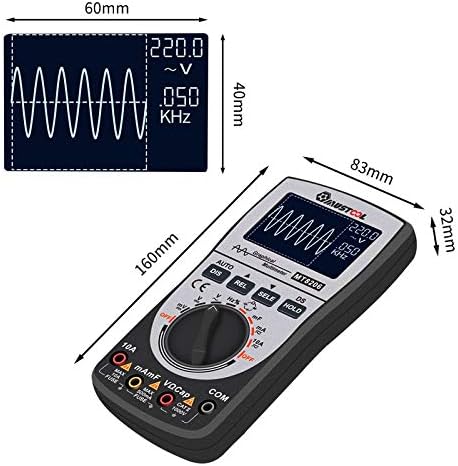
Figure 4.3: Dimensions of the MT8206 unit and its display area.
5. Setup
5.1 Battery Installation
The MT8206 requires batteries for operation (batteries are not included). To install or replace batteries:
- Ensure the device is turned OFF.
- Locate the battery compartment cover on the back of the unit (refer to Figure 4.2).
- Use a screwdriver to open the battery compartment.
- Insert the required batteries, observing correct polarity (+ and -).
- Replace the battery compartment cover and secure it with the screw.
5.2 Connecting Test Probes
Proper connection of test probes is crucial for accurate and safe measurements.
- Always connect the black test lead to the 'COM' (Common) input jack.
- For voltage, resistance, capacitance, frequency, and diode/continuity tests, connect the red test lead to the 'VΩCap' input jack.
- For current measurements up to 500mA, connect the red test lead to the 'mAμF' input jack.
- For high current measurements up to 10A, connect the red test lead to the '10A' input jack.
6. Operating Modes
The MT8206 offers various measurement functions accessible via the central rotary dial and function buttons.
6.1 Multimeter Functions
Rotate the central dial to select the desired measurement function. The device features auto-ranging, but manual range selection may be available via the 'RANGE' button (if present, otherwise 'AUTO' mode is default).
- Voltage (V~ / V-): Measure AC or DC voltage. Select the appropriate setting on the dial.
- Current (A~ / A-): Measure AC or DC current. Ensure the red probe is connected to the correct current input jack (mAμF or 10A).
- Resistance (Ω): Measure electrical resistance.
- Capacitance (Cap): Measure capacitance. The device has two ranges: 0.1nF-100uF for quick small capacitor measurements and a 10mF gear for high capacitance and accuracy.
- Frequency/Duty Cycle (Hz/%): Measure the frequency and duty cycle of a signal.
- Diode Test (→|): Test diodes for forward voltage drop.
- Continuity Test ( ))): Check for continuity in a circuit, indicated by an audible tone.
6.2 Oscilloscope Function (Graphical Waveform Display)
The MT8206 can display graphical waveforms for ACV/DCV/ACA/DCA measurements up to 20kHz.
- Select the desired ACV, DCV, ACA, or DCA function using the rotary dial.
- Press the dedicated button (e.g., 'GRAPH' or 'WAVEFORM' if available, otherwise it's often integrated with the display mode) to switch to the graphical waveform display. The display will show the waveform of the measured signal.
- Use the 'HOLD' button to freeze the current waveform and data on the screen for analysis.
- The device supports one-button automatic waveform capture for ease of use.

Figure 6.1: MT8206 in use, measuring an internal circuit board.
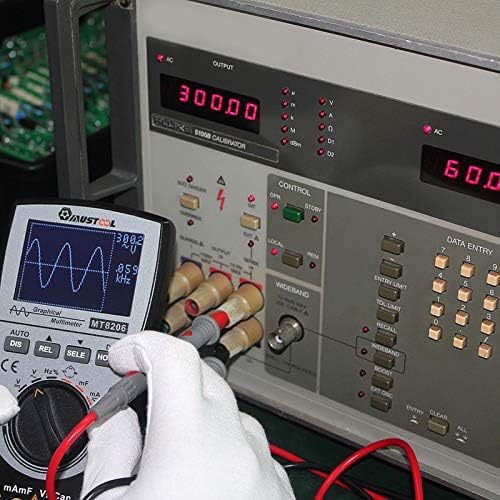
Figure 6.2: MT8206 connected to a calibration device, demonstrating its measurement capabilities.
6.3 Data Storage and Recall
The MT8206 can store up to 100 sets of data and 10 waveforms. Refer to the specific buttons (e.g., 'SAVE', 'RECALL') on the device for these functions. The unique record reading mode allows displaying historical data and real-time measurements on the same screen for comparison.
7. Maintenance
7.1 Cleaning
To clean the device, wipe the case with a damp cloth and a mild detergent. Do not use abrasives or solvents. Ensure the device is powered off and disconnected from all circuits before cleaning.
7.2 Battery Replacement
When the low battery indicator appears on the display, replace the batteries as described in Section 5.1. Remove batteries if the device will not be used for an extended period to prevent leakage.
7.3 Fuse Replacement
The device is protected by internal fuses. If the current measurement function fails, the fuse may need replacement. This procedure should only be performed by qualified personnel. Refer to the specifications for the correct fuse type and rating.
8. Troubleshooting
If the device is not functioning as expected, review the following common issues before seeking professional assistance:
- No Display: Check battery installation and charge level. Replace batteries if necessary.
- Incorrect Readings: Ensure test leads are correctly connected to the appropriate input jacks and the rotary dial is set to the correct function. Verify the circuit under test is within the device's measurement range.
- Current Measurement Failure: Check the fuse. If blown, replace with a fuse of the correct rating.
- Unstable Waveform: Ensure proper probe connection and minimize external interference. Use the 'HOLD' function to capture a stable waveform if possible.
9. Specifications
The following table outlines the general specifications of the Phoncoo MUSTOOL MT8206.
| Specification | Value |
|---|---|
| Brand | Phoncoo |
| Model | MT8206 |
| Measurement Type | Multimeter, Oscilloscope |
| Analog Bandwidth | ACV/DCV/ACA/DCA 20kHz |
| A/D Sampling Rate | 200k high-speed |
| Display Counts | 4000 counts |
| Max Operating Voltage | 380 Volts (for frequency measurement) |
| Current Measurement | Up to 10A AC/DC |
| Capacitance Ranges | 0.1nF-100uF, 10mF |
| Frequency Measurement | 5Hz ~ 5MHz (auto-switching) |
| Power Source | Battery Powered (batteries not included) |
| Color | Black |
| Dimensions | 19.1 x 14.3 x 4.7 cm (Package) |
| Weight | 349 g (Package) |
10. Warranty and Support
For warranty information or technical support, please refer to the documentation provided with your purchase or contact your retailer. Keep your purchase receipt as proof of purchase.