
Sharp SJX-640-BK3
Sharp Side by Side Refrigerator SJX-640-BK3 User Manual
Model: SJX-640-BK3 | Brand: Sharp
1. Important Safety Information
Please read all safety instructions carefully before operating your new Sharp refrigerator. Keep this manual for future reference.
- Ensure the refrigerator is placed on a firm, level surface.
- Do not block ventilation openings in the appliance enclosure or in the built-in structure.
- Do not use mechanical devices or other means to accelerate the defrosting process, other than those recommended by the manufacturer.
- Do not damage the refrigerant circuit.
- Do not use electrical appliances inside the food storage compartments of the appliance, unless they are of the type recommended by the manufacturer.
- Unplug the appliance before cleaning or performing maintenance.
2. Setup and Installation
2.1 Unpacking
Carefully remove all packaging materials, including tape and protective films. Retain packaging for potential future transport.
2.2 Placement
Place the refrigerator in a location with adequate air circulation. Avoid direct sunlight or proximity to heat sources. Ensure sufficient clearance around the appliance for proper ventilation (e.g., 10cm at the back and sides, 30cm at the top).
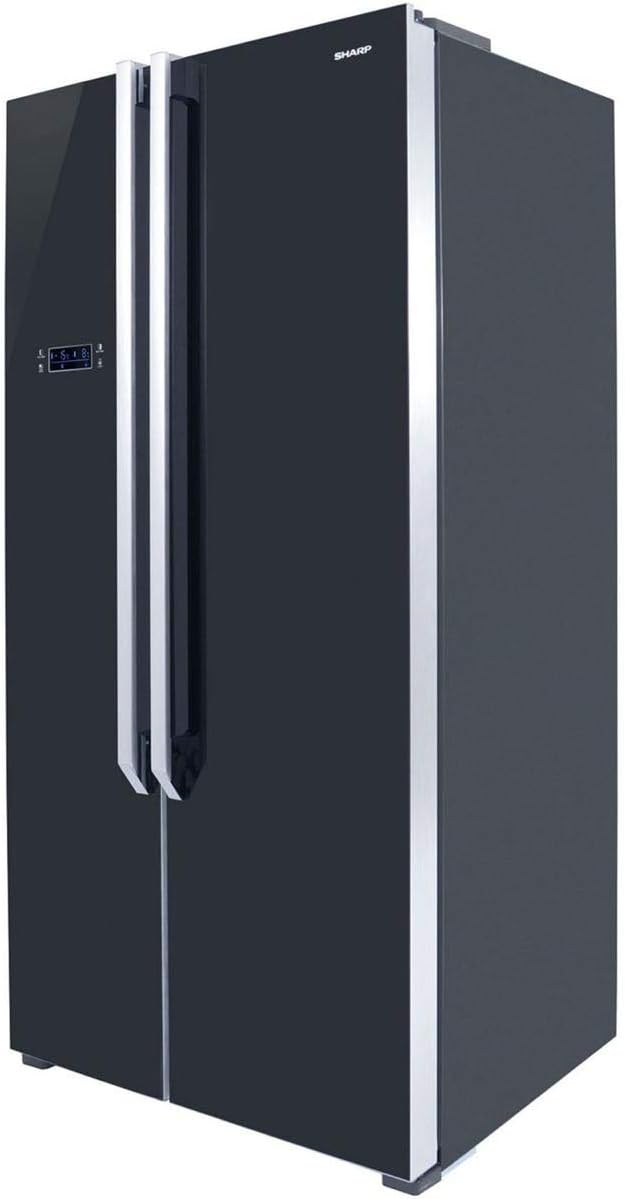
Figure 2.1: Angled view of the Sharp SJX-640-BK3 refrigerator, showing its sleek black glass finish and side profile, important for understanding placement requirements.
2.3 Leveling
Adjust the leveling feet at the bottom of the refrigerator to ensure it is stable and level. This prevents vibrations and ensures proper door sealing.
2.4 Electrical Connection
Connect the refrigerator to a dedicated, grounded electrical outlet. Do not use extension cords or adapters. Allow the refrigerator to stand upright for at least 2-4 hours before plugging it in to allow refrigerants to settle.
3. Operating Instructions
3.1 Control Panel Overview
The Sharp SJX-640-BK3 features a Digital Smart Control panel located on the exterior of the freezer door. This panel allows you to adjust temperatures and access various functions.

Figure 3.1: Front view of the Sharp SJX-640-BK3 refrigerator, highlighting the external Digital Smart Control panel on the left door.
3.2 Temperature Settings
Use the control panel to set the desired temperature for both the refrigerator and freezer compartments. The Digital Smart Control senses when warm food is stored and adjusts cooling accordingly.
3.3 Magic Cool Zone
The Magic Cool Zone compartment offers flexible temperature control for specific items. Select from the following modes:
- Fresh: Ideal for general produce and dairy.
- Vegetable: Optimized for keeping vegetables crisp and fresh.
- Fish: Maintains a lower temperature suitable for fresh fish.
- Meat: Provides optimal conditions for storing fresh meat.
3.4 Special Features
- Xpress Can Chiller: A dedicated compartment designed to rapidly chill beverages.
- Spill-Proof Shelves: Tempered glass shelves with raised edges to contain accidental spills and prevent liquids from dripping to lower shelves.
- Temperature Alarm: Alerts you if the internal temperature fluctuates significantly, helping to preserve food freshness.
- Door Alarm: Sounds an alert if a refrigerator door is left open for an extended period.
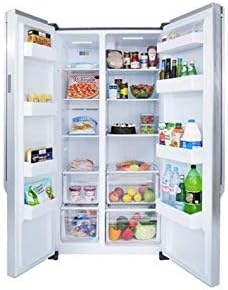
Figure 3.2: Interior view of the Sharp SJX-640-BK3 refrigerator, showcasing the spacious compartments, spill-proof glass shelves, and storage bins.
4. Maintenance and Cleaning
4.1 Interior Cleaning
Regularly clean the interior with a mild detergent and warm water. Wipe dry with a soft cloth. Remove shelves and drawers for thorough cleaning as needed. Do not use abrasive cleaners or solvents.
4.2 Exterior Cleaning
Wipe the exterior surfaces, including the black glass finish, with a soft, damp cloth. For stubborn marks, use a mild glass cleaner. Avoid harsh chemicals that may damage the finish.
4.3 Door Seals
Clean the door seals regularly to ensure a tight seal. A dirty or damaged seal can lead to inefficient cooling.
4.4 Automatic Defrost
This refrigerator features an automatic defrost system, eliminating the need for manual defrosting of the freezer compartment.
5. Troubleshooting
Before contacting service, please check the following common issues and solutions:
| Problem | Possible Cause | Solution |
|---|---|---|
| Refrigerator not cooling | Power supply issue, temperature setting too high, door not closed properly. | Check power plug, adjust temperature, ensure doors are fully closed. |
| Unusual noises | Refrigerator not level, items vibrating inside, normal compressor sounds. | Level the appliance, rearrange items, normal operation sounds are expected. |
| Door alarm sounds frequently | Door not fully closed, obstruction, faulty sensor. | Ensure nothing blocks the door, check door seals, close door firmly. |
| Water on floor | Drain tube clogged, excessive humidity. | Clear drain tube (refer to service manual if needed), ensure proper ventilation. |
6. Specifications
Technical specifications for the Sharp SJX-640-BK3 Side by Side Refrigerator:
| Feature | Detail |
|---|---|
| Brand Name | Sharp |
| Model Info | SJX-640-BK3 |
| Product Dimensions | 70 x 90 x 178 cm |
| Capacity | 24 Cubic Feet (640 Liters) |
| Freezer Capacity | 24 Cubic Feet (shared total capacity) |
| Installation Type | Freestanding |
| Form Factor | Side By Side |
| Special Features | Compact, Digital Smart Control, Magic Cool Zone, Xpress Can Chiller, Spill-Proof Shelves, Temperature Alarm, Door Alarm |
| Color | Black |
| Defrost | Automatic |
| Door Hinges | Side by Side |
| Door Material Type | Glass |
| Shelf Type | Glass |
| Material Type | Metal |
| Shipping Weight | 110 kg |
| Date First Available | 10 March 2019 |
7. Warranty and Support
For detailed warranty information, please refer to the warranty card included with your product or visit the official Sharp website. For technical support or service inquiries, please contact Sharp customer service through their official channels.
You can visit the official Sharp store on Amazon for more products and information: Sharp Store
Ask a question about this manual
Ask about setup, troubleshooting, compatibility, parts, safety, or missing instructions. Manuals+ will review the question and use this page’s manual context to help answer it.