
1. Introduction
This manual provides instructions for the UBay EN3R39H replacement remote control, designed for use with various Hisense LCD LED 4K Smart TV models. This remote offers direct functionality without the need for programming, operating immediately upon battery installation.
2. Setup
2.1 Battery Installation
- Locate the battery compartment on the back of the remote control.
- Slide the battery cover downwards or in the direction indicated by an arrow to open it.
- Insert two (2) AAA batteries, ensuring the positive (+) and negative (-) terminals align correctly with the markings inside the compartment.
- Replace the battery cover by sliding it back into position until it clicks securely.
Note: Batteries are not included with the remote control.
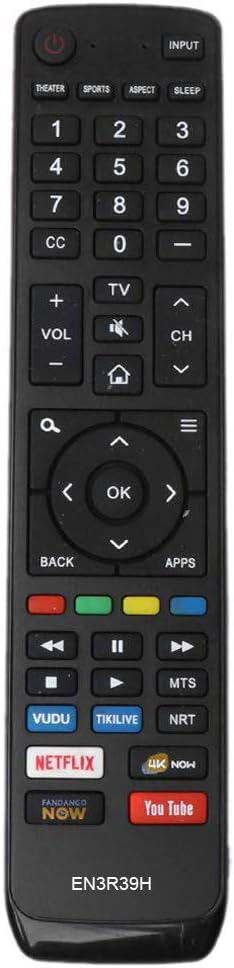
Image 1: Front view of the UBay EN3R39H remote control. This image displays the full layout of buttons, including power, input, number pad, volume, channel, navigation, and dedicated app buttons for Netflix, YouTube, Vudu, and others.
3. Operating Instructions
The UBay EN3R39H remote control is designed for intuitive operation. Point the remote directly at your Hisense TV for optimal performance.
3.1 Key Button Functions
- Power (⑁): Turns the TV on or off.
- Input: Cycles through available input sources (HDMI, AV, etc.).
- Theater / Sports / Aspect / Sleep: Quick access buttons for specific TV modes or functions.
- Number Pad (0-9): Direct channel selection.
- CC (Closed Caption): Toggles closed captions on or off.
- VOL (+/-): Adjusts the volume level.
- Mute (🔇): Mutes or unmutes the TV audio.
- CH (▲/▼): Changes TV channels up or down.
- Home (🏠): Accesses the TV's main smart hub or home screen.
- Navigation Pad (▲▼◄►) & OK: Navigates menus and confirms selections.
- Back: Returns to the previous menu or screen.
- Apps: Opens the applications menu.
- Color Buttons (Red, Green, Yellow, Blue): Functionality varies by TV model and on-screen prompts.
- Media Playback Controls (Rewind, Play/Pause, Fast Forward, Stop): Controls media playback.
- Dedicated App Buttons (Netflix, YouTube, Vudu, Tikilive, MTS, NRT, 4K Now, Fandango Now): Provides direct access to these streaming services.

Image 2: Angled view of the UBay EN3R39H remote control, highlighting its ergonomic design and the placement of the dedicated streaming service buttons.
4. Compatibility
The UBay EN3R39H remote control is compatible with a range of Hisense LCD LED 4K Smart TV models, including but not limited to:
- 49H6E, 60H6E, 49H6E1, 60H6E1
- 49H6020E, 60H6020E, 49H6030E, 60H6030E
- 49H6040E, 60H6040E, 49H6050E, 60H6050E
- 49H6070E, 60H6070E, 49H6080E, 60H6080E
- 60EU6070, 49H6508, 49H7508
- 60H6408, 60H7408
- 43H6080E, 43H6E, 50H6E, 55EU6070
- 55H6E, 55H8E, 55H9D, 65H6E, 65H8E
5. Maintenance
To ensure the longevity and optimal performance of your remote control, follow these maintenance guidelines:
- Cleaning: Wipe the remote with a soft, dry cloth. Avoid using liquid cleaners or abrasive materials.
- Battery Care: Replace batteries when the remote's response becomes sluggish. Remove batteries if the remote will not be used for an extended period to prevent leakage.
- Storage: Store the remote in a cool, dry place, away from direct sunlight and extreme temperatures.
- Avoid Drops: Protect the remote from physical impact, as drops can damage internal components.
6. Troubleshooting
If you encounter issues with your UBay EN3R39H remote control, refer to the following common solutions:
- Remote Not Responding:
- Ensure batteries are inserted correctly with the correct polarity.
- Replace old batteries with new AAA batteries.
- Check for any obstructions between the remote and the TV's infrared sensor.
- Confirm the remote is pointed directly at the TV.
- Specific Buttons Not Working:
- Clean around the unresponsive button to ensure no debris is preventing its movement.
- If multiple buttons are affected, try replacing the batteries.
- TV Not Responding to Remote:
- Verify that your TV model is listed in the compatibility section.
- Ensure the TV's power is on and it is not in a standby mode that disables remote input.
7. Specifications
| Brand | UBay |
| Model Number | EN3R39H |
| Product Dimensions | 8.5 x 1.8 x 0.75 inches |
| Item Weight | 3.98 ounces |
| Power Source | 2 x AAA Batteries (not included) |
| Color | Black |
| Special Feature | Ergonomic Design |
| Compatible Devices | Television |
8. Warranty and Support
For any questions, technical assistance, or warranty inquiries regarding your UBay EN3R39H remote control, please contact the seller or manufacturer directly through your purchase platform. Please refer to your purchase documentation for specific warranty terms and contact information.