
TELESIN TELESIN Diving Goggles B07PGX3R9J
TELESIN Diving Goggles User Manual
Brand: TELESIN
Model: TELESIN Diving Goggles B07PGX3R9J
1. Introduction
The TELESIN Diving Goggles are designed to enhance your underwater experience, offering clear vision and the convenience of mounting an action camera directly to the mask. This manual provides essential information for the proper setup, operation, maintenance, and troubleshooting of your diving goggles.
These goggles feature high waterproof performance, tempered glass lenses for clear underwater vision, and a comfortable, super-soft silicone skirt and strap for a flexible and secure fit. They are ideal for snorkeling, scuba diving, and capturing underwater footage with compatible action cameras.
2. Product Overview
2.1 Package Contents
Upon opening the package, please ensure all the following items are present:
- 1 x TELESIN Diving Glasses
- 1 x Screw (for camera attachment)
- 1 x Carry Case
2.2 Key Features
- Great Compatibility: Compatible with a wide range of action cameras including GoPro Max, Hero series (13, 12, 11, 10, 9, 8, 7, 2018, 6, 5 Black, 5 Session, 4 Session, 4, 3+, 3, 2, 1), Fusion, SJCAM, Dazzne P2, Insta360 One R/RS/X2/X3/GO2/GO3/Ace Pro, EKEN, DJI Osmo Action, DJI Action 3/4/5 Pro, and most other sport cameras.
- Innovative Design: Features a highly waterproof design for free diving experiences.
- High Quality Material: Constructed from earthquake-resistant tempered glass and comfortable, super-soft silicone. Resistant to water, flow, impact, and pressure.
- Clear Vision: Tempered glass lenses with anti-fog treatment provide clear underwater visibility.
- Detachable Mount: Integrated mount allows for easy attachment and removal of action cameras for underwater photography. Can also be used as ordinary diving glasses when the mount is removed.

Figure 2.2.1: Front view of the TELESIN Diving Goggles, showcasing the dual tempered glass lenses and soft silicone skirt.
3. Setup Guide
3.1 Initial Preparation
Before first use, it is recommended to clean the inside of the lenses to prevent fogging. Apply a small amount of non-abrasive toothpaste (not gel) to the dry lenses and gently rub with your finger or a soft cloth. Rinse thoroughly with fresh water. This process helps remove any manufacturing residue that can cause fogging.
3.2 Attaching Your Action Camera
- Locate the integrated camera mount at the top of the goggles.
- Align your action camera's mounting bracket with the mount on the goggles.
- Insert the provided screw through the camera bracket and the goggles' mount.
- Tighten the screw securely to ensure the camera is firmly attached and stable. Do not overtighten.

Figure 3.2.1: TELESIN Diving Goggles with an action camera securely attached to the integrated mount.
3.3 Adjusting the Strap
The silicone strap is adjustable to fit various head sizes. To adjust, pull the ends of the strap through the buckles on either side of the mask until a comfortable and snug fit is achieved. The mask should create a light seal on your face without being too tight, which can cause discomfort or leaks.
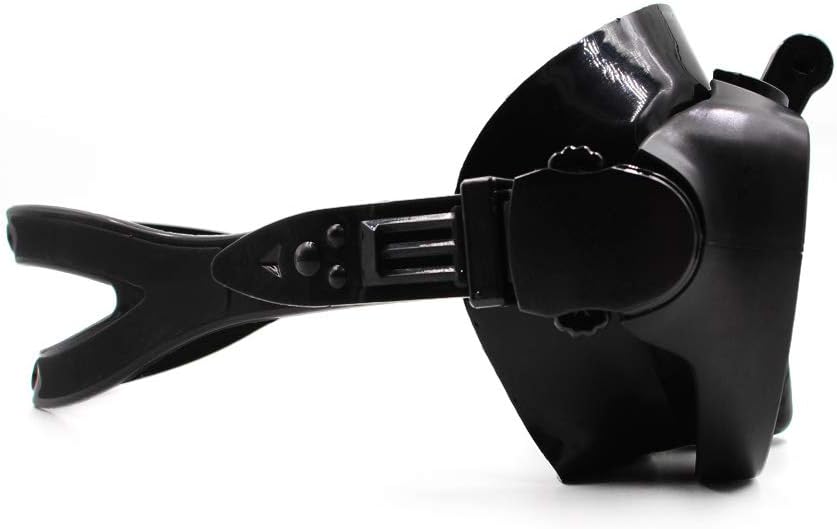
Figure 3.3.1: Side view of the goggles illustrating the adjustable strap mechanism for a customized fit.
4. Operation
4.1 Using the Goggles Underwater
Before entering the water, ensure the mask forms a good seal on your face. Place the mask on your face and inhale gently through your nose; the mask should suction to your face. If it does not, adjust the strap or reposition the mask. Once in the water, breathe normally. If water enters the mask, gently press the top of the mask against your forehead and exhale through your nose to clear the water.
4.2 Underwater Photography and Videography
With your action camera securely mounted, you can capture hands-free footage of your underwater adventures. Ensure your camera's settings are appropriate for underwater use (e.g., white balance, resolution). Periodically check the camera's angle to ensure you are capturing the desired view, as the weight of the camera can sometimes affect the mask's position slightly.
5. Maintenance and Care
5.1 Cleaning After Use
After each use, especially in saltwater, rinse your goggles thoroughly with fresh, clean water. This helps remove salt, chlorine, and other residues that can degrade the silicone and lenses over time. Avoid using harsh chemicals, abrasive cleaners, or solvents, as these can damage the materials and anti-fog coating.
5.2 Storage
Store your TELESIN Diving Goggles in the provided carry case when not in use. This protects the lenses from scratches and the silicone from dust and direct sunlight, which can cause discoloration and deterioration. Store in a cool, dry place away from extreme temperatures.

Figure 5.2.1: The TELESIN Diving Goggles neatly stored within their protective zippered carry case.
6. Troubleshooting
6.1 Common Issues and Solutions
- Fogging Lenses:
Even with anti-fog treatment, fogging can occur due to temperature differences or residue. Ensure initial cleaning (Section 3.1) is performed. Before each use, apply a commercial anti-fog solution or a small amount of baby shampoo diluted with water to the inside of the lenses, then rinse lightly. Some users find that rubbing a small amount of saliva on the lenses before rinsing also helps.
- Water Leaks into Mask:
Leaks are typically caused by an improper seal. Check the following:
- Ensure no hair is caught under the silicone skirt.
- Adjust the strap for a snug but not overly tight fit.
- Make sure the mask is centered on your face and not crooked.
- Facial hair (e.g., mustaches) can sometimes break the seal. Consider applying a thin layer of petroleum jelly to the area where the mask meets facial hair to improve the seal.
- Camera Angle Issues:
If your camera footage shows too much water surface or sky, adjust the camera's tilt angle on the mount. Ensure the screw is tightened sufficiently to prevent the camera from shifting during movement.
7. Technical Specifications
| Specification | Detail |
|---|---|
| Brand | TELESIN |
| Model | B07PGX3R9J |
| Item Weight | 0.34 Kilograms |
| Age Range (Description) | Adult |
| Frame Material | Plastic |
| Number of Windows | 2 |
| Strap Type | Adjustable |
| UPC | 705346347436 |
| Item Package Dimensions L x W x H | 9.06 x 5.31 x 3.94 inches |
| Package Weight | 0.34 Kilograms |
| Number of Items | 1 |
| Material | Silicone |
| Color | Black |
| Sport | Snorkeling, Scuba Diving, Swimming |
| Lens Type | Dual Lens |
8. Warranty and Support
Information regarding product warranty and customer support is not available in this manual. Please refer to the product packaging or the retailer's website for details on warranty coverage and how to contact customer service for support.
Ask a question about this manual
Ask about setup, troubleshooting, compatibility, parts, safety, or missing instructions. Manuals+ will review the question and use this page’s manual context to help answer it.