
1. Introduction
Thank you for choosing the Wiltec Airbrush Extraction System, Model 34278. This system is designed to provide a clean and safe working environment by effectively removing paint mist and fumes generated during airbrushing and other hobby activities. With its powerful dual fans, integrated LED lighting, and easy-to-use design, it is an essential tool for any enthusiast or professional.

Image 1.1: The Wiltec Airbrush Extraction System in operation, demonstrating its use for model painting.
2. Safety Instructions
Please read all safety instructions carefully before operating the device. Failure to follow these instructions may result in electric shock, fire, or serious injury.
- Ensure the power supply voltage matches the specifications of the unit.
- Do not operate the unit with a damaged power cord or plug.
- Keep the unit away from water and do not operate in wet conditions.
- Always use the unit in a well-ventilated area, even with the extraction system.
- Do not block the air intake or exhaust vents during operation.
- Regularly clean or replace the filter to maintain optimal performance and safety.
- Keep children and pets away from the operating unit.
- Disconnect power before cleaning or performing any maintenance.
- This unit is designed for hobby and light professional use. Do not use for industrial applications.
3. Package Contents
Verify that all components are present and undamaged upon unpacking.
- Wiltec Airbrush Extraction System Main Unit
- Flexible Exhaust Hose with Flat Nozzle
- Turntable
- Filter (pre-installed or separate)
- Power Adapter
- Instruction Manual

Image 3.1: Examples of items that can be painted using the extraction system, highlighting its broad application.
4. Setup Instructions
The Wiltec Airbrush Extraction System is designed for quick and easy assembly.
- Unfold the Main Unit: Carefully unfold the side panels of the extraction system until they lock into place, forming the booth structure. The foldable design allows for compact storage and quick deployment.
- Install the Filter: Ensure the blue filter is correctly positioned in the designated slot at the back of the booth. This filter is crucial for capturing paint particles and fumes.
- Attach the Exhaust Hose: Connect the flexible exhaust hose to the outlet port on the back of the main unit. Extend the hose and position the flat nozzle outside a window or into a suitable ventilation system to direct fumes away from your workspace. The hose length is adjustable from 0.7 m to 1.7 m.
- Place the Turntable: Position the included turntable inside the booth. This allows for easy rotation of your workpiece during painting.
- Connect Power: Plug the power adapter into the unit and then into a suitable electrical outlet.

Image 4.1: The flexible exhaust hose can be easily positioned in window or door openings for effective ventilation.
5. Operating Instructions
Follow these steps for optimal performance and safety during operation.
- Power On: Once assembled and connected to power, turn on the unit using the power switch.
- Adjust Fan Speed: Use the rotary knob to adjust the fan speed. The dual fans provide a powerful airflow of 9 m³/min, effectively drawing paint mist and fumes through the filter and out the exhaust hose.
- Activate LED Lighting: If your model includes LED lighting, activate it to illuminate your workspace. The bright LEDs ensure clear visibility for detailed work.
- Position Workpiece: Place your item on the turntable inside the booth. Rotate the turntable as needed to access all sides of your workpiece without touching it.
- Begin Airbrushing: Start your airbrushing or painting task. The system will continuously extract airborne particles and fumes.
- Power Off: After completing your work, turn off the unit and disconnect it from the power supply.

Image 5.1: The powerful dual fans provide 9 m³/min airflow, with a noise level of 53 dB, controlled by the rotary knob.

Image 5.2: Bright LED lights effectively illuminate the work area, complemented by a practical rotating turntable.
6. Maintenance
Regular maintenance ensures the longevity and efficient operation of your extraction system.
- Filter Cleaning/Replacement: The blue filter absorbs paint particles and should be cleaned or replaced regularly depending on usage. To clean, gently tap out loose particles or rinse with water if the filter material allows (ensure it's completely dry before re-installation). Replace the filter when it becomes heavily clogged or damaged.
- General Cleaning: Wipe down the interior and exterior surfaces of the booth with a damp cloth. Avoid using harsh chemicals or abrasive cleaners that could damage the plastic.
- Storage: When not in use, the unit can be folded for compact storage. Ensure it is clean and dry before storing.
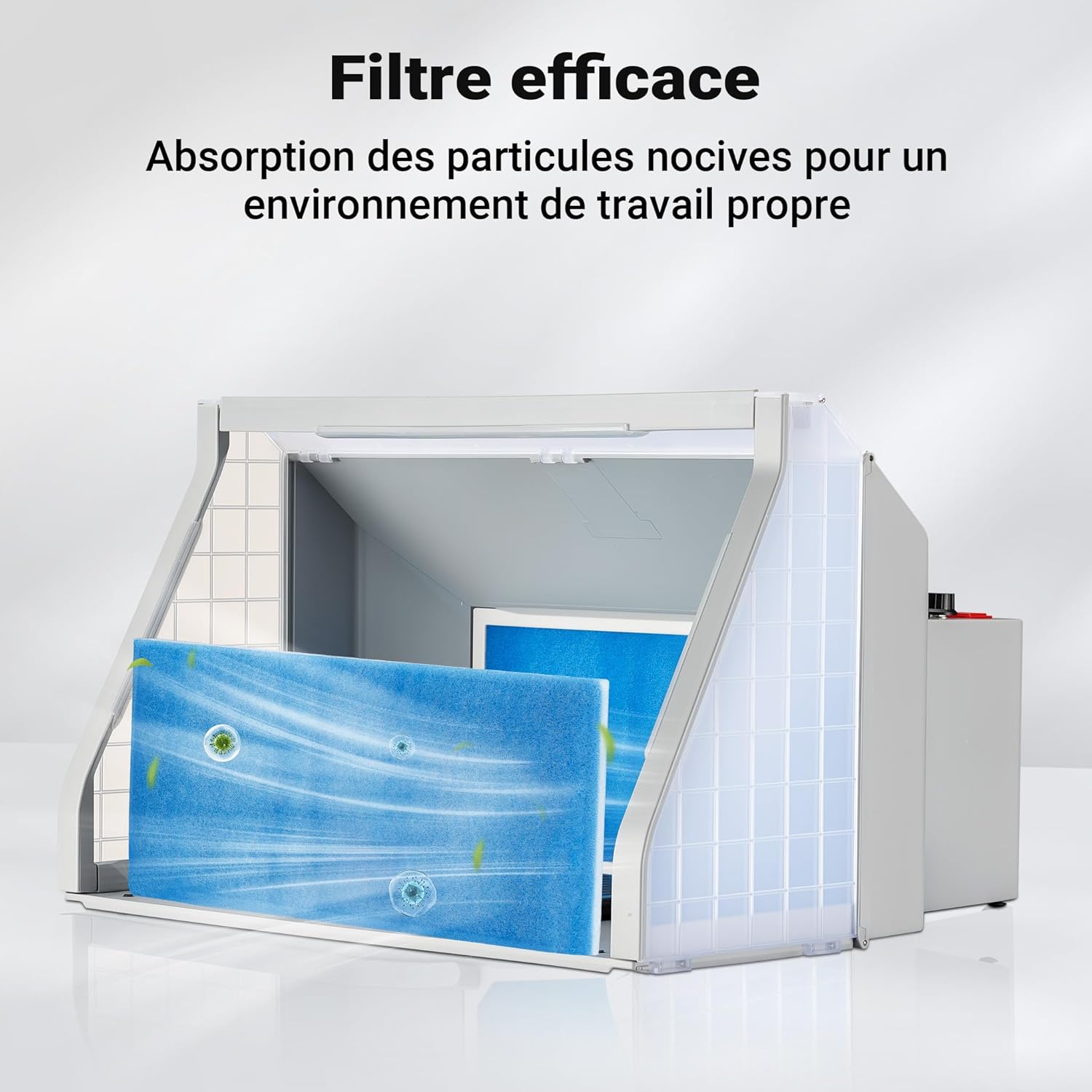
Image 6.1: The efficient filter system absorbs harmful particles, contributing to a clean and safe workspace.
7. Troubleshooting
| Problem | Possible Cause | Solution |
|---|---|---|
| Unit does not power on. | No power supply; power switch off; damaged power cord. | Check power connection; ensure switch is ON; inspect power cord for damage. |
| Low suction power. | Clogged filter; blocked exhaust hose; fan speed too low. | Clean or replace filter; clear any obstructions in the hose; increase fan speed. |
| LED lights not working. | Lights switched off; faulty LED component. | Ensure LED switch is ON; contact support if issue persists. |
| Excessive noise. | Obstruction in fan; unit not stable on surface. | Check for foreign objects near the fan; ensure unit is placed on a flat, stable surface. |
8. Specifications
| Feature | Detail |
|---|---|
| Brand | WilTec |
| Model Number | 34278 |
| Power | 110 Watts |
| Voltage | 12 Volts |
| Airflow | 9 m³/min |
| Noise Level | 56 / 65 / 79 dB (depending on speed) |
| Item Weight | 5.26 Kilograms |
| Color | Grey |
| Package Dimensions | 60.7 x 38.3 x 33.2 cm |
| Exhaust Hose Length | Adjustable 0.7 m to 1.7 m |
| Country of Origin | China |

Image 8.1: Detailed product dimensions for the extraction system and its exhaust hose.
9. Warranty and Support
Information regarding spare parts availability is not explicitly provided. For warranty claims, technical support, or inquiries about spare parts, please contact your retailer or the official Wiltec customer service. Keep your purchase receipt as proof of purchase.
You can visit the Wiltec store for more products and information: Wiltec Store

