
1. Introduction
This manual provides essential information for the proper installation, operation, and maintenance of your Wathai 120mm x 25mm 12V DC Cooling Fan. Please read this manual thoroughly before using the product to ensure optimal performance and longevity.
2. Product Overview
The Wathai 120mm x 25mm 12V DC Cooling Fan is designed for high-performance cooling in various electronic applications. It features a 2-pin XH2.54 connector and operates at 12 volts, providing efficient airflow with a low noise level.
Key Features:
- High Performance: Rated Voltage: 12V 0.15A; Speed: 2000RPM; Air flow: 66.7CFM; Noise: 28dBA.
- Durable Construction: Features a sleeve bearing for a life expectancy of 35,000 hours.
- Versatile Applications: Suitable for cooling computer cases, RV refrigerators, ice machines, power supplies, amplifiers, drive towers, dehumidifiers, space heaters, grow tents, wine coolers, electric boats, portable dryers, and other audio/video electronics.
- Standard Dimensions: 120mm(L) x 120mm(W) x 25mm(H) / 4.72x4.72x1 inch.
- Easy Connectivity: Equipped with an XH2.54-2Pin connector and a 28cm (11 inches) cable length.

Image: Two Wathai 120mm DC cooling fans with protective metal grilles.

Image: Wathai 120mm DC fan shown with various application examples including a laser engraver, RV refrigerator, ice maker, and amplifier.
3. Safety Information
- Ensure the power supply matches the fan's rated voltage (12V DC).
- Do not obstruct the fan blades during operation.
- Keep fingers and loose objects away from rotating blades.
- Disconnect power before installation or maintenance.
- Avoid exposing the fan to excessive moisture or extreme temperatures beyond its operating range (-10 to 75 °C).
4. Package Contents
Verify that all items are present in the package:
- 2 x 120mm DC Cooling Fans
- 2 x Fan Grills
- 8 x Mounting Screws & Nuts

Image: Contents of the fan package, including two fans, two grilles, and mounting hardware.
5. Specifications
| Feature | Detail |
|---|---|
| Model Number | 12025s12v2p2.5high |
| Dimensions | 120mm x 120mm x 25mm (4.72"L x 4.72"W x 1"H) |
| Rated Voltage | 12 Volts DC |
| Rated Current | 0.15A |
| Wattage | 1.8 watts |
| Speed | 2000 RPM |
| Air Flow | 66.7 CFM |
| Noise Level | 28 dBA |
| Bearing Type | Sleeve Bearing |
| Life Expectancy | 35,000 hours |
| Power Connector | 2-Pin XH2.54 |
| Cable Length | 28 cm (11 inches) |
| Material | Plastic |
| Operating Temperature | -10 to 75 °C |
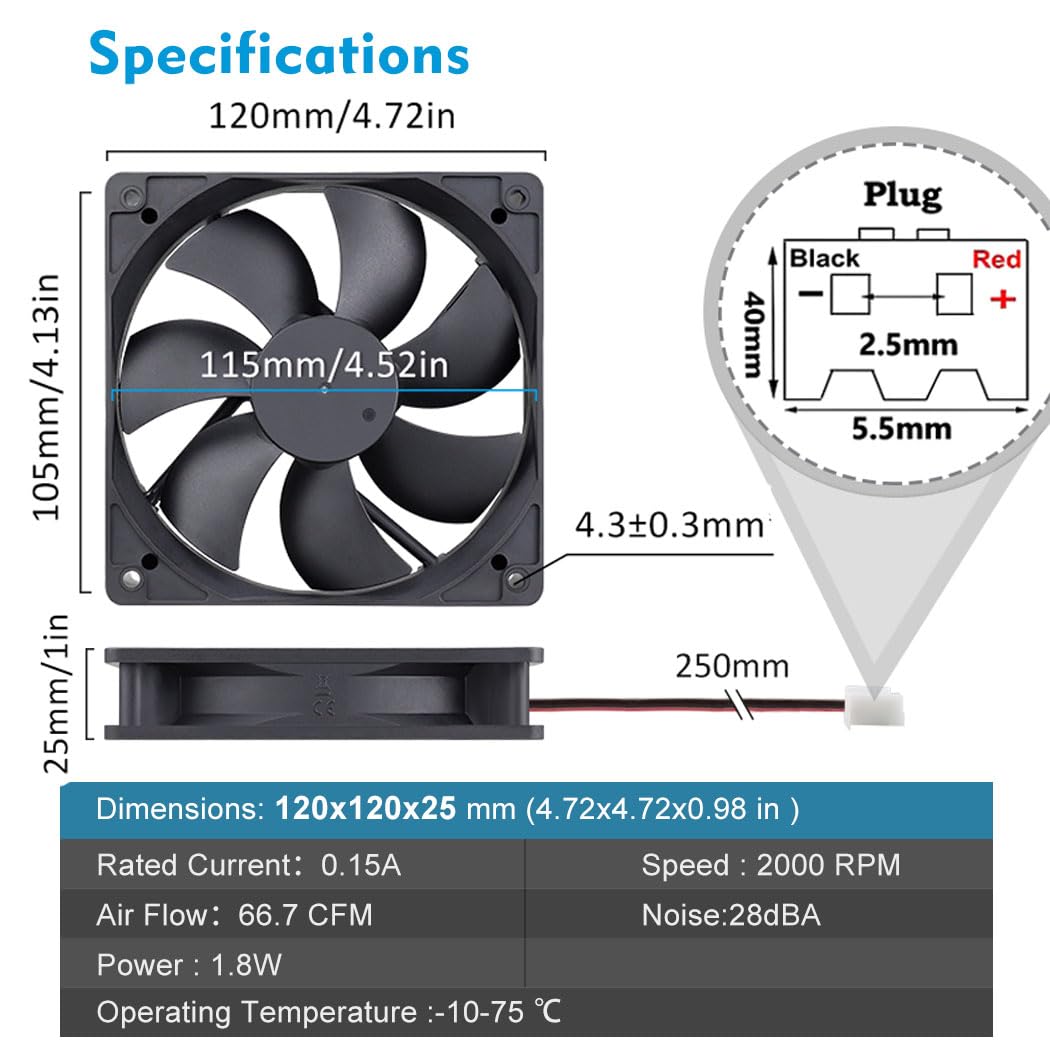
Image: Detailed diagram showing the dimensions of the 120mm fan and the pinout for the XH2.54-2Pin connector.
6. Setup
Follow these general steps for installing your Wathai 120mm DC Cooling Fan:
- Identify Mounting Location: Choose a suitable location for the fan, such as a computer case, electronic enclosure, or appliance requiring ventilation. Ensure there is adequate space for airflow.
- Prepare Mounting Surface: If installing in an enclosure, ensure the opening matches the fan's dimensions (120mm x 120mm).
- Mount the Fan: Use the provided mounting screws and nuts to secure the fan in place. Attach the fan grill to the intake or exhaust side as desired for protection.
- Connect Power: Connect the fan's 2-pin XH2.54 connector to a compatible 12V DC power source. The red wire is positive (+), and the black wire is negative (-). Ensure correct polarity.
- Secure Wiring: Route the cable safely to prevent it from interfering with other components or moving parts.

Image: Example installation of Wathai 120mm DC fans within a computer case, illustrating airflow paths.

Image: A Wathai 120mm DC fan positioned next to an open 12V power supply unit, indicating its use as a replacement or additional cooling component.
Video: A demonstration of the Wathai 120mm DC fan in operation, highlighting its suitability for DIY cooling projects.
7. Operating Instructions
Once properly installed and connected to a 12V DC power source, the fan will begin to operate. The fan is designed for continuous operation. Ensure the fan blades are free from obstructions to maintain optimal airflow and prevent damage.

Image: A visual representation of the rapid cooling airflow produced by the Wathai 120mm fan operating at 2000 RPM.
Video: A demonstration of the 12V cooling fan in action, suitable for various DIY projects.
Video: A short preview demonstrating the 120mm 25mm 2-pin 12V fan in operation.
8. Maintenance
Regular maintenance helps ensure the fan's longevity and efficient operation:
- Cleaning: Periodically clean the fan blades and grill to remove dust and debris. Use a soft brush or compressed air. Ensure power is disconnected before cleaning.
- Inspection: Check for any signs of wear or damage to the fan blades, housing, or power cable.
- Bearing Care: As this fan uses a sleeve bearing, it is generally maintenance-free. Avoid applying lubricants unless specifically recommended by the manufacturer.
Video: A demonstration of a fan with variable speed control, useful for understanding fan operation and maintenance.
9. Troubleshooting
If you encounter issues with your Wathai cooling fan, refer to the following common problems and solutions:
- Fan Not Spinning:
- Check if the fan is properly connected to the 12V DC power source.
- Verify the power source is active and providing 12V DC.
- Ensure the red wire is connected to positive (+) and the black wire to negative (-).
- Inspect for any obstructions preventing the blades from rotating.
- Excessive Noise:
- Check for loose mounting screws or vibrations.
- Ensure no cables or objects are touching the fan blades.
- Clean any dust or debris from the blades and housing.
- Low Airflow:
- Ensure the fan is installed with the correct airflow direction for your application.
- Clean any dust or obstructions from the fan blades and surrounding area.
- Verify the power supply is providing sufficient voltage (12V DC).
10. Warranty and Support
For warranty information or technical support, please refer to the contact details provided with your purchase or visit the official Wathai website. Keep your purchase receipt as proof of purchase.