
SV3C B08POE-5MPL-A
SV3C POE IP Camera Outdoor 5MP Security Camera User Manual
Model: B08POE-5MPL-A
Brand: SV3C
Introduction
This manual provides comprehensive instructions for the installation, operation, and maintenance of your SV3C POE IP Camera. Designed for outdoor surveillance, this 5-megapixel camera offers high-resolution video, motion detection alerts, night vision capabilities, and a durable metal shell with waterproof construction. Please read this manual thoroughly before using the product to ensure proper setup and optimal performance.

Figure 1: SV3C POE IP Camera - Front View
Safety Information
- Ensure the camera is installed in a stable location to prevent falling.
- Use only the specified power adapter or a compatible Power over Ethernet (POE) source.
- Do not expose the camera to extreme temperatures or corrosive environments.
- Avoid direct exposure of the lens to strong light sources, as this may damage the sensor.
- Disconnect power before performing any maintenance or cleaning.
- Keep out of reach of children.
Package Contents
Please verify that all items listed below are included in your package:
- 1 x SV3C IP POE Camera
- 1 x Network Cable (Ethernet)
- 1 x Screw Pack (for mounting)
- 1 x Power Adapter
- 1 x Waterproof Lid
- 1 x Quick Start Guide
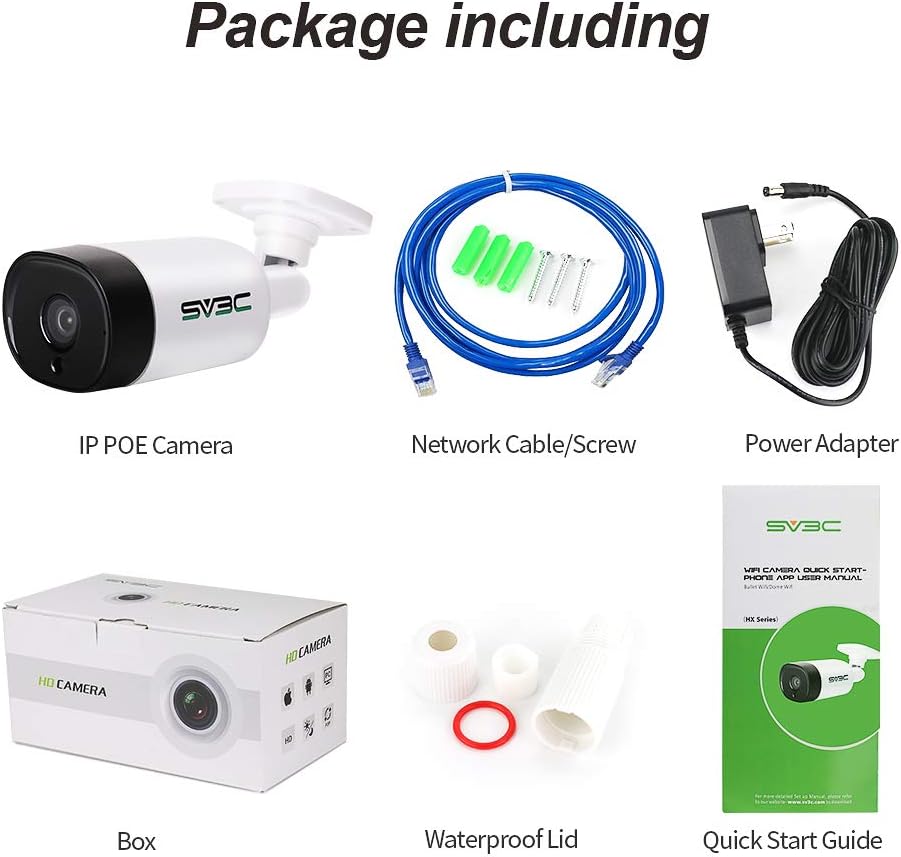
Figure 2: Included items in the product package.
Product Overview
The SV3C POE IP Camera features a robust design suitable for outdoor environments. Key components are detailed below:

Figure 3: Labeled components of the SV3C POE IP Camera.
- Aluminum Case: Provides durable protection against environmental elements.
- HD 3.6mm Lens: Captures high-definition video.
- IR Lens Light: Infrared LEDs for night vision illumination.
- Sensor: Detects light levels and captures image data.
- DC Port: For connecting the included power adapter (optional, if not using POE).
- POE Port: Ethernet port for Power over Ethernet connectivity, providing both power and data.
Setup
1. Physical Installation
- Choose a Location: Select an outdoor location that provides the desired viewing angle and is within range of your network and power source (if not using POE). The camera is designed for wall mounting.
- Mounting: Use the included screws and bracket to securely mount the camera to a wall or suitable surface. Ensure the mounting surface is strong enough to support the camera's weight.
- Adjust Angle: Loosen the adjustment screws on the camera bracket to set the desired viewing angle. Tighten the screws once the angle is set.
2. Connectivity
The camera supports Power over Ethernet (POE) for simplified installation, requiring only one Ethernet cable for both power and data. Alternatively, it can be powered via the DC port.
- POE Connection: Connect one end of an Ethernet cable to the camera's POE port and the other end to a POE-enabled switch or POE injector.
- DC Power (Alternative): If not using POE, connect the included power adapter to the camera's DC port and plug it into a power outlet. Then, connect an Ethernet cable from the camera's POE port to your network router or switch.
- Network Configuration: The camera is ONVIF conformant and can be integrated with various NVR systems or PC clients. For initial setup, it is recommended to connect the camera to your network and use the provided software or app.
3. Software and App Installation
The SV3C camera supports the Danale APP for mobile devices and a PC Client for desktop access. Refer to the Quick Start Guide for detailed instructions on downloading and configuring these applications to view and manage your camera.
Operating Instructions
Video Recording and Resolution
The camera captures video at a resolution of up to 5 Megapixels (2592 x 1944). You can adjust the resolution and frame rate (up to 15fps) through the camera's web interface or the associated software/app to suit your storage and bandwidth needs.
Night Vision
The camera is equipped with infrared (IR) LEDs for automatic night vision, providing clear surveillance even in low-light or no-light conditions up to 100 feet. It automatically switches between day (color) and night (black and white IR) modes based on ambient light.

Figure 4: Comparison of Day (color) and IR Night Vision (black and white) modes.
Motion Detection and Alerts
Configure motion detection zones and sensitivity settings via the camera's interface. When motion is detected, the camera can trigger alerts (e.g., push notifications to your phone) and initiate video recording, which can be stored locally or in the cloud.

Figure 5: Smart Motion Detection Alarm with APP alerts and video recording storage.
Remote Access and Cloud Storage
Access your camera's live feed and recorded footage remotely using the Danale APP or PC Client. The camera supports cloud storage options for secure off-site backup of your video recordings.
One-Way Audio
The camera features one-way audio, allowing you to listen to the environment around the camera through the monitoring application.
Maintenance
Regular maintenance ensures the longevity and optimal performance of your camera.
- Cleaning: Gently wipe the camera lens and body with a soft, damp cloth. Do not use harsh chemicals or abrasive cleaners.
- Waterproof Design: The camera boasts an IP66 waterproof rating, protecting it from dust and powerful water jets. However, avoid submerging the camera in water.
- Firmware Updates: Periodically check the manufacturer's website for firmware updates to ensure your camera has the latest features and security enhancements.

Figure 6: The camera's IP66 rating ensures protection against harsh weather conditions.
Troubleshooting
| Problem | Possible Cause | Solution |
|---|---|---|
| No image/video feed. | No power; network connectivity issue; incorrect IP address. | Check power connection (POE or DC adapter). Verify Ethernet cable connection. Ensure camera is on the same network as your viewing device. Use IP scanner tool to find camera IP. |
| Poor image quality at night. | IR lights obstructed; reflective surfaces nearby; dirty lens. | Ensure IR lights are not blocked. Reposition camera to avoid reflections. Clean the camera lens. |
| Motion detection not working or too sensitive. | Incorrect sensitivity settings; detection zone not configured. | Adjust motion detection sensitivity in the camera settings. Define or refine motion detection zones to exclude irrelevant areas. |
| Cannot connect to Danale APP. | Incorrect network settings; app not updated; firewall issues. | Ensure your mobile device has internet access. Verify camera's network connection. Update the Danale APP to the latest version. Check router/firewall settings if blocking camera communication. |
Specifications
| Feature | Detail |
|---|---|
| Model | B08POE-5MPL-A |
| Resolution | 5 Megapixels (2592 x 1944) |
| Sensor Type | 1/3" 5MP CMOS sensor |
| Lens | 3.6mm HD Lens |
| Viewing Angle | 87 Degrees |
| Frame Rate | Up to 15 frames per second |
| POE Standard | 802.3af, 48V |
| Weatherproof Rating | IP66 |
| Audio | One-Way Audio |
| Power Source | DC 12V 1A or POE |
| Night Vision Range | 100 Feet |
| Connectivity Protocol | ONVIF |
| Material | Metal |
| Dimensions (L x W x H) | 7.09 x 3.15 x 3.15 inches |
| Item Weight | 1.35 pounds |
Warranty and Support
SV3C provides lifetime technology support for this product. For any technical assistance, troubleshooting, or warranty inquiries, please contact SV3C customer support through their official website or the contact information provided in your product packaging.
Please retain your purchase receipt for warranty purposes.