
Introduction
This manual provides essential instructions for the setup, operation, and maintenance of your Panasonic KX-TG273SK Link2Cell Bluetooth Cordless Phone System. This system includes a base unit with an answering machine and three cordless handsets, offering features such as Link2Cell Bluetooth connectivity and Voice Assist.
1. Setup
1.1 Unpacking and Components
Carefully unpack all items. Ensure the following components are present:
- Main Base Unit
- Three Cordless Handsets
- AC Adapter for Base Unit
- Two Charging Cradles with AC Adapters
- Six AAA-sized Rechargeable Batteries
- Telephone Line Cord
1.2 Battery Installation
For each handset:
- Open the battery compartment cover on the back of the handset.
- Insert two AAA rechargeable batteries, observing the correct polarity (+ and -).
- Close the battery compartment cover.
- Place the handset on its charging cradle or the main base unit to charge for at least 7 hours before initial use.
1.3 Base Unit Connection
Connect the main base unit as follows:
- Connect the AC adapter to the base unit and plug it into a standard electrical outlet.
- Connect the telephone line cord to the base unit and plug the other end into your telephone wall jack.
1.4 Bluetooth (Link2Cell) Pairing
To connect your mobile phone via Bluetooth:
- On the base unit, press and hold the CELL button until the Bluetooth indicator flashes.
- On your mobile phone, enable Bluetooth and search for available devices.
- Select the Panasonic phone system (e.g., "KX-TG273SK") from the list.
- If prompted, enter the PIN (usually "0000") on your mobile phone.
- Once paired, the Bluetooth indicator on the base unit will glow steadily.
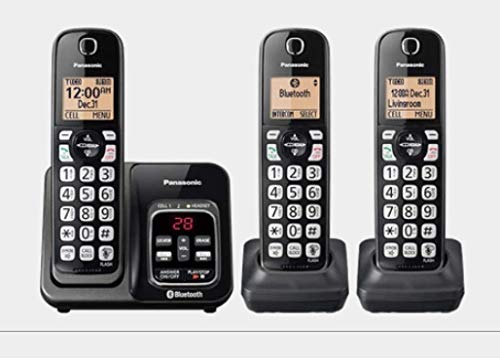
Image: The Panasonic KX-TG273SK cordless phone system, showing one handset docked in the main base unit. The base unit features controls for the answering machine and Bluetooth connectivity. The handset has a backlit display and large, illuminated buttons.
2. Operating Instructions
2.1 Making and Receiving Calls
To Make a Call:
- Lift a handset from its cradle or press the TALK button.
- Dial the desired phone number.
- Press TALK again if you dialed before lifting the handset.
To Receive a Call:
- When the phone rings, press the TALK button on any handset.
2.2 Answering Machine
The system features a digital answering machine with approximately 15 minutes of recording capacity.
- Turning On/Off: Press the ANSWER ON/OFF button on the base unit.
- Playing Messages: Press the PLAY/STOP button on the base unit.
- Erasing Messages: During message playback, press the ERASE button on the base unit.
2.3 Call Blocking
To block unwanted calls, use the CALL BLOCK button on the handset. Refer to the detailed menu options on the handset for specific blocking procedures.
2.4 Volume Control
During a call, use the VOL + and VOL - buttons on the handset or base unit to adjust the earpiece or speaker volume.
2.5 Speakerphone
To activate the speakerphone function during a call, press the SPEAKERPHONE button on the handset. Press it again to return to handset mode.
3. Maintenance
3.1 Cleaning
Wipe the phone and base unit with a soft, dry cloth. Avoid using liquid cleaners or abrasive materials, as these can damage the surfaces.
3.2 Battery Care
To ensure optimal battery life:
- Always use the provided rechargeable AAA batteries.
- Return handsets to their charging cradles when not in use.
- If the phone will be unused for an extended period, remove the batteries.
4. Troubleshooting
If you encounter issues with your phone system, try the following solutions:
| Problem | Solution |
|---|---|
| No dial tone | Ensure the telephone line cord is securely connected to both the base unit and the wall jack. Check if the AC adapter is properly connected to the base unit and power outlet. |
| Handset not charging | Verify the handset is correctly seated in the charging cradle. Ensure the charging cradle's AC adapter is plugged in. Check that the batteries are inserted with correct polarity. If issues persist, consider replacing the rechargeable AAA batteries. |
| Poor sound quality | Move closer to the base unit. Check for interference from other electronic devices. Ensure the telephone line cord is not damaged. |
| Bluetooth pairing failure | Ensure your mobile phone's Bluetooth is enabled and discoverable. Make sure the Panasonic phone system is in pairing mode. Try restarting both devices. |
5. Specifications
- Brand: Panasonic
- Model Number: KX-TG273SK
- Telephone Type: Cordless
- Color: Black
- Number of Handsets: 3
- Batteries: 6 AAA rechargeable batteries (2 per handset)
- Answering System Type: Digital
- Recording Capacity: 15 Minutes
- Phone Talk Time: 10 Hours
- Caller ID: Yes
- Compatible Devices: PSTN, Bluetooth-enabled devices
- Material: Plastic
6. Warranty and Support
Your Panasonic KX-TG273SK phone system is covered by a manufacturer's warranty. For specific warranty details, please refer to the warranty card included with your product or visit the official Panasonic support website. For technical assistance or further inquiries, please contact Panasonic customer support.