
Fanimation MAD7912BBN
Fanimation Levon Custom DC Motor Ceiling Fan
User Manual
Model: MAD7912BBN
Introduction
This manual provides detailed instructions for the safe installation, operation, and maintenance of your Fanimation Levon Custom DC Motor Ceiling Fan, model MAD7912BBN. The Levon Custom series offers a versatile design with various optional blade and finish combinations, allowing for a personalized aesthetic. This fan is designed for indoor use and features a DC motor for efficient performance, along with Wi-Fi compatibility and fanSync Bluetooth for modern control options.
Safety Information
Please read and understand all instructions before beginning installation. Failure to follow these instructions could result in electric shock, fire, or personal injury.
- Ensure the installation site is structurally sound and can support the fan's weight (approximately 19 pounds).
- All electrical connections must be made in accordance with local codes, ordinances, and the National Electric Code (NEC). If you are unfamiliar with electrical wiring, consult a qualified electrician.
- Disconnect power at the main circuit breaker before attempting any installation or maintenance.
- Do not operate the fan with a damaged power cord or plug.
- Keep hands, hair, and clothing away from moving fan blades.
- This fan is designed for indoor use only.
Package Contents
Carefully unpack all components and ensure you have received all items listed below. If any parts are missing or damaged, contact Fanimation customer support immediately.
- DC Motor Assembly (Fanimation Levon Custom)
- Mounting Bracket
- Downrod
- Canopy
- Hardware Pack (screws, washers, wire nuts)
- fanSync Bluetooth Receiver
- Instruction Manual
- Note: Fan blades and optional LED Light Kit are sold separately.
Setup and Installation
Installation of the Fanimation Levon Custom ceiling fan requires basic electrical knowledge. If you are unsure about any steps, please consult a qualified electrician.
1. Prepare the Installation Site
Ensure the electrical box is securely mounted to the building structure and is rated for fan support. The fan requires a 120V AC power supply.
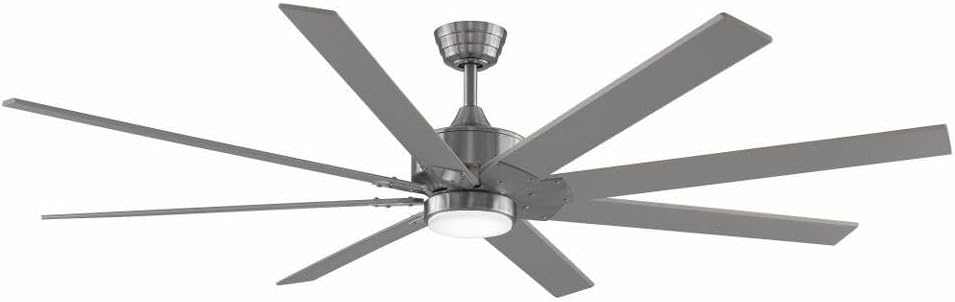
Figure 1: Assembled Fanimation Levon Custom DC Motor Ceiling Fan. This image shows the complete fan unit, including the motor housing, downrod, and a set of eight fan blades (sold separately), all in a brushed nickel finish.
2. Mount the Bracket and Downrod
Attach the mounting bracket to the electrical box. Secure the downrod to the fan motor assembly, ensuring all pins and screws are tightened.
3. Electrical Connections
Connect the fan's electrical wires to the household wiring according to the wiring diagram provided in the separate detailed installation guide. Ensure proper grounding. The fanSync Bluetooth receiver should be wired in line as per instructions for remote and smart control functionality.

Figure 2: Side view of the Fanimation Levon Custom DC Motor Ceiling Fan. This perspective highlights the sleek profile of the motor housing and the angle of the fan blades, demonstrating its modern design.
4. Attach Fan Blades and Light Kit (Optional)
Securely attach the fan blades (sold separately) to the motor housing. If installing the optional LED light kit (sold separately), follow its specific installation instructions.

Figure 3: Close-up view of the Fanimation Levon Custom DC Motor Ceiling Fan's central housing. This image focuses on the brushed nickel finish of the motor unit and the integrated light fixture, which is part of the optional LED light kit.
Operating Instructions
Your Fanimation Levon Custom fan can be controlled via the included fanSync Bluetooth remote or through a compatible Wi-Fi enabled smart device (with required controls sold separately).
- Power On/Off: Use the designated button on your remote or smart device interface to turn the fan on or off.
- Speed Control: The fan offers 3 distinct power levels. Adjust the fan speed using the speed control buttons on your remote or the slider/buttons in your smart application.
- Light Control (if applicable): If an optional LED light kit is installed, use the light control buttons on your remote or smart device to turn the light on/off and adjust brightness (if dimmable).
- Wi-Fi Connectivity: For Wi-Fi control, ensure you have the necessary Wi-Fi compatible controls and follow their specific pairing instructions to connect your fan to your home network.
Maintenance
Regular maintenance will ensure the longevity and optimal performance of your ceiling fan.
- Cleaning: To clean the fan, wipe with a soft, damp cloth. Do not use abrasive cleaners or solvents, as these may damage the finish or blades.
- Blade Inspection: Periodically check the blade attachments for tightness. Loose blades can cause wobbling and noise.
- Motor Lubrication: The DC motor is permanently lubricated and does not require additional oiling.
- Electrical Connections: Annually inspect all electrical connections for any signs of wear or loosening. Ensure power is disconnected before inspection.
Troubleshooting
If you experience issues with your Fanimation Levon Custom ceiling fan, refer to the following common problems and solutions:
| Problem | Possible Cause | Solution |
|---|---|---|
| Fan does not start | No power to the fan; Loose wire connections; Remote control battery low. | Check circuit breaker and wall switch. Ensure all wire connections are secure. Replace remote control batteries. |
| Fan wobbles | Loose blade screws; Unbalanced blades; Loose mounting bracket. | Tighten all blade screws. Use a balancing kit (not included) to balance blades. Ensure mounting bracket is securely fastened. |
| Noisy operation | Loose screws; Motor hum; Blades hitting an obstruction. | Check and tighten all screws. A slight motor hum is normal for DC motors. Ensure nothing is obstructing the blade path. |
| Remote control not working | Low battery; Not paired correctly; Obstruction between remote and receiver. | Replace batteries. Refer to fanSync pairing instructions. Ensure clear line of sight. |
Specifications
Detailed technical specifications for the Fanimation Levon Custom DC Motor Ceiling Fan (Model MAD7912BBN).
| Brand | Fanimation |
| Model Name | Levon Custom DC Motor - BN |
| Model Number | MAD7912BBN |
| Color | Brushed Nickel |
| Electric Fan Design | Ceiling Fan |
| Power Source | Corded Electric |
| Special Feature | Wi-Fi Enabled (with separate controls) |
| Finish Type | Finished |
| Air Flow Capacity | 8244 CFPH |
| Voltage | 120.0 V |
| Item Weight | 18.96 pounds (approx. 8.6 kg) |
| Product Dimensions | 52 x 52 x 15.58 inches (approx. 132 x 132 x 39.6 cm) |
| Indoor/Outdoor Usage | Indoor |
| Blade Material | Plastic (if purchased separately) |
| Number of Power Levels | 3 |
| UPC | 840506087224 |
Warranty Information
The Fanimation Levon Custom DC Motor Ceiling Fan is backed by a Limited Lifetime Warranty. This warranty covers defects in materials and workmanship under normal use. For specific terms, conditions, and limitations, please refer to the warranty documentation included with your purchase or visit the official Fanimation website.
Customer Support
If you have any questions, require technical assistance, or need to report a missing or damaged part, please contact Fanimation customer support. Have your model number (MAD7912BBN) and purchase information ready when contacting support.
For the most up-to-date contact information and additional resources, please visit the official Fanimation website: www.fanimation.com
Related documentsMAD7912BBN


Ask a question about this manual
Ask about setup, troubleshooting, compatibility, parts, safety, or missing instructions. Manuals+ will review the question and use this page’s manual context to help answer it.