
1. Introduction
This manual provides essential information for the proper installation, operation, and maintenance of your JBL Stage 3627 6.5-inch two-way car audio speakers. Please read this manual thoroughly before attempting installation or use to ensure optimal performance and safety.
2. Safety Information
Always observe the following safety precautions:
- Disconnect the vehicle's battery before beginning any electrical installation to prevent short circuits.
- Ensure all wiring is properly insulated and secured to prevent damage or interference.
- Consult a professional installer if you are unsure about any aspect of the installation process.
- Avoid installing speakers in locations that obstruct vehicle operation or safety features.
- Do not expose speakers to excessive moisture or extreme temperatures.
3. Package Contents
Verify that all items are present in the package:
- 2 x JBL Stage 3627 6.5-inch Speakers
- 2 x Speaker Grilles
- 8 x Mounting Screws
- 8 x Speed Clips

Figure 3.1: JBL Stage 3627 Speakers and included components.
4. Features
The JBL Stage 3627 speakers incorporate several design elements for enhanced audio performance:
- Plus One Woofers Cones: Designed to provide a larger surface area, which increases overall efficiency by up to 2dB. This contributes to superior output and performance, especially when upgrading from a factory system.
- Edge-driven Dome Tweeter: Delivers a broader and smoother high-frequency response for clear and detailed sound.
- Engineered to Fit: Designed for compatibility with a wide range of vehicle applications.
- Vented Basket Frame Design: Helps to cool the voice coils, contributing to speaker reliability and longevity.
5. Setup and Installation
Proper installation is crucial for optimal speaker performance. Follow these general steps:
5.1. Preparation
- Disconnect the negative terminal of your vehicle's battery.
- Remove existing speakers or access the speaker mounting locations in your vehicle.
- Ensure the mounting location has sufficient depth and clearance for the JBL Stage 3627 speakers. Refer to the specifications section for dimensions.
5.2. Wiring
- Identify the positive (+) and negative (-) speaker wires from your vehicle's audio system.
- Connect the positive terminal of the JBL speaker to the positive wire from the audio system.
- Connect the negative terminal of the JBL speaker to the negative wire from the audio system.
- Ensure all connections are secure and properly insulated to prevent short circuits.
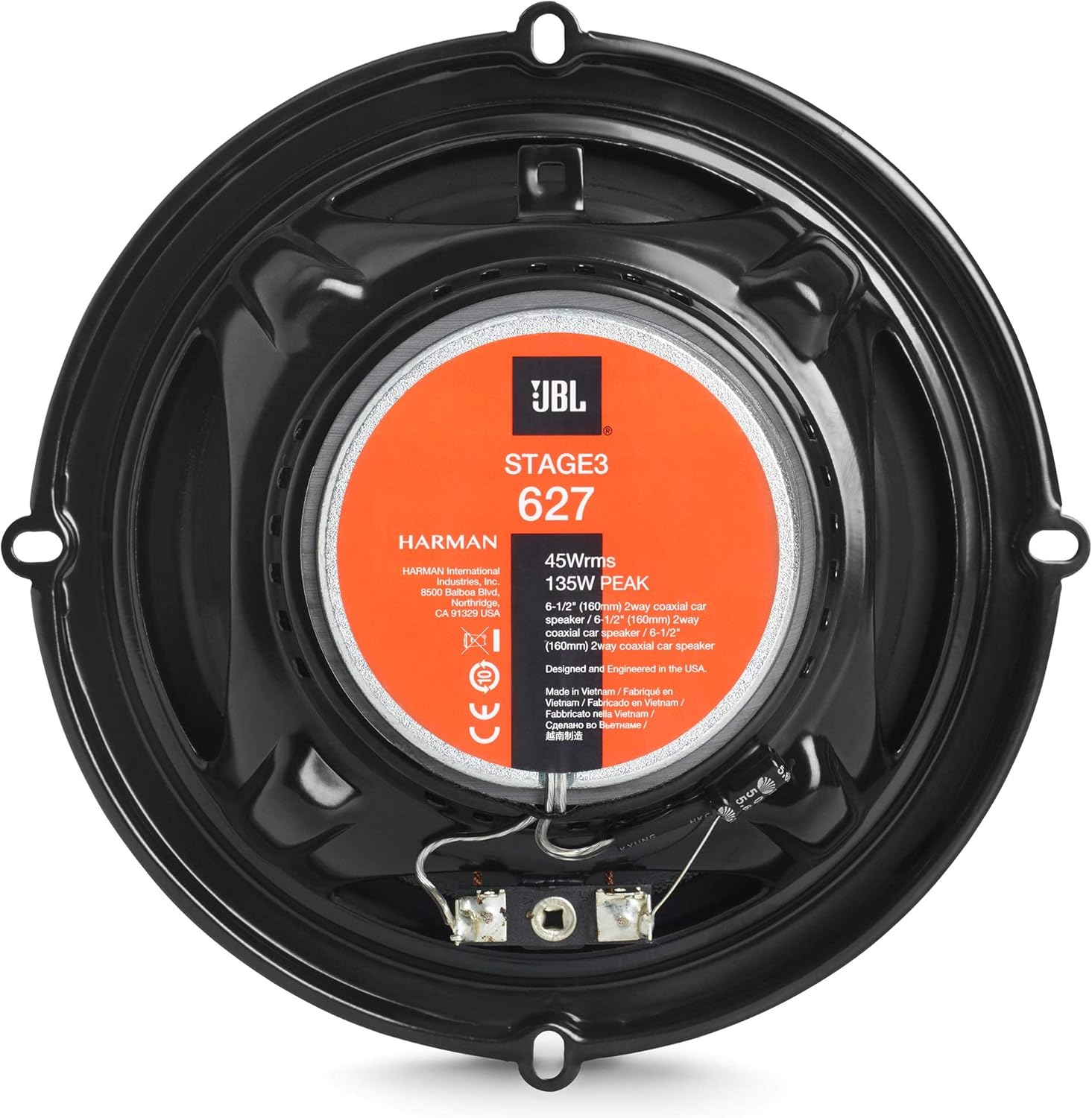
Figure 5.1: Rear view of the speaker with wiring terminals.
5.3. Mounting
- Place the speaker into the mounting opening.
- Align the speaker's mounting holes with the vehicle's mounting points.
- Secure the speaker using the provided mounting screws and speed clips. Do not overtighten.
- If desired, attach the speaker grilles over the installed speakers.

Figure 5.2: Front view of the speaker without grille.

Figure 5.3: Front view of the speaker with grille.
5.4. Final Steps
- Reconnect the negative terminal of the vehicle's battery.
- Test the speakers to ensure they are functioning correctly.
6. Operating
Once installed, the JBL Stage 3627 speakers operate as part of your vehicle's audio system. Adjust audio settings (bass, treble, balance, fader) on your head unit or amplifier to achieve your preferred sound quality. Avoid setting volume levels excessively high for prolonged periods to prevent speaker damage and hearing loss.
7. Maintenance
The JBL Stage 3627 speakers require minimal maintenance:
- Cleaning: Use a soft, dry cloth to gently wipe the speaker grilles and cones. Do not use harsh chemicals or abrasive cleaners.
- Inspection: Periodically check wiring connections for looseness or corrosion.
- Environment: Ensure the speakers are not exposed to direct sunlight for extended periods or extreme temperature fluctuations, which can degrade materials over time.
8. Troubleshooting
If you encounter issues with your JBL Stage 3627 speakers, refer to the following common problems and solutions:
| Problem | Possible Cause | Solution |
|---|---|---|
| No sound from speakers | Loose or incorrect wiring connections Head unit or amplifier not powered on Blown fuse in audio system | Check and secure all speaker wires Ensure audio system is on and functioning Inspect and replace any blown fuses |
| Distorted or poor sound quality | Incorrect audio settings Over-driving speakers (volume too high) Damaged speaker cone or voice coil Improper impedance match | Adjust bass/treble, balance, and fader settings Reduce volume to a moderate level Inspect speakers for physical damage Ensure speakers are compatible with amplifier impedance |
| Intermittent sound | Loose wiring connection Faulty audio source or amplifier | Check and secure all wiring connections Test with a different audio source or consult an audio technician |
If the problem persists after attempting these solutions, contact JBL customer support or a qualified car audio technician.
9. Specifications
Detailed technical specifications for the JBL Stage 3627 6.5-inch Two-Way Car Audio Speakers:
| Specification | Value |
|---|---|
| Model Name | Stage 3627 |
| Item Model Number | Stage3627AM |
| Speaker Type | Woofer (Coaxial) |
| Speaker Size | 6.5 Inches |
| Speaker Maximum Output Power | 225 Watts |
| Surround Sound Channel Configuration | 2.0 |
| Connectivity Technology | Wired |
| Recommended Uses For Product | Vehicle |
| Compatible Devices | Vehicle |
| Color | Black |
| Product Dimensions | 17"D x 15.25"W x 9.75"H |
| Item Weight | 2.9 Pounds |
| Is Waterproof | FALSE |
| UPC | 050036353908 |
| Manufacturer | JBL |
| Date First Available | February 8, 2019 |

Figure 9.1: Side view of the speaker, illustrating its depth.
10. Warranty and Support
The JBL Stage 3627 speakers come with a Limited Warranty. Please refer to the warranty card included with your product or visit the official JBL website for detailed warranty terms and conditions.
For technical support, troubleshooting assistance, or warranty claims, please contact JBL customer service through their official website or the contact information provided in your product documentation.


