1. Product Overview
The HKS Power Editor (Model: 42018-AH002) is a high-performance electronic device designed to enhance the engine output of the Honda Civic Type R (FK8). This boost-up device is engineered to provide increased power and torque throughout the entire RPM range, optimizing your vehicle's performance.
It comes with HKS data presets specifically compatible with the HONDA CIVIC TypeR [FK8] (Japanese specifications). While the Civic Type R already boasts significant output, the Power Editor further increases its capabilities. For instance, stock output of 233.5 kW (317.5 ps) and 398 Nm (40.6 kgf·m) can be boosted to 244.2 kW (332.0 ps) and 405.5 Nm (41.4 kgf·m) with the Power Editor.
The device is designed for easy installation using coupler connections and allows for data modification via the "Easy Writer for Power Editor" software. A return connector is included to revert the vehicle to its normal, stock condition if desired.

Figure 1.1: Cover of the HKS Power Editor Instruction Manual.
2. Package Contents
Please verify that all the following items are included in your package:
- Main Power Editor Unit
- Installation Harness
- Tie-wraps (5 pieces)
- Instruction Manual
- Normal Return Connector (1 piece)

Figure 2.1: All components included in the HKS Power Editor package, including the main unit, wiring harness, USB cable, tie-wraps, and the product box.
3. Installation Guide
Important Safety Notice: Before beginning installation, ensure the vehicle's ignition is off and the battery is disconnected. If you are unsure about any steps, consult a qualified automotive technician.
- Locate the ECU: Identify the vehicle's Engine Control Unit (ECU) and the relevant sensor connectors where the Power Editor will be integrated. Refer to your vehicle's service manual for precise locations.
- Connect the Harness: The HKS Power Editor is designed for easy boost-up installation using coupler-on connections. Carefully connect the provided installation harness between the vehicle's existing wiring and the Power Editor unit. Ensure all connections are secure and properly seated.
- Mount the Power Editor Unit: Securely mount the main Power Editor unit in a safe location away from excessive heat, moisture, and vibrations. Use the provided tie-wraps to manage cables and ensure a tidy installation.
- Reconnect Battery: Once all connections are verified, reconnect the vehicle's battery.
- Initial Check: Start the vehicle and check for any warning lights or unusual behavior. If issues arise, refer to the Troubleshooting section or consult a professional.
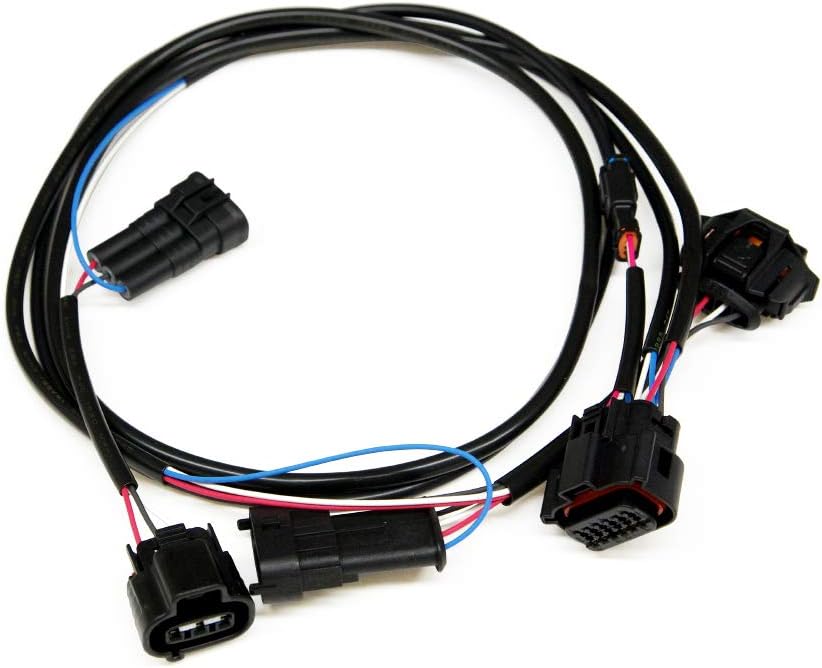
Figure 3.1: The dedicated wiring harness for connecting the Power Editor to the vehicle's ECU system.

Figure 3.2: Close-up view of the HKS Power Editor main unit, showing its compact design and connection ports.
Returning to Stock: To revert your vehicle to its original, stock condition, disconnect the Power Editor and connect the included normal return connector in its place. This allows for easy removal and restoration of the factory wiring configuration.

Figure 3.3: Example of a connector, similar to those used for installation or the return connector.
4. Operating Instructions & Data Modification
The HKS Power Editor comes pre-loaded with optimized data for the Honda Civic Type R (FK8). For most users, no further adjustment is necessary to experience the performance benefits.
However, for advanced users who wish to customize the boost-up data, the "Easy Writer for Power Editor" software is available. This software allows you to modify and fine-tune the performance parameters of your Power Editor.
- Software Acquisition: Obtain the "Easy Writer for Power Editor" software from the official HKS website or authorized distributors.
- Connection: Connect the Power Editor unit to your computer using the provided USB cable.
- Data Modification: Follow the instructions within the "Easy Writer" software to adjust boost-up data according to your preferences or specific vehicle modifications. Exercise caution when modifying data, as incorrect settings can affect engine performance or reliability.
- Saving Changes: Ensure all modified data is properly saved and uploaded to the Power Editor unit before disconnecting.

Figure 4.1: The USB cable used to connect the Power Editor to a computer for data modification.
Note: Any modifications to the pre-set data should be done by experienced individuals or professionals. HKS is not responsible for damage caused by improper data modification.
5. Maintenance
The HKS Power Editor is a robust electronic device designed for durability. Minimal maintenance is required to ensure its longevity and optimal performance.
- Keep Clean: Periodically inspect the unit and its connections for dust, dirt, or debris. Gently wipe the exterior with a soft, dry cloth. Do not use harsh chemicals or abrasive cleaners.
- Check Connections: Ensure all wiring connections remain secure and free from corrosion. Loose connections can lead to intermittent performance issues.
- Environmental Protection: While designed for automotive environments, avoid exposing the unit to extreme temperatures, direct water spray, or excessive vibrations beyond normal vehicle operation.
6. Troubleshooting
If you encounter issues with your HKS Power Editor, please refer to the following common troubleshooting steps:
| Problem | Possible Cause | Solution |
|---|---|---|
| No noticeable performance change. | Incorrect installation; Power Editor not active; vehicle's ECU adapting. |
|
| Check Engine Light (CEL) or error codes. | Loose connection; sensor malfunction; incompatible settings. |
|
| Difficulty connecting to "Easy Writer" software. | Incorrect USB cable; driver issues; software not installed correctly. |
|
If the problem persists after attempting these solutions, please contact HKS customer support or an authorized HKS dealer for further assistance.
7. Specifications
| Attribute | Detail |
|---|---|
| Manufacturer | HKS |
| Brand | HKS |
| Model | 42018-AH002 |
| Item Weight | 13.4 ounces (approx. 380 grams) |
| Package Dimensions | 6.69 x 6.22 x 2.6 inches (approx. 17 x 15.8 x 6.6 cm) |
| Manufacturer Part Number | 42018-AH002 |
| ASIN | B07PBYXLBY |
| Compatibility | Honda Civic Type R (FK8) - Japanese specifications |
| Origin | Made in Japan |
8. Warranty and Support
For detailed information regarding warranty coverage, terms, and conditions for your HKS Power Editor (Model: 42018-AH002), please refer to the official HKS website or the warranty card included with your product.
For technical support, product inquiries, or assistance with installation and operation, please contact HKS customer service or an authorized HKS dealer. Contact information can typically be found on the official HKS website (www.hks-power.co.jp/en/).


