
Walfront IR01D
Walfront IR01D Digital Infrared Thermometer Instruction Manual
Model: IR01D | Brand: Walfront
1. Introduction
The Walfront IR01D is a non-contact digital infrared thermometer designed for industrial applications. It provides quick and accurate temperature measurements of surfaces from a distance. This manual provides essential information for the safe and effective operation, maintenance, and troubleshooting of your device.
Important Note: This device is intended for industrial use only and is not suitable for measuring human body temperature.
2. Safety Information
- Always read and understand this manual before operating the device.
- Do not point the laser directly at eyes or reflective surfaces, as this may cause eye damage. The laser is Class 2 (<1mW/630-670nm).
- Do not use the thermometer in environments with explosive gas, vapor, or dust.
- Keep the device away from strong electromagnetic fields.
- Do not immerse the device in water or other liquids.
- If the device is damaged, do not attempt to repair it yourself. Contact qualified personnel.
- Dispose of batteries according to local regulations.
3. Package Contents
Verify that all items are present and undamaged upon opening the package:
- 1 x Walfront IR01D Digital Infrared Thermometer
- 1 x Instruction Manual (this document)
Note: 1.5V*2 AAA Batteries are not included and must be purchased separately.
4. Product Overview

Figure 4.1: Front view of the Walfront IR01D Infrared Thermometer, showing the trigger and measurement lens.

Figure 4.2: Close-up of the IR01D's LCD display, showing temperature readings, emissivity, and humidity.
4.1 Components
- Measurement Lens: Collects infrared radiation from the target.
- Laser Pointer: Helps in aiming at the target (Class 2 laser).
- LCD Display: Shows temperature readings, settings, and other indicators.
- Trigger: Activates measurement and laser.
- Mode Button: Cycles through different settings and modes.
- Up/Down Buttons: Adjust settings like emissivity and alarm limits.
- Battery Compartment: Holds two AAA batteries.
4.2 LCD Display Indicators
The LCD display provides various pieces of information:
- Temperature Reading: Displays the measured temperature in Celsius (℃) or Fahrenheit (℉).
- Emissivity (E): Indicates the current emissivity setting (0.1 to 1.0).
- Humidity: Shows the environmental humidity percentage.
- Environment Temperature: Displays the ambient temperature.
- Laser Indicator: Icon indicating the laser is active.
- Battery Indicator: Shows remaining battery life.
- Alarm Indicators: Icons for high or low temperature alarms.
- Data Hold: Icon indicating the last reading is held on the display.
5. Setup
5.1 Battery Installation
The IR01D thermometer requires two 1.5V AAA batteries (not included).
- Locate the battery compartment cover on the handle of the device.
- Gently slide or open the battery compartment cover.
- Insert two AAA batteries, ensuring correct polarity (+ and -) as indicated inside the compartment.
- Close the battery compartment cover securely until it clicks into place.

Figure 5.1: View of the battery compartment with the cover open, showing where to insert AAA batteries.
6. Operating Instructions
6.1 Taking a Measurement
- Point the thermometer at the target surface. Ensure the target is within the device's D:S (Distance to Spot) ratio of 12:1. For example, at 12 inches distance, the measurement spot is 1 inch in diameter.
- Press and hold the trigger. The laser pointer will activate to help you aim, and the display will show the real-time temperature reading.
- Release the trigger to hold the last measured temperature on the display. The device will automatically shut down after 30 seconds of inactivity to conserve battery life.
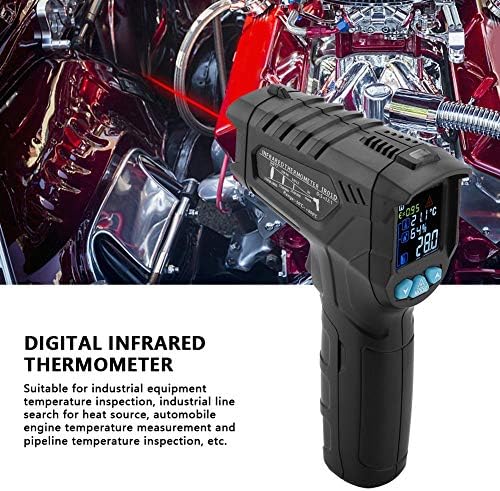
Figure 6.1: The thermometer being held, demonstrating the laser pointer for accurate targeting of the measurement area.
6.2 Adjusting Emissivity
Emissivity (E) is a measure of an object's ability to emit infrared energy. Different materials have different emissivity values. The IR01D allows adjustment from 0.1 to 1.0 for accurate readings on various surfaces.
- With the device powered on, press the MODE button until the emissivity (E) indicator flashes on the display.
- Use the UP and DOWN buttons to adjust the emissivity value. Refer to common emissivity tables for typical materials.
- Press the MODE button again to confirm the setting and exit emissivity adjustment mode.
6.3 Temperature Difference Alarm
The device features a temperature difference alarm, allowing you to set upper and lower temperature limits. If the measured temperature falls outside these limits, an alarm will sound or an indicator will appear.
- Press the MODE button repeatedly until the alarm setting mode is active (e.g., HI or LO alarm indicator flashes).
- Use the UP and DOWN buttons to set the desired high or low temperature limit.
- Continue pressing MODE to set the other limit or exit the alarm setting mode.
6.4 Unit Conversion (Celsius/Fahrenheit)
The IR01D can display temperatures in both Celsius (℃) and Fahrenheit (℉).
- While the device is powered on, press the MODE button until the temperature unit flashes.
- Use the UP or DOWN button to toggle between ℃ and ℉.
- Press MODE again to confirm.
7. Maintenance
- Cleaning: Wipe the device clean with a soft, damp cloth. Do not use abrasive cleaners or solvents. Ensure the lens is clean for accurate readings.
- Storage: Store the thermometer in a dry place, away from direct sunlight and extreme temperatures. The recommended storage temperature is -10℃ to 60℃ (14℉ to 140℉).
- Battery Replacement: Replace batteries when the low battery indicator appears on the display. Remove batteries if the device will not be used for an extended period to prevent leakage.
8. Troubleshooting
| Problem | Possible Cause | Solution |
|---|---|---|
| Device does not power on. | Batteries are dead or incorrectly installed. | Check battery polarity. Replace with new AAA batteries. |
| Inaccurate readings. | Dirty lens; incorrect emissivity setting; target too far or too small. | Clean the lens. Adjust emissivity for the target material. Ensure target fills the measurement spot. |
| Laser not working. | Laser function disabled; device malfunction. | Ensure laser is enabled in settings (if applicable). If not, contact support. |
| Display shows "OL" or "LO". | Temperature is outside the measurement range. | Ensure the target temperature is within -50℃ to 800℃. |
9. Specifications
| Parameter | Value |
|---|---|
| Model | IR01D |
| Temperature Measurement Range | -50℃ to 800℃ (-58℉ to 1472℉) |
| Environment Temperature Range | -10℃ to 60℃ (14℉ to 140℉) |
| Environment Humidity Range | 0% to 100% RH |
| Distance to Spot Ratio (D:S) | 12:1 |
| Emissivity | 0.1 to 1.0 (Adjustable) |
| Response Spectrum | 8 to 14µm |
| Positioning | 12-point ring indicating temperature sensitive zone |
| Laser Power | <1mW/630-670nm (Class 2) |
| Response Time | <0.5 seconds |
| Automatic Shutdown | 30 seconds (approx.) |
| Data Retention | Yes |
| Service Temperature | 0℃ to 40℃ (32℉ to 104℉) |
| Storage Temperature | -10℃ to 60℃ (14℉ to 140℉) |
| Power Supply | 2 x 1.5V AAA Batteries (not included) |
| Weight | Approx. 204g (7.2oz) |
| Dimensions (L x W x H) | Approx. 140 x 95 x 42mm (5.5 x 3.7 x 1.7in) |
| Display Type | LCD (with backlight) |
| Material | Plastic |
10. Warranty and Support
Walfront products are designed for reliability and performance. For any questions, technical support, or warranty inquiries, please contact your retailer or visit the official Walfront store for assistance.
Official Walfront Store: Walfront Amazon Store
Ask a question about this manual
Ask about setup, troubleshooting, compatibility, parts, safety, or missing instructions. Manuals+ will review the question and use this page’s manual context to help answer it.