
1. Introduction
The hysure T8PLUS Compact Dehumidifier is designed to efficiently remove excess moisture from small spaces, improving air quality and preventing issues related to high humidity. Utilizing advanced Peltier technology, this unit operates quietly without a compressor, making it ideal for bedrooms, bathrooms, RVs, dorm rooms, and baby rooms. It effectively extracts moisture from the air and collects it in a convenient, spill-proof water reservoir.

Figure 1: Hysure T8PLUS Compact Dehumidifier, front view.
2. Important Safety Instructions
Please read all instructions carefully before operating the dehumidifier and retain this manual for future reference. Failure to follow these instructions may result in electric shock, fire, or serious injury.
- Always place the dehumidifier on a stable, level surface.
- Ensure the power cord is not damaged or pinched.
- Do not immerse the unit, power cord, or plug in water or other liquids.
- Unplug the dehumidifier before cleaning, moving, or emptying the water tank.
- Keep the air inlets and outlets clear of obstructions to ensure proper airflow.
- Do not operate the unit in extremely cold environments (below 41°F / 5°C) as it may affect performance.
- This appliance is for indoor use only.
- Keep out of reach of children and pets.
3. Product Overview
Familiarize yourself with the main components of your hysure dehumidifier:
- Main Unit: Houses the dehumidifying components and control panel.
- Power Button/Indicator Light: Located on the top, controls power and indicates operational status.
- Air Inlet: Located on the front, where humid air is drawn in.
- Air Outlet: Located on the back, where dry air is expelled.
- Water Tank: Detachable reservoir at the bottom for collecting condensed water.

Figure 2: Rear view of the dehumidifier showing the air outlet.
4. Setup and Placement
Follow these steps to set up your dehumidifier:
- Unpack: Carefully remove the dehumidifier from its packaging.
- Placement: Place the unit on a firm, level surface in the desired location. Ensure there is at least 2 inches (5 cm) of space around the air inlets and outlets for optimal performance. The unit is suitable for areas up to 215 sq ft.
- Power Connection: Plug the power adapter into the DC input port on the back of the dehumidifier, then plug the other end into a suitable wall outlet.

Figure 3: Examples of suitable placement in different room types.
For best results, operate the dehumidifier in temperatures between 68°F (20°C) and 86°F (30°C) and relative humidity around 80%.
5. Operating Instructions
The hysure dehumidifier features simple one-button control:
- Power On: Press the power button on the top of the unit once. The indicator light will turn green, indicating the dehumidifier is operating.
- Power Off: Press the power button again to turn off the unit. The indicator light will turn off.
- Auto Shut-Off: The dehumidifier is equipped with an automatic shut-off function. When the water tank is full, the unit will automatically stop operating, and the indicator light will turn yellow. This prevents overflow and ensures safe operation.

Figure 4: Power button and indicator light status.
The unit operates quietly, typically generating a noise level of 20-40dB, comparable to a quiet library environment, ensuring it does not disturb your daily life.

Figure 5: Noise level comparison.
6. Maintenance
6.1 Emptying the Water Tank
The water tank has a capacity of 700ml (approximately 24 oz). When the tank is full, the unit will stop operating and the indicator light will turn yellow.
- Turn off the dehumidifier and unplug it from the power outlet.
- Carefully pull out the water tank from the back of the unit.
- Locate the rubber plug on the water tank. Open the plug to drain the collected water into a sink or drain.
- Once empty, securely close the rubber plug.
- Slide the water tank back into the dehumidifier until it clicks into place.
- Plug the dehumidifier back in and press the power button to resume operation.
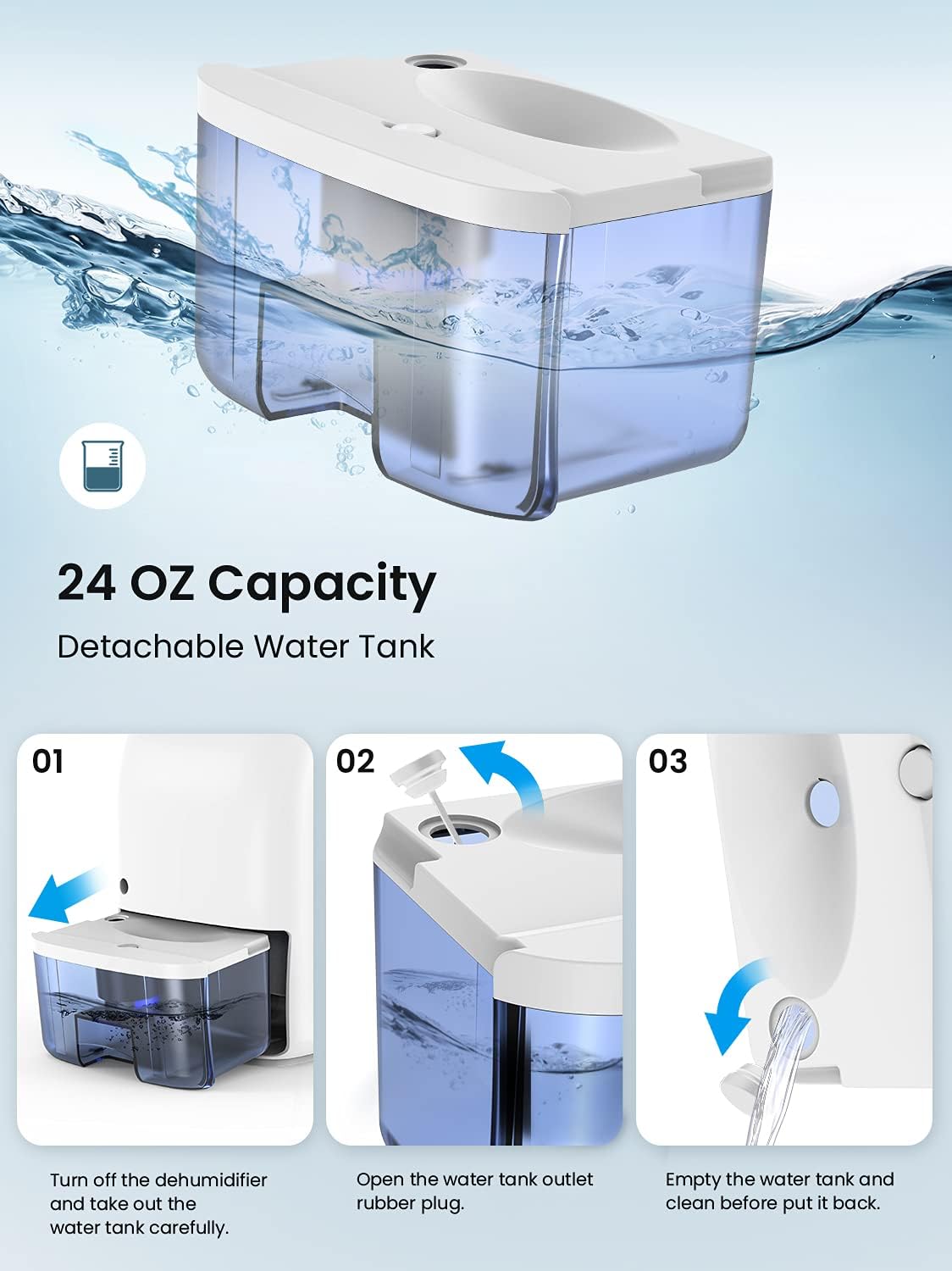
Figure 6: Steps for emptying the water tank.
6.2 Cleaning the Dehumidifier
Regular cleaning helps maintain the efficiency and lifespan of your dehumidifier:
- Exterior Cleaning: Wipe the exterior of the unit with a soft, damp cloth. Do not use abrasive cleaners or solvents.
- Water Tank Cleaning: Clean the water tank regularly with mild soap and water to prevent mold or mildew buildup. Rinse thoroughly before reinserting.
- Air Inlets/Outlets: Use a soft brush or vacuum cleaner attachment to gently remove any dust or debris from the air inlets and outlets.
7. Troubleshooting
If you encounter issues with your dehumidifier, please refer to the following common problems and solutions:
| Problem | Possible Cause | Solution |
|---|---|---|
| Dehumidifier does not turn on. | No power supply; power button not pressed; water tank not properly inserted. | Check power connection; press power button; ensure water tank is fully inserted. |
| Unit is running but not collecting water. | Room temperature too low; humidity level too low; air inlets/outlets blocked. | Ensure room temperature is above 41°F (5°C); unit works best in higher humidity; clear any obstructions. |
| Indicator light is yellow. | Water tank is full. | Empty the water tank and reinsert it. |
| Unit is making unusual noise. | Unit not on a level surface; internal fan obstruction. | Place on a stable, level surface; contact customer support if noise persists. |
8. Specifications
| Feature | Detail |
|---|---|
| Brand | hysure |
| Model Name | T8PLUS |
| Water Tank Capacity | 700 Milliliters (approx. 24 oz) |
| Coverage Area | 50-215 sq ft |
| Product Dimensions (D x W x H) | 4.2"D x 6.4"W x 10.5"H |
| Item Weight | 2.68 pounds |
| Wattage | 23 Watt-hours |
| Operation Mode | Continuous |
| Noise Level | 20-40dB (approx. 35dB) |
9. Warranty and Support
For warranty information, technical support, or customer service inquiries, please refer to the contact information provided with your product packaging or visit the official hysure website. Please have your model number (T8PLUS) and purchase details ready when contacting support.
You can also visit the hysure Store on Amazon for more information and product updates.
