
Introduction
Thank you for choosing the Black+Decker BES610K-QS 650W Corded Jigsaw. This manual provides important information regarding the safe operation, setup, maintenance, and troubleshooting of your new tool. Please read this manual thoroughly before use and keep it for future reference.
The Black+Decker BES610K-QS is a 650W corded pendulum jigsaw designed for various cutting tasks. It offers a speed of 3100 strokes per minute and can cut up to 90mm in wood, 15mm in aluminum, and 8mm in metal. Key features include 3 pendulum settings, variable speed control, a dust extraction port, and an integrated LED light for improved visibility.
General Safety Instructions
WARNING: Read all safety warnings, instructions, illustrations, and specifications provided with this power tool. Failure to follow all instructions listed below may result in electric shock, fire, and/or serious injury.
Work Area Safety
- Keep the work area clean and well-lit. Cluttered or dark areas invite accidents.
- Do not operate power tools in explosive atmospheres, such as in the presence of flammable liquids, gases, or dust. Power tools create sparks which may ignite the dust or fumes.
- Keep children and bystanders away while operating a power tool. Distractions can cause you to lose control.
Electrical Safety
- Power tool plugs must match the outlet. Never modify the plug in any way. Do not use any adapter plugs with earthed (grounded) power tools. Unmodified plugs and matching outlets will reduce risk of electric shock.
- Avoid body contact with earthed or grounded surfaces, such as pipes, radiators, ranges, and refrigerators. There is an increased risk of electric shock if your body is earthed or grounded.
- Do not expose power tools to rain or wet conditions. Water entering a power tool will increase the risk of electric shock.
- Do not abuse the cord. Never use the cord for carrying, pulling, or unplugging the power tool. Keep cord away from heat, oil, sharp edges, or moving parts. Damaged or entangled cords increase the risk of electric shock.
Personal Safety
- Always wear eye protection. Use safety glasses, goggles, or a face shield.
- Wear appropriate personal protective equipment (PPE) such as dust masks, non-skid safety shoes, hard hats, or hearing protection when necessary.
- Dress properly. Do not wear loose clothing or jewelry. Keep your hair and clothing away from moving parts.
- Do not overreach. Keep proper footing and balance at all times. This enables better control of the power tool in unexpected situations.
- Always disconnect the plug from the power source before making any adjustments, changing accessories, or storing power tools.
Product Overview
The Black+Decker BES610K-QS Jigsaw is a versatile tool designed for precision cutting in various materials. Familiarize yourself with its components before operation.

Figure 1: Black+Decker BES610K-QS Jigsaw main view.
This image shows the overall design of the Black+Decker BES610K-QS Jigsaw, highlighting its ergonomic handle and control layout.
Key Features:
- 650W Motor: Provides ample power for various cutting tasks.
- Ergonomic Design: Slim grip handle for optimized control and comfort.
- Dust Extraction Port: Removable adapter for easy connection to a vacuum cleaner, keeping the work area clean.
- Quick Accessory Change: Facilitates fast and easy blade changes.
- Integrated LED Light: Enhances visibility of the cutting line.
- Variable Speed (0-3100 SPM): Allows adjustment for different materials and cutting requirements.
- Cutting Capacity: 90mm in wood, 15mm in aluminum, 8mm in metal.
- 3 Pendulum Settings: For optimized cutting performance in various materials.
- Beveled Metal Base: For angled cuts.
Setup and Assembly
Unpacking
Carefully remove the jigsaw and all accessories from the packaging. Ensure all components are present and undamaged. The package typically includes the jigsaw, a standard blade, a guide blade, and a storage case.

Figure 2: Jigsaw with included storage case and blade.
This image displays the jigsaw along with its protective storage case and one of the included blades, ready for use.
Blade Installation
- Ensure the tool is unplugged from the power source.
- Locate the blade clamp mechanism, usually near the front of the tool.
- Open the blade clamp (refer to Figure 3 for visual guidance).
- Insert the blade into the clamp with the teeth facing forward. Ensure the back edge of the blade fits into the blade guide roller.
- Close the blade clamp securely. Tug gently on the blade to ensure it is firmly seated.

Figure 3: Proper blade installation into the jigsaw.
This image illustrates the process of inserting a blade into the jigsaw's quick-change mechanism, ensuring it is correctly aligned and secured.
Adjusting the Base Plate for Bevel Cuts
The jigsaw's base plate can be adjusted for angled cuts (bevel cuts).
- Unplug the tool.
- Loosen the screws that secure the base plate.
- Tilt the base plate to the desired angle (e.g., 15°, 30°, 45°). The tool has 3 pre-selected bevel angles.
- Tighten the screws firmly to secure the base plate in position.
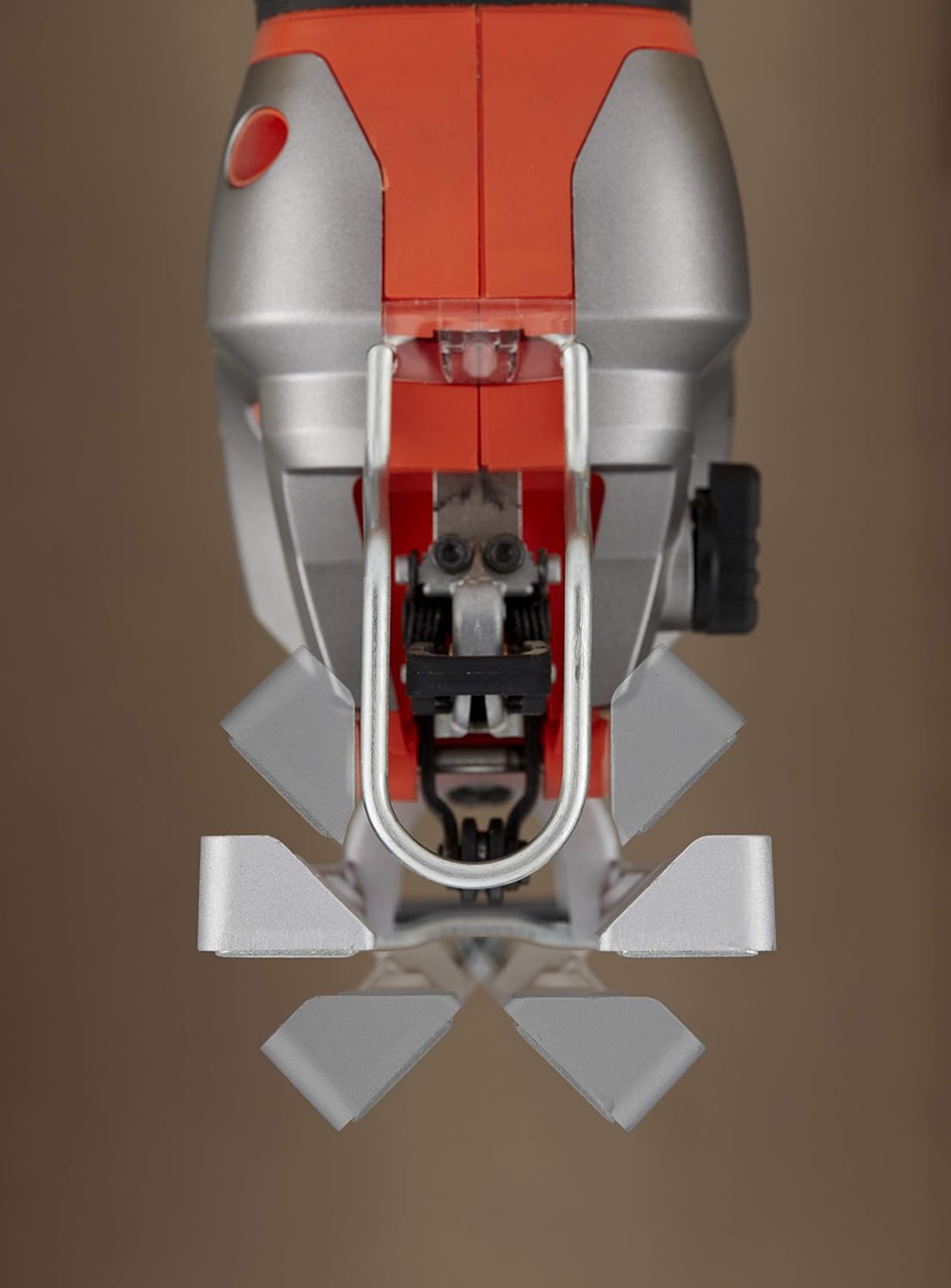
Figure 4: Jigsaw base plate set for an angled cut.
This image shows the jigsaw's base plate tilted to an angle, demonstrating its capability for making bevel cuts in a workpiece.
Dust Extraction Connection
For a cleaner work environment, connect a vacuum cleaner to the dust extraction port.
- Attach the removable adapter to the dust extraction port on the jigsaw.
- Connect the hose of a suitable vacuum cleaner to the adapter.
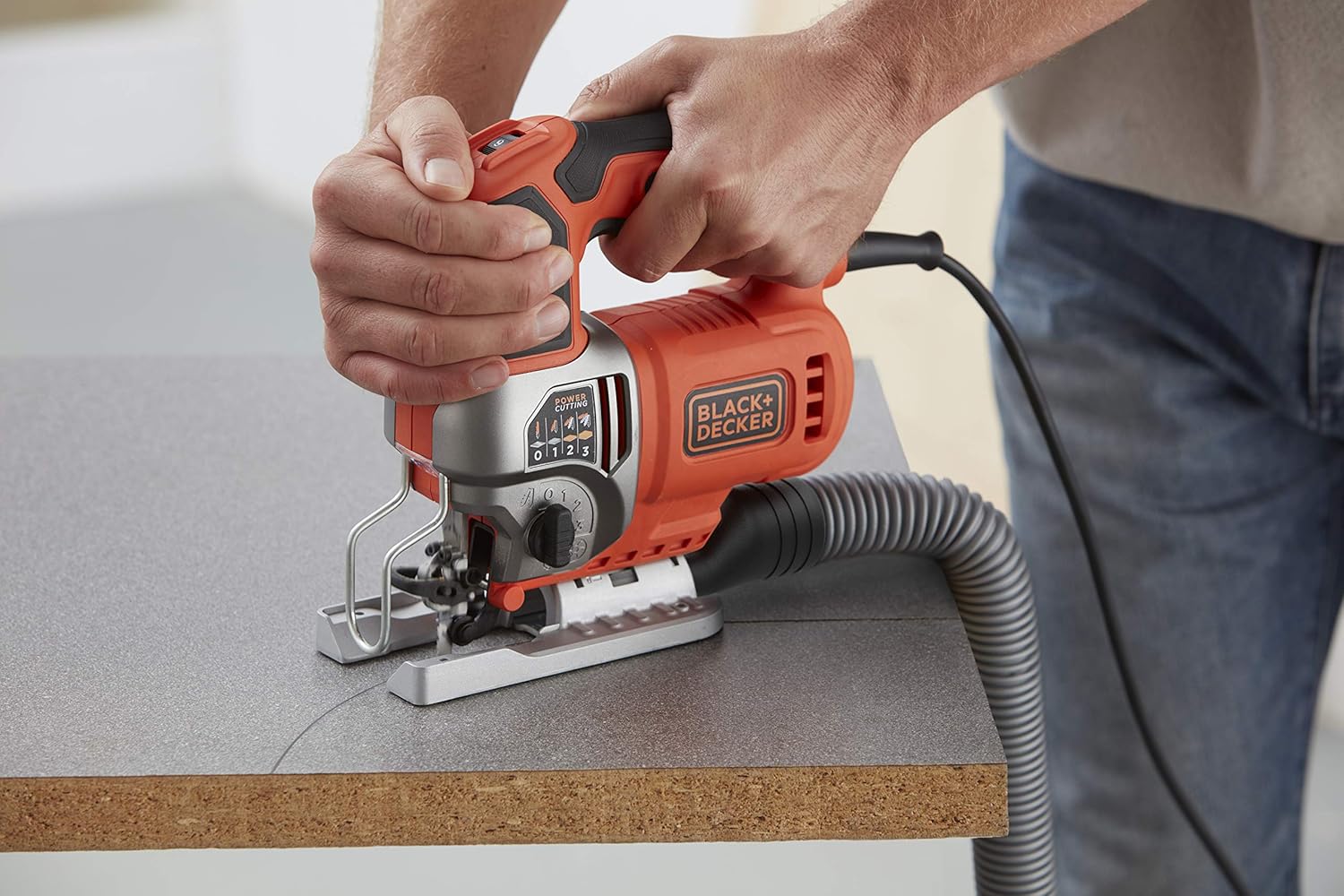
Figure 5: Jigsaw connected to a dust extraction system.
This image shows the jigsaw in operation with a vacuum hose attached to its dust extraction port, illustrating how to maintain a clean work area.
Operating Instructions
Powering On/Off
- To turn on the jigsaw, press the trigger switch.
- To turn off, release the trigger switch.
Variable Speed Control
The jigsaw features a variable speed control dial, allowing you to adjust the cutting speed for different materials and applications.
- Locate the variable speed dial, typically on the top or side of the handle.
- Rotate the dial to select the desired speed. Lower speeds are suitable for harder materials or intricate cuts, while higher speeds are for softer materials and faster cutting.

Figure 6: Adjusting the variable speed dial on the jigsaw.
This image shows a hand adjusting the speed dial on the jigsaw, indicating the control over strokes per minute for different cutting needs.
Pendulum Action Adjustment
The pendulum action (orbital action) allows the blade to move in an elliptical motion, providing faster cutting in softer materials. The BES610K-QS has 3 pendulum settings.
- Locate the pendulum action selector switch, usually on the side of the tool.
- Select setting '0' for straight cuts or fine finishes.
- Select settings '1', '2', or '3' for increasingly aggressive cuts in wood or other soft materials. Higher settings provide faster cutting but may result in a rougher finish.
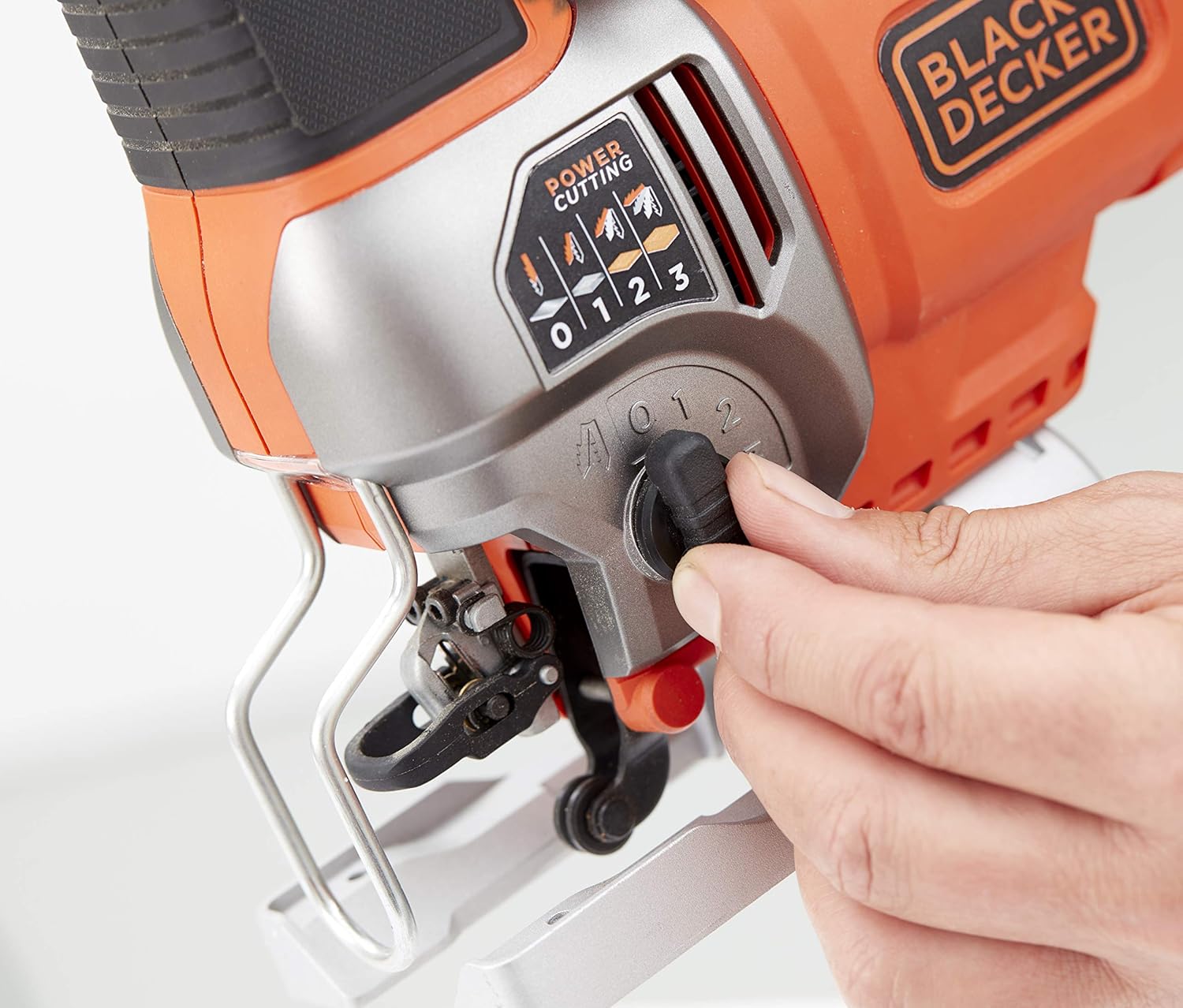
Figure 7: Adjusting the pendulum action setting on the jigsaw.
This image demonstrates how to adjust the pendulum action selector, which controls the aggressiveness of the blade's orbital motion for various materials.
Making a Cut
- Secure the workpiece firmly to prevent movement during cutting.
- Place the front edge of the jigsaw's base plate flat on the workpiece, ensuring the blade is clear of the material.
- Start the tool and allow it to reach full speed before engaging the blade with the material.
- Guide the jigsaw along the cutting line with steady, even pressure. Do not force the tool.
- The integrated LED light will illuminate the cutting area for better visibility.

Figure 8: User operating the jigsaw to cut a wooden board.
This image shows a user holding the jigsaw firmly and guiding it along a wooden workpiece to make a cut.

Figure 9: Jigsaw being used to cut a piece of trim.
This image depicts the jigsaw being used for a more delicate cut on a piece of trim, demonstrating its versatility.

Figure 10: Close-up of the jigsaw's LED light illuminating the cutting path.
This close-up image highlights the integrated LED light, which brightens the cutting line for enhanced accuracy and visibility.

Figure 11: Jigsaw cutting a metal pipe.
This image shows the jigsaw effectively cutting through a metal pipe, demonstrating its capability with different materials.

Figure 12: Jigsaw cutting a corrugated sheet.
This image illustrates the jigsaw cutting a corrugated sheet, showcasing its ability to handle various material shapes and textures.

Figure 13: Jigsaw cutting wood from the underside.
This image shows the jigsaw being used to cut a wooden piece from the underside, a technique often used to minimize splintering on the visible surface.
Maintenance
Regular maintenance ensures the longevity and optimal performance of your jigsaw.
Cleaning
- Always unplug the tool before cleaning.
- Use a soft brush or compressed air to clean dust and debris from the ventilation openings and around the blade clamp area.
- Wipe the tool housing with a damp cloth. Do not use harsh chemicals or abrasive cleaners.
Blade Care
- Replace dull or damaged blades immediately. Using worn blades can lead to poor cutting performance and increased strain on the tool.
- Store blades in a dry place to prevent rust.
General Inspection
- Periodically check the power cord for any signs of damage. If damaged, have it replaced by a qualified service technician.
- Ensure all screws and fasteners are tight.
Troubleshooting
This section addresses common issues you might encounter with your jigsaw.
| Problem | Possible Cause | Solution |
|---|---|---|
| Tool does not start. | No power supply. Damaged power cord. | Check power outlet and circuit breaker. Inspect cord for damage; have it replaced by a professional if necessary. |
| Poor cutting performance / Rough cuts. | Dull or incorrect blade. Incorrect speed or pendulum setting. Forcing the tool. | Replace blade; ensure it's suitable for the material. Adjust speed and pendulum action according to material. Allow the tool to work at its own pace. |
| Excessive vibration. | Loose blade. Damaged blade. Worn internal components. | Ensure blade is securely clamped. Replace blade. Contact customer service for inspection. |
| Blade gets stuck. | Forcing the tool. Incorrect blade for material thickness. | Reduce feed pressure. Use a blade appropriate for the material and thickness. |
If you encounter problems not listed here or if the suggested solutions do not resolve the issue, please contact Black+Decker customer service.
Specifications
Technical data for the Black+Decker BES610K-QS Jigsaw:
| Feature | Value |
|---|---|
| Manufacturer | BLACK+DECKER |
| Model Number | BES610K-QS |
| Power | 650 Watts |
| Voltage | 230 Volts |
| Speed | 3100 strokes/min (variable) |
| Power Source | Corded Electric |
| Cutting Capacity (Wood) | 90 mm |
| Cutting Capacity (Aluminum) | 15 mm |
| Cutting Capacity (Metal) | 8 mm |
| Special Features | Bevel Capacity, LED Light, Dust Extraction |
| Product Dimensions (L x W x H) | 31 x 11 x 30.5 cm |
| Weight | 3.05 Kilograms |
| Included Components | Jigsaw, 2 blades (as per product variant), Storage Case |
Warranty and Support
Black+Decker products are manufactured to high-quality standards and are guaranteed against defects in materials and workmanship. This product comes with a limited warranty.
For specific warranty terms and conditions, or if you require technical assistance, spare parts, or repair service, please refer to the warranty card included with your product or visit the official Black+Decker website. You can also contact Black+Decker customer support directly.
Online Support: Visit www.blackanddecker.com for product information, FAQs, and service center locations.