
1. Introduction
This manual provides essential information for the safe and effective use of your BLACK+DECKER BHHV520BFP-QW Handheld Vacuum. Please read these instructions carefully before operating the appliance and retain them for future reference.
The BLACK+DECKER BHHV520BFP-QW is a cordless handheld vacuum cleaner designed for quick clean-ups, especially effective for pet hair and general debris. It features a lithium-ion battery, two-speed control, an integrated crevice tool, a detachable powered pet brush, and a Smart Tech LED panel for battery and filter status.
2. Safety Instructions
Always observe basic safety precautions when using electrical appliances to reduce the risk of fire, electric shock, and personal injury.
- Do not use the appliance outdoors or on wet surfaces.
- Do not allow the appliance to be used as a toy. Close attention is necessary when used by or near children.
- Use only as described in this manual. Use only manufacturer’s recommended attachments.
- Do not use with damaged cord or plug. If appliance is not working as it should, has been dropped, damaged, left outdoors, or dropped into water, return it to a service center.
- Do not pull or carry by cord, use cord as a handle, close a door on cord, or pull cord around sharp edges or corners. Do not run appliance over cord. Keep cord away from heated surfaces.
- Do not unplug by pulling on cord. To unplug, grasp the plug, not the cord.
- Do not handle plug or appliance with wet hands.
- Do not put any object into openings. Do not use with any opening blocked; keep free of dust, lint, hair, and anything that may reduce air flow.
- Keep hair, loose clothing, fingers, and all parts of body away from openings and moving parts.
- Do not pick up anything that is burning or smoking, such as cigarettes, matches, or hot ashes.
- Do not use without dust bag and/or filters in place.
- Turn off all controls before unplugging.
- Use extra care when cleaning on stairs.
- Do not use to pick up flammable or combustible liquids, such as gasoline, or use in areas where they may be present.
- Store the appliance indoors.
3. Product Components
Familiarize yourself with the main parts of your BLACK+DECKER BHHV520BFP-QW handheld vacuum.
- Handheld Vacuum Unit: The main body containing the motor, battery, and dust bowl.
- Integrated Crevice Tool: An extendable nozzle for reaching tight spaces.
- Detachable Powered Pet Brush: An attachment with anti-tangle bristles for effective pet hair removal.
- Charging Base: For convenient storage and recharging of the vacuum.
- Washable Pre-filter: The initial filter layer.
- Washable Main Filter: The primary filter for dust collection.
- Dust Bowl: Transparent container for collected debris, with a 0.7 Liter capacity.
- Smart Tech LED Panel: Displays battery level and filter status.

Image: Overview of the BLACK+DECKER BHHV520BFP-QW Handheld Vacuum, showing its main body and integrated nozzle.

Image: The handheld vacuum with its integrated crevice tool fully extended, ready for use in narrow areas.

Image: The handheld vacuum shown with the detachable powered pet brush attachment, designed for efficient pet hair removal.
4. Setup
4.1 Initial Charging
Before first use, fully charge the vacuum's battery. Place the vacuum onto the charging base and ensure the charging base is plugged into a power outlet. The Smart Tech LED panel will indicate charging status. A full charge takes approximately 5 hours.

Image: The handheld vacuum placed on its charging base, which is plugged into a wall outlet, indicating it is charging.
4.2 Attaching Accessories
The detachable powered pet brush can be easily attached to the nozzle for specialized cleaning. Align the attachment with the vacuum's nozzle and push until it clicks securely into place. To remove, press the release button (if present) and pull the attachment off.
5. Operating Instructions
5.1 Powering On/Off and Speed Control
To turn the vacuum on, press the power button. The vacuum will start in standard mode. Press the power button again to switch to high-power mode for heavier debris. Press a third time to turn the vacuum off.
5.2 Using the Integrated Crevice Tool
For reaching tight spaces, such as between cushions or along edges, pull out the integrated crevice tool from the front of the vacuum. Extend it to the desired length. Push it back in when not needed.

Image: A person using the handheld vacuum with its extended crevice tool to clean a high window frame.
5.3 Using the Detachable Powered Pet Brush
Attach the pet brush for effective removal of pet hair from carpets, upholstery, and curtains. The anti-tangle bristles are designed to pick up stubborn hair efficiently.

Image: A person using the handheld vacuum with the pet brush attachment to clean pet hair from a pet bed.
5.4 Monitoring Battery and Filter Status
The Smart Tech LED panel provides real-time updates. Check the panel for battery level indicators and filter status warnings, which will alert you when the filter needs cleaning.
6. Maintenance
Regular maintenance ensures optimal performance and extends the life of your vacuum cleaner.
6.1 Emptying the Dust Bowl
The vacuum features a one-touch empty system. Position the vacuum over a waste bin, press the release button for the dust bowl, and the contents will be released. The dust bowl has a 0.7 Liter capacity.

Image: A person demonstrating the one-touch emptying system, releasing collected debris from the dust bowl into a waste bin.
6.2 Cleaning and Washing Filters
Both the pre-filter and main filter are washable. To access the filters, detach the dust bowl. Remove the filters and tap them gently to dislodge loose dirt. For a thorough clean, wash them under running water. Ensure filters are completely dry before reinserting them into the vacuum. Do not use the vacuum without filters properly installed and dry.

Image: A person removing the filter assembly from the handheld vacuum for cleaning.
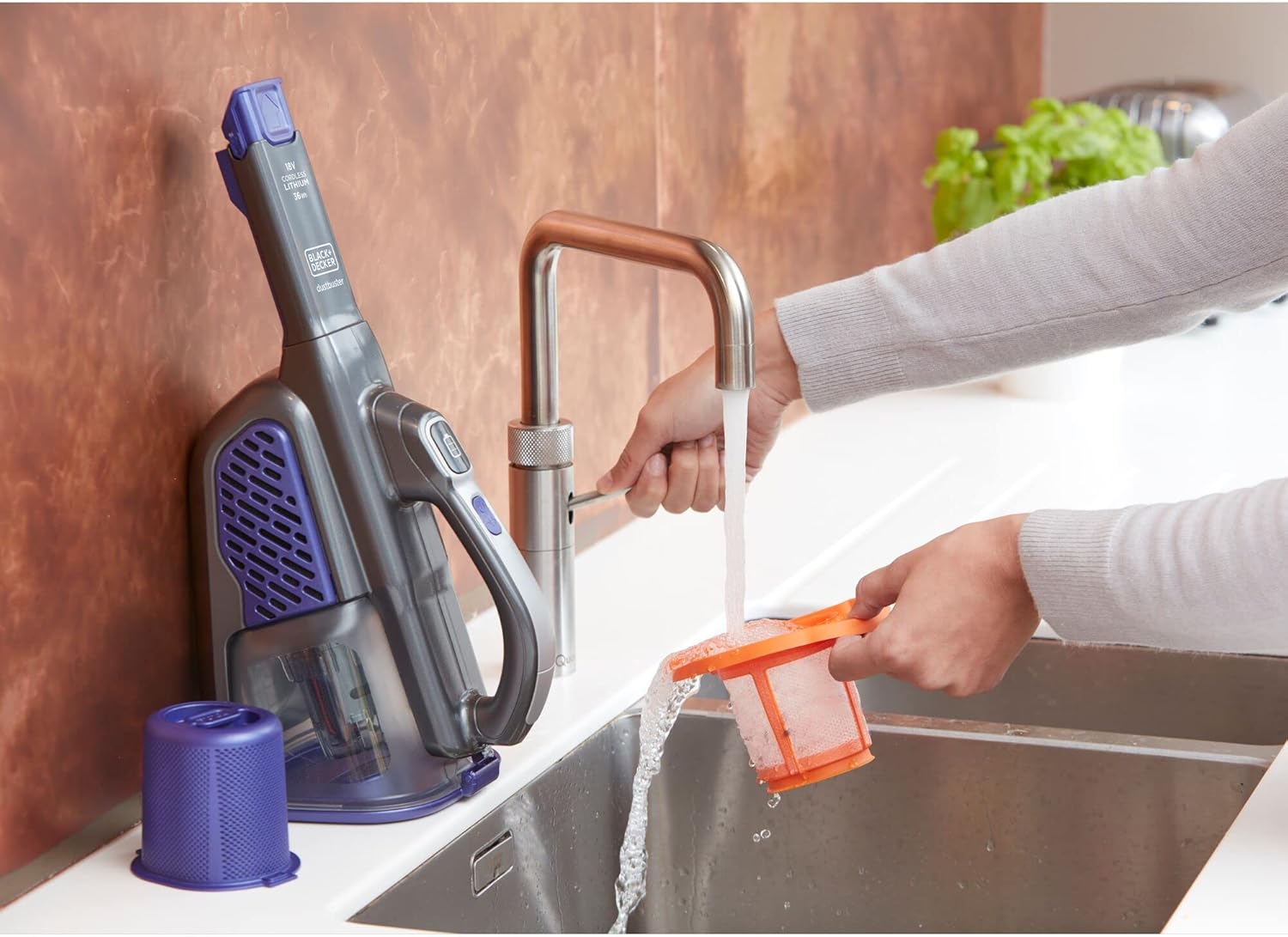
Image: A person washing the vacuum's filter under running water, demonstrating the washable filter feature.
6.3 Cleaning the Pet Brush
Periodically check the detachable pet brush for tangled hair or debris. Remove any obstructions to maintain effective cleaning performance.
7. Troubleshooting
If you encounter issues with your vacuum, refer to the following common problems and solutions:
- Vacuum does not turn on: Ensure the battery is charged. Place the vacuum on the charging base and check the LED indicator.
- Reduced suction power: Check if the dust bowl is full and empty it if necessary. Inspect filters for clogs and clean or wash them. Ensure all attachments are securely fitted.
- Battery not charging: Verify that the charging base is properly plugged into a working outlet. Ensure the vacuum is correctly seated on the charging base.
- Unusual noise: Turn off the vacuum and check for any obstructions in the nozzle, dust bowl, or brush attachment.
If the problem persists after attempting these solutions, contact customer support.
8. Specifications
| Brand | BLACK+DECKER |
| Model Name | BHHV520BFP-QW |
| Filter Type | Cloth (HEPA-style) |
| Cordless | Yes |
| Dust Bowl Capacity | 0.7 Liters |
| Wattage | 36 Watt-hours |
| Charging Time | 5 Hours |
| Battery Life | 21 minutes |
| Noise Level | 72 Decibels |
| Number of Speeds | 2 |
| Product Dimensions | 15.75 x 7.99 x 6.5 inches |
| Item Weight | 2.64 pounds |
| Batteries | 1 Lithium Ion battery (included) |
| Power Source | Battery Powered |
9. Warranty and Support
For warranty information and customer support, please refer to the warranty card included with your product or visit the official BLACK+DECKER website. Keep your proof of purchase for any warranty claims.
For further assistance, you may contact BLACK+DECKER customer service directly.


