
1. Introduction
Thank you for choosing the PondXpert 2000 Eco Water Garden Pond Pump Filter Box. This filter box is designed to provide mechanical and biological filtration for small ponds, helping to maintain clear and healthy water. It is ideal for use with solar or fountain pumps (not supplied) and offers an effective solution for pond filtration without requiring main electricity. This manual provides essential information for the safe and efficient installation, operation, and maintenance of your filter box.
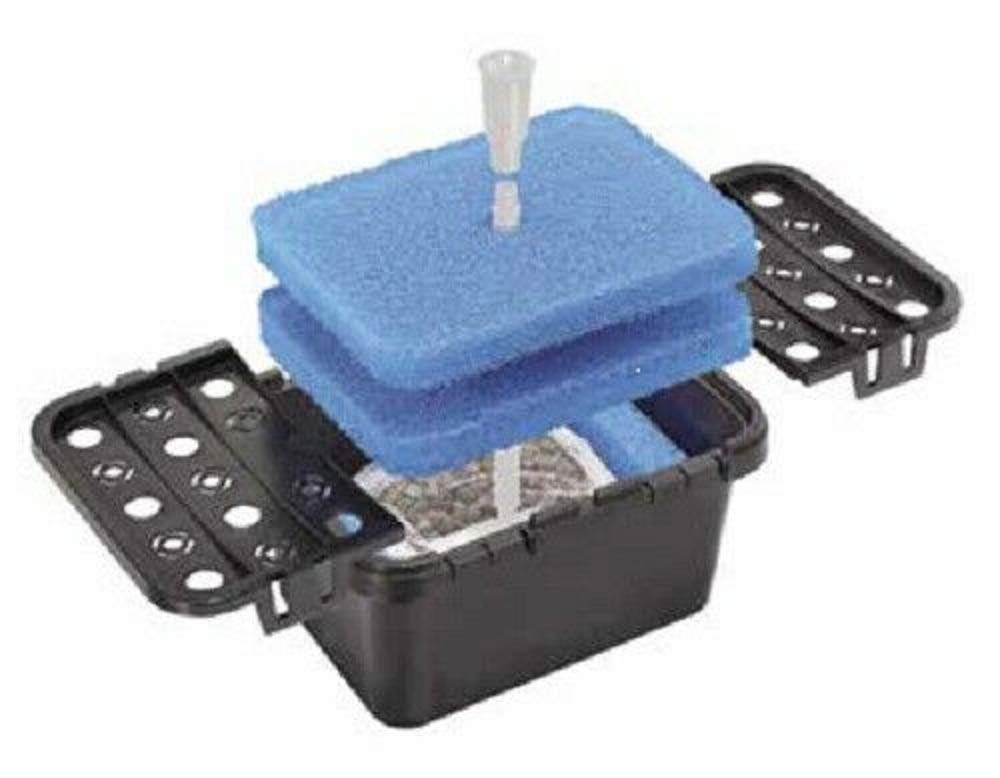
Image 1.1: The PondXpert 2000 Eco Water Garden Pond Pump Filter Box. This compact unit is designed for effective pond filtration.
2. Safety Information
Please read all safety instructions carefully before installing or operating the filter box. Failure to follow these instructions may result in injury or damage to the product.
- Electrical Safety: This product is designed to be used with a pond pump (not supplied). Ensure any pump used is suitable for outdoor, submersible use and is installed according to its own safety instructions and local electrical codes.
- Submersion: The filter box is designed for full submersion in water. Do not operate it dry.
- Children and Pets: Keep children and pets away from the pond area during installation and maintenance.
- Handling: Always lift the filter box by its main body, not by hoses or cables.
- Intended Use: This filter box is intended for water garden ponds. It is not designed for keeping Koi or heavily stocked fish ponds clean.
- Cleaning: Disconnect any connected pump from the power supply before performing any maintenance or cleaning.
3. Package Contents
Carefully unpack the box and ensure all items are present and undamaged. If any items are missing or damaged, please contact your retailer.
- 1 x Plastic Pump Box Filter (Does not include pond pump)
- 6 x Foam Pieces (Filter Media)
- 2 x Fine Media Nets (for biological media)

Image 3.1: The filter box shown with the included foam filter media. The lid is designed to hold additional media.
4. Setup and Installation
The PondXpert 2000 Eco filter box is designed for easy installation. It functions similarly to an all-in-one pond filter, where the pump fits inside the box, and the entire unit is submerged.
- Prepare the Filter Media:
- Rinse the foam pieces and fine media nets thoroughly with pond water (not tap water) to remove any manufacturing residues.
- Place the foam pieces into the designated compartments within the filter box.
- Fill the fine media nets with your chosen biological filter media (not supplied, but the product description mentions it includes mechanical and biological filter media, so I will assume the nets are for biological media). Place these nets into the filter box, typically on top of or alongside the foam.
- Install the Pump:
- Place your submersible pond pump (not supplied) inside the filter box. Ensure the pump is securely positioned and its intake is clear.
- Connect the pump's outlet to any desired fountain or waterfall attachments, routing the hose through the designated opening in the filter box lid.
- Position the Filter Box:
- Carefully lower the assembled filter box into your pond.
- Position it on a stable, level surface at the bottom of the pond, ensuring it is fully submerged.
- Ensure the pump's power cable is routed safely out of the pond and connected to a suitable, weather-protected power source according to the pump's instructions.

Image 4.1: A diagram illustrating a typical pond setup with the filter box submerged, connected to a pump and fountain/waterfall.
5. Operation
Once installed, the PondXpert 2000 Eco filter box operates continuously to filter your pond water. The pump (not supplied) draws water into the filter box, where it passes through the mechanical and biological media before being returned to the pond.
- Initial Start-up: After installation, power on your pond pump. Water should begin to flow through the filter and out of your fountain or waterfall.
- Continuous Filtration: For optimal water quality, the filter box should operate 24 hours a day, 7 days a week, during the pond season.
- Monitoring: Regularly observe your pond water clarity. A decrease in flow from the pump or a noticeable reduction in water clarity may indicate that the filter media requires cleaning.

Image 5.1: A well-maintained pond with aquatic plants, demonstrating the clear water quality achievable with proper filtration.
6. Maintenance
Regular maintenance is crucial for the efficient operation and longevity of your filter box and for maintaining healthy pond water. The frequency of cleaning will depend on pond size, fish load, and environmental conditions.
- Disconnect Power: Always disconnect the pond pump from the power supply before attempting any maintenance.
- Remove Filter Box: Carefully lift the filter box out of the pond.
- Clean Foam Media:
- Remove the foam pieces from the filter box.
- Rinse the foam thoroughly using pond water (not chlorinated tap water) until the majority of accumulated debris is removed. Avoid cleaning them too vigorously, as this can remove beneficial bacteria.
- Clean Biological Media:
- Gently rinse the biological media nets in a bucket of pond water to remove any large debris. Do not clean these too thoroughly, as they house beneficial bacteria essential for biological filtration.
- Clean Filter Box and Pump:
- Clean the inside of the filter box to remove any sludge or debris.
- Inspect and clean your pond pump according to its manufacturer's instructions.
- Reassemble and Restart:
- Place all cleaned media back into the filter box.
- Reinstall the pump.
- Return the filter box to the pond and reconnect the pump to the power supply.

Image 6.1: A vibrant pond with healthy fish, illustrating the benefits of consistent filtration and maintenance.
7. Troubleshooting
This section addresses common issues you might encounter with your PondXpert 2000 Eco filter box. Remember to always disconnect power before inspecting the unit.
| Problem | Possible Cause | Solution |
|---|---|---|
| Poor Water Clarity |
|
|
| Reduced Water Flow from Pump |
|
|
| Filter Box Floating |
|
|
8. Specifications
Key technical details for the PondXpert 2000 Eco Water Garden Pond Pump Filter Box:
- Model: Pex204
- Product Dimensions: 11 x 8 x 6 inches (30cm x 21cm x 16cm)
- Item Weight: 6 pounds
- Filter Type: Mechanical and Biological
- UVC: Not included
- Pump: Not supplied (requires separate submersible pond pump)
- Intended Use: Small water garden ponds (not for Koi or heavily stocked ponds)
9. Warranty and Support
PondXpert products are manufactured to high standards. For specific warranty information, please refer to the documentation provided at the time of purchase or contact your retailer. If you encounter any issues or require technical assistance, please contact PondXpert customer support or your authorized dealer.
Manufacturer: PondXpert
ASIN: B07P6S5QWX