
Introduction
This manual provides detailed instructions for the operation and maintenance of your FILA Digital Watch, Model 38-171-004. Please read this manual thoroughly to ensure proper use and to maximize the lifespan of your watch.
Product Overview
The FILA Digital Watch Model 38-171-004 features a digital display, chronograph, alarm, hourly chime, and water resistance up to 100 meters.
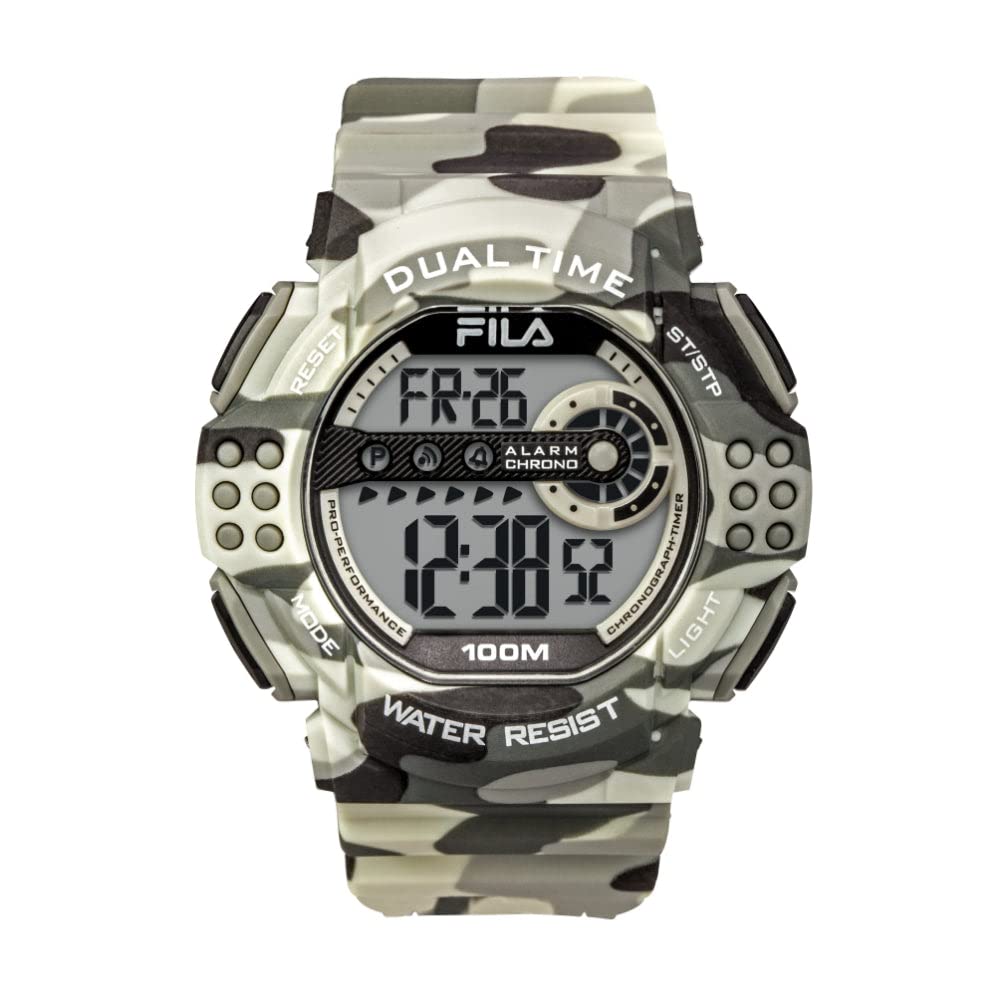
Image Description: A FILA Digital Watch, Model 38-171-004, displayed in its original packaging. The watch features a camouflage-patterned case and strap, with a black digital display showing "WE 8" (Wednesday 8th) and "7:02" (time). Text on the watch face indicates "ALARM", "CHRONO", "100M WATER RESIST". A product tag with "38-171-004" and a barcode is visible in the foreground.
Watch Components and Buttons
Your watch has four primary buttons for navigation and setting, typically located on the sides of the watch case.
- MODE Button: Used to cycle through different modes (Time, Alarm, Chronograph).
- LIGHT Button: Activates the backlight for visibility in low light conditions.
- ST/STP (Start/Stop) Button: Used to start and stop the chronograph, or adjust settings.
- RESET/ADJ (Reset/Adjust) Button: Used to reset the chronograph or select items for adjustment in setting modes.
Setup and Basic Operation
Initial Time Setting
- In Timekeeping Mode, press the MODE button until the seconds begin to flash. This indicates you are in setting mode.
- Press the RESET/ADJ button to cycle through the settings: Seconds, Hour, Minute, Month, Date, Day of Week.
- Use the ST/STP button to increase the flashing value. Hold down to rapidly advance.
- Once all settings are correct, press the MODE button to exit the setting mode.
12/24 Hour Format
While in Timekeeping Mode, press the ST/STP button to toggle between 12-hour and 24-hour display formats.
Operating Modes
Press the MODE button to cycle through the following modes: Timekeeping → Chronograph → Alarm → Timekeeping.
Chronograph (Stopwatch) Mode
- From Timekeeping Mode, press MODE once to enter Chronograph Mode. The display will show "0:00:00".
- Press ST/STP to start the stopwatch.
- Press ST/STP again to stop the stopwatch.
- Press RESET/ADJ to reset the stopwatch to "0:00:00".
Alarm Mode
- From Timekeeping Mode, press MODE twice to enter Alarm Mode. The alarm time will be displayed.
- Press RESET/ADJ to select the hour or minute for adjustment. The selected value will flash.
- Use the ST/STP button to set the desired alarm hour and minute.
- Press MODE to exit alarm setting.
- To turn the alarm ON/OFF, press ST/STP while in Alarm Mode (not in setting mode). An alarm icon will appear/disappear.
- To activate/deactivate the hourly chime, press RESET/ADJ while in Alarm Mode (not in setting mode). A chime icon will appear/disappear.
Backlight
Press the LIGHT button to illuminate the display for a few seconds.
Maintenance
Water Resistance
This watch is rated for 10 ATM (100 meters) water resistance. This means it is suitable for swimming, showering, and snorkeling. Do not operate buttons underwater. Avoid exposing the watch to extreme temperature changes (e.g., hot shower immediately followed by cold water) as this can compromise seals.
Cleaning
Clean the watch case and strap regularly with a soft, damp cloth. For stubborn dirt, a mild soap solution can be used, followed by rinsing with clean water and drying thoroughly.
Battery Replacement
When the display becomes dim or functions become erratic, the battery may need replacement. Battery replacement should be performed by a qualified watch technician to ensure water resistance is maintained.
Troubleshooting
- Display is blank or dim: The battery may be low or depleted. Replace the battery.
- Buttons are unresponsive: Ensure the watch is not in a locked mode (if applicable, though not specified for this model). Try resetting the watch by pressing all four buttons simultaneously for a few seconds (consult a technician if this does not work).
- Water inside the watch: Immediately take the watch to a qualified technician. Do not attempt to dry it yourself.
Specifications
| Feature | Detail |
|---|---|
| Model Number | 38-171-004 |
| Case Material | ABS |
| Strap Material | PU |
| Crystal Type | Mineral Crystal Glass |
| Water Resistance | 10 ATM (100 meters) |
| Functions | Chrono, Date and Time, Alarm, Hourly Chime |
| Battery Type | 1 Lithium Metal battery (included) |
| Product Dimensions | 8.6 x 11.6 x 9.4 cm |
| Weight | 220 g |
Warranty and Support
For warranty information and customer support, please refer to the documentation provided with your purchase or contact your retailer. Keep your proof of purchase for warranty claims.