
1. Introduction
Thank you for choosing the BLACK+DECKER BHHV520BF-QW Cordless Handheld Vacuum Cleaner. This manual provides essential information for the safe and effective use of your appliance. Please read it thoroughly before first use and keep it for future reference.
This powerful handheld vacuum is designed for quick and efficient cleaning tasks, featuring an 18V Lithium battery, cyclonic action, and an improved ventilation system for optimal suction performance.
2. Safety Instructions
Always observe basic safety precautions when using electrical appliances to reduce the risk of fire, electric shock, and personal injury.
- Do not use the appliance outdoors or on wet surfaces.
- Do not allow the appliance to be used as a toy. Close attention is necessary when used by or near children.
- Use only as described in this manual. Use only manufacturer's recommended attachments.
- Do not use with damaged cord or plug. If appliance is not working as it should, has been dropped, damaged, left outdoors, or dropped into water, return it to a service center.
- Do not pull or carry by cord, use cord as a handle, close a door on cord, or pull cord around sharp edges or corners. Do not run appliance over cord. Keep cord away from heated surfaces.
- Do not unplug by pulling on cord. To unplug, grasp the plug, not the cord.
- Do not handle plug or appliance with wet hands.
- Do not put any object into openings. Do not use with any opening blocked; keep free of dust, lint, hair, and anything that may reduce air flow.
- Keep hair, loose clothing, fingers, and all parts of body away from openings and moving parts.
- Do not pick up anything that is burning or smoking, such as cigarettes, matches, or hot ashes.
- Use extra care when cleaning on stairs.
- Do not use to pick up flammable or combustible liquids, such as gasoline, or use in areas where they may be present.
- Do not pick up toxic material, such as chlorine bleach, ammonia, or drain cleaner.
- Do not use in an enclosed space where vapors are present from oil base paint, paint thinner, some mothproofing substances, flammable dust, or other explosive or toxic vapors.
- Do not pick up hard or sharp objects such as glass, nails, screws, coins, etc.
- Prevent unintentional starting. Ensure the switch is in the off-position before connecting to battery pack, picking up or carrying the appliance.
- Recharge only with the charger specified by the manufacturer.
3. Package Contents
Ensure all items are present in the package:
- BLACK+DECKER BHHV520BF-QW Handheld Vacuum Cleaner
- Filter (pre-installed)
- User Manual (this document)
- Integrated Extender Nozzle
- Charging Base/Adapter (not explicitly listed but implied by 'battery-powered' and 'recharge only with charger')
4. Setup and Charging
4.1 Initial Charge
Before first use, fully charge the vacuum cleaner's 18V Lithium-ion battery. This typically takes several hours. Refer to the charging indicator LED for battery status.
4.2 Charging Procedure
- Connect the charging adapter to a power outlet.
- Place the vacuum cleaner onto its charging base or connect the charging cable directly to the charging port.
- The LED indicator will illuminate to show charging status. A full charge is indicated when the LED changes color or turns off (refer to specific LED behavior in your product's quick start guide if available).
Note: The vacuum features an LED indicator to show the battery charge level.
5. Operating Instructions
5.1 Powering On/Off
To turn the vacuum cleaner on, slide the power switch to the 'ON' position. To turn it off, slide the switch back to the 'OFF' position.
5.2 Suction Adjustment
The vacuum cleaner offers 2 suction levels to adapt to different cleaning tasks. Use the control button to switch between the two speeds:
- Speed 1: For lighter debris and extended runtime (up to 21 minutes).
- Speed 2: For heavier debris and maximum suction power.
5.3 Using the Integrated Extender
The vacuum features an integrated extender nozzle designed to reach inaccessible places, such as between sofa cushions or narrow gaps. Simply pull out the extender until it locks into position. Push it back in when not needed.

Image: Using the vacuum for quick clean-ups on a table surface.
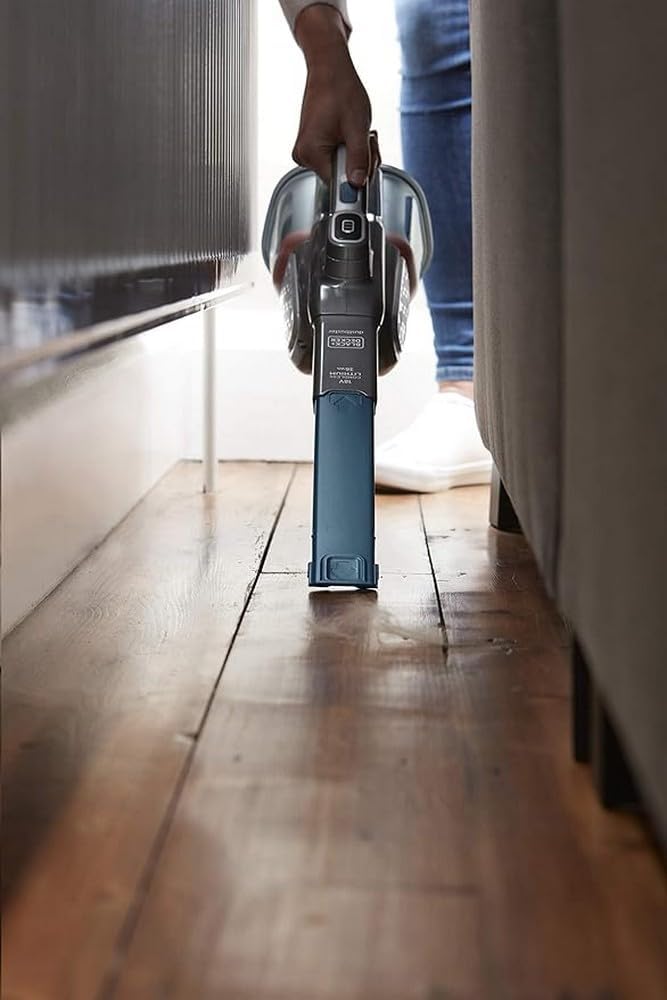
Image: The vacuum's slim design allows cleaning in tight spaces, such as under furniture.

Image: Cleaning upholstery with the handheld vacuum.
6. Maintenance
Regular maintenance ensures optimal performance and extends the life of your vacuum cleaner.
6.1 Emptying the Dust Collector
The vacuum features a simplified collector emptying system designed to prevent contact with dust.
- Ensure the vacuum is turned off.
- Press the dust collector release button.
- Carefully remove the dust collector from the main unit.
- Hold the dust collector over a waste bin and open its lid to empty the contents.
- Reattach the dust collector to the main unit until it clicks securely into place.
6.2 Cleaning the Filters
The vacuum uses a double filtration system: a rigid filter for large particles and a fabric filter for finer dust. Regular cleaning of both filters is crucial for maintaining suction power.
- After emptying the dust collector, separate the filters.
- Tap the rigid filter gently over a bin to remove loose debris.
- The fabric filter can be rinsed under running water. Ensure it is completely dry before reassembling.
- Reassemble the filters and place them back into the dust collector.
Important: An LED indicator for filter obstruction will alert you when the filter needs cleaning.
7. Troubleshooting
If you encounter issues with your vacuum cleaner, refer to the following table:
| Problem | Possible Cause | Solution |
|---|---|---|
| Vacuum does not turn on. | Battery is discharged. | Charge the battery fully. |
| Reduced suction power. | Dust collector is full. | Empty the dust collector. |
| Reduced suction power. | Filters are clogged. | Clean the filters as per maintenance instructions. |
| Reduced suction power. | Nozzle or hose is blocked. | Remove any obstructions from the nozzle or extender. |
| Battery LED indicator not working. | Vacuum not charging or fully charged. | Ensure charger is properly connected and power outlet is active. |
8. Specifications
| Feature | Specification |
|---|---|
| Brand | BLACK+DECKER |
| Model Number | BHHV520BF-QW |
| Color | Blue/Silver/Titanium |
| Dimensions (L x W x H) | 40 x 20.3 x 16.5 cm |
| Weight | 1 Kilogram |
| Dust Collector Capacity | 700 Milliliters |
| Power | 36 Watt-hours |
| Voltage | 18 Volts |
| Number of Speeds | 2 |
| Runtime | Up to 21 minutes |
| Special Features | Compact, Lightweight, Cyclonic Action, LED Battery Indicator, LED Filter Obstruction Indicator, Integrated Extender |
| Filter Type | Fabric (Double filtration system) |
| Power Source | Battery powered (1 Lithium-ion battery included) |
9. Warranty and Support
BLACK+DECKER products are manufactured to high quality standards. For information regarding warranty, service, or replacement parts, please refer to the warranty card included with your purchase or visit the official BLACK+DECKER website. Keep your proof of purchase for warranty claims.