1. Introduction
Thank you for choosing the Nikai NVC2302 Canister Vacuum Cleaner. This manual provides essential information for the safe and efficient operation, maintenance, and troubleshooting of your appliance. Please read these instructions carefully before use and retain them for future reference.
2. Important Safety Instructions
To reduce the risk of fire, electric shock, or injury, always follow basic safety precautions when using an electrical appliance, including the following:
- Read all instructions before using the vacuum cleaner.
- Do not leave the appliance unattended when plugged in. Unplug from outlet when not in use and before servicing.
- Do not use outdoors or on wet surfaces.
- Do not allow to be used as a toy. Close attention is necessary when used by or near children.
- Use only as described in this manual. Use only manufacturer's recommended attachments.
- Do not use with damaged cord or plug. If appliance is not working as it should, has been dropped, damaged, left outdoors, or dropped into water, return it to a service center.
- Do not pull or carry by cord, use cord as a handle, close a door on cord, or pull cord around sharp edges or corners. Do not run appliance over cord. Keep cord away from heated surfaces.
- Do not unplug by pulling on cord. To unplug, grasp the plug, not the cord.
- Do not handle plug or appliance with wet hands.
- Do not put any object into openings. Do not use with any opening blocked; keep free of dust, lint, hair, and anything that may reduce airflow.
- Keep hair, loose clothing, fingers, and all parts of body away from openings and moving parts.
- Do not pick up anything that is burning or smoking, such as cigarettes, matches, or hot ashes.
- Do not use to pick up flammable or combustible liquids, such as gasoline, or use in areas where they may be present.
- Do not pick up toxic material, such as chlorine bleach, ammonia, or drain cleaner.
- Do not use without dust bag and/or filters in place.
- Turn off all controls before unplugging.
- Use extra care when cleaning on stairs.
3. Product Overview and Components
Familiarize yourself with the parts of your Nikai NVC2302 Canister Vacuum Cleaner.

Figure 1: Main unit with hose, telescopic wand, and floor nozzle, along with crevice tool and dusting brush.

Figure 2: Angled view of the vacuum cleaner, highlighting its compact design and accessory storage.

Figure 3: Side profile of the vacuum cleaner, showing the flexible hose connection and rear wheels.

Figure 4: Detailed view of the multi-surface floor nozzle, designed for effective cleaning on various floor types.
Components List:
- Main Unit: Contains the motor, dust bag compartment, and filters.
- Flexible Hose: Connects the main unit to the telescopic wand.
- Telescopic Wand: Adjustable length tube for extended reach.
- Floor Nozzle: Main cleaning head for carpets and hard floors.
- Crevice Tool: For narrow spaces and corners.
- Dusting Brush: For delicate surfaces and upholstery.
- Power Cord: With automatic rewind function.
- Dust Bag: Collects dirt and debris.
- Filters: Motor protection filter and exhaust filter.
4. Setup and Assembly
- Attach the Flexible Hose: Insert the hose end into the suction inlet on the main unit until it clicks securely into place. To remove, press the release button and pull.
- Assemble the Telescopic Wand: Connect the handle end of the flexible hose to the wider end of the telescopic wand. Extend the wand to your desired length by pressing the adjustment button and pulling the sections apart.
- Attach the Floor Nozzle: Connect the floor nozzle to the narrow end of the telescopic wand. Ensure it is firmly attached. For other accessories like the crevice tool or dusting brush, attach them directly to the handle end of the flexible hose or the telescopic wand as needed.
- Power Connection: Pull out the power cord from the rear of the unit. Insert the plug into a suitable electrical outlet.
5. Operating Instructions
- Power On/Off: Press the ON/OFF foot pedal switch located on the main unit to start or stop the vacuum cleaner.
- Suction Power Control: The vacuum cleaner features speed control for adjusting suction power. Use the control dial or slider (refer to your specific unit's design) to increase suction for heavily soiled areas or decrease it for delicate surfaces.
- Cleaning Different Surfaces:

Figure 5: The vacuum cleaner provides powerful suction suitable for various floor types, including carpets and hard floors.
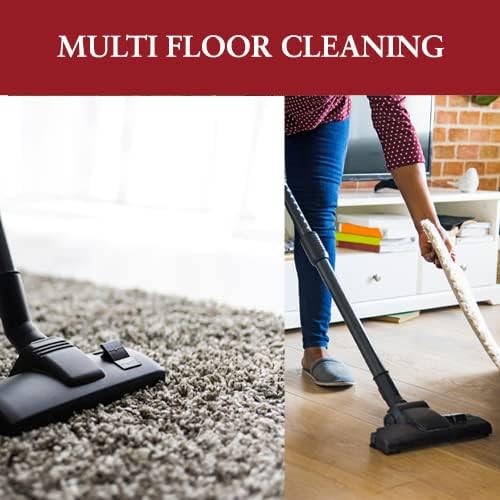
Figure 6: Designed for multi-floor cleaning, easily transitioning between different surfaces.
- For carpets and rugs, use the floor nozzle. Adjust suction as needed.
- For hard floors (tiles, wood, laminate), use the floor nozzle. Some nozzles have a brush setting for hard floors; ensure it is engaged if available.
- For upholstery, curtains, or delicate items, use the dusting brush with reduced suction.
- For crevices, corners, and tight spaces, attach the crevice tool.
- Automatic Cord Rewind: After use, unplug the vacuum cleaner from the wall outlet. Press the cord rewind button (usually a foot pedal) to automatically retract the power cord into the unit. Guide the cord to prevent whipping.
6. Maintenance
Regular maintenance ensures optimal performance and extends the life of your vacuum cleaner.
6.1 Dust Bag Replacement
The Nikai NVC2302 uses a dust bag system. Replace the dust bag when the "dust bag full" indicator (if present) illuminates, or when suction power noticeably decreases.
- Unplug the vacuum cleaner from the power outlet.
- Open the dust bag compartment cover (usually by pressing a latch).
- Carefully remove the full dust bag from its holder. Dispose of it properly.
- Insert a new, genuine Nikai replacement dust bag, ensuring it is correctly seated in the holder.
- Close the dust bag compartment cover until it latches securely.
6.2 Filter Maintenance
Your vacuum cleaner is equipped with multi-stage filtration, including a motor protection filter and an exhaust filter (cartridge type). Regular cleaning or replacement of these filters is crucial for maintaining suction power and air quality.
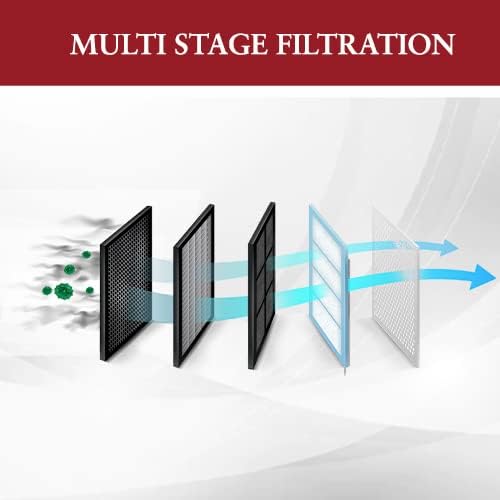
Figure 7: Illustration of the multi-stage filtration system, designed to capture dust and allergens.
- Unplug the vacuum cleaner.
- Motor Protection Filter: This filter is usually located near the dust bag compartment. Open the compartment, remove the dust bag, and then locate the motor filter. Gently tap it to remove loose dust or rinse it under cold water if washable (check manual for specific instructions). Ensure it is completely dry before reinserting.
- Exhaust Filter (Cartridge Type): This filter is typically located at the rear or side of the vacuum cleaner. Open the filter cover, remove the cartridge filter. Tap it clean or replace it if heavily soiled. Do not wash unless specified by the manufacturer.
- Reassemble all parts and close covers securely.
Note: Filter replacement frequency depends on usage. Replace filters every 6-12 months or more frequently if you notice a decrease in performance or increased motor noise.
6.3 General Cleaning
- Wipe the exterior of the vacuum cleaner with a soft, damp cloth. Do not use abrasive cleaners or solvents.
- Check the floor nozzle and attachments regularly for blockages (hair, threads, debris) and remove them.
- Ensure the hose is free from obstructions.
7. Troubleshooting
If you encounter issues with your vacuum cleaner, refer to the following common problems and solutions:
| Problem | Possible Cause | Solution |
|---|---|---|
| Vacuum cleaner does not start. | Not plugged in. Power outlet faulty. Thermal cut-out activated. | Ensure plug is firmly in outlet. Test outlet with another appliance. Unplug, check for blockages, allow to cool for 30 minutes before restarting. |
| Low suction power. | Dust bag full. Filters clogged. Hose or attachments blocked. Suction control open. | Replace dust bag. Clean or replace filters. Check and clear any blockages in hose, wand, or nozzle. Close the suction control opening on the hose handle. |
| Unusual noise. | Blockage in hose/nozzle. Dust bag full. Motor filter clogged. | Check and clear blockages. Replace dust bag. Clean or replace motor filter. |
| Dust escaping from unit. | Dust bag not installed correctly or damaged. Filters missing or incorrectly installed. Compartment covers not closed properly. | Check dust bag installation, replace if damaged. Ensure all filters are correctly in place. Close all covers securely. |
If the problem persists after attempting these solutions, please contact Nikai customer support or an authorized service center.
8. Specifications
| Feature | Detail |
|---|---|
| Brand | Nikai |
| Model Number | 2724332682601 (NVC2302) |
| Power / Wattage | 1400 Watts |
| Voltage | 1400 Volts (Note: This might be a typo in source data, typically operating voltage is 220-240V for 1400W appliances.) |
| Capacity (Dust Bag) | 2 Liters |
| Noise Level | 70 dB |
| Product Dimensions (L x W x H) | 27 x 40 x 31.2 cm |
| Item Weight | 4.63 Kilograms |
| Cordless Operation | No (Corded) |
| Bagless Technology | Bagged |
| Filter Type | Cartridge |
| Surface Recommendation | Carpet (also suitable for hard floors) |
| Special Features | Speed control, Easy built-in carry slot |
9. Warranty and Support
For warranty information, please refer to the warranty card included with your product packaging or visit the official Nikai website. Keep your purchase receipt as proof of purchase for any warranty claims.
For technical support, spare parts, or service inquiries, please contact Nikai customer service through their official channels. Contact details can typically be found on the product packaging or the manufacturer's website.


