
1. Introduction to the Konnected Alarm Panel
The Konnected Alarm Panel is a smart device designed to integrate your existing wired alarm system with modern smart home platforms. It allows you to transform traditional wired sensors (such as door/window contacts, motion detectors, and glass break sensors) into smart devices, providing enhanced monitoring and automation capabilities without recurring monthly fees.
This panel is compatible with leading smart home ecosystems including SmartThings, Amazon Alexa, and Home Assistant, enabling seamless control and notifications directly from your smartphone or other smart devices.
Official overview of the Konnected Alarm Panel, demonstrating its core functionality and integration with smart home systems.
2. Setup Guide
2.1. Unboxing and Component Identification
Your Konnected Alarm Panel kit includes the main circuit board, necessary wiring accessories, and mounting hardware. The panel is compact and designed for easy integration into your existing alarm system's enclosure.
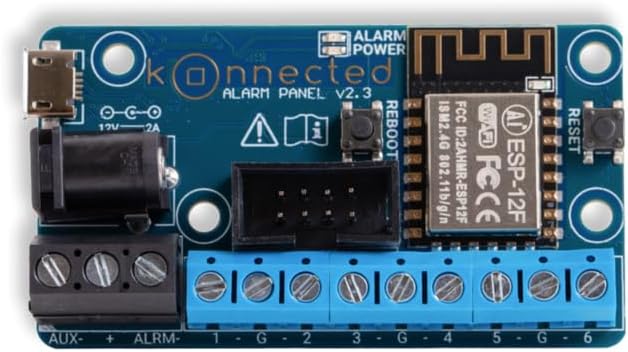
The compact Konnected Alarm Panel circuit board.

Overview of the Konnected Alarm Panel kit, highlighting its 6-zone capacity, included accessories, built-in Wi-Fi, and no required fees.
2.2. Wiring Your Existing Sensors
The Konnected panel connects directly to your existing wired sensors. Carefully disconnect the wires from your old alarm panel and connect them to the corresponding terminals on the Konnected board. Ensure proper polarity and secure connections for reliable operation.

A hand connecting wires to the Konnected Alarm Panel, demonstrating the physical installation process.

Illustrative diagram showing how the Konnected panel integrates various wired sensors like door/window, motion, glass break, siren, and strobe into a smart home system.
2.3. Connecting to Wi-Fi
After wiring, power on your Konnected panel. It will broadcast its own Wi-Fi network. Use your smartphone or computer to connect to this network. Once connected, open a web browser and navigate to the provided IP address (usually 192.168.4.1) to access the Konnected setup page. Select your home Wi-Fi network and enter your password. The device will then connect to your home network.
2.4. SmartThings and Cloud Integration
Download the Konnected app from your phone's app store (Apple App Store or Google Play Store). Ensure your phone and the Konnected module are on the same network. The app will guide you through discovering and registering your device with the Konnected Cloud. This cloud-based integration facilitates faster and easier setup with SmartThings and other compatible platforms. You will then assign zones (e.g., "Front Door," "Kitchen Window") to each connected sensor within the app.

The Konnected app interface demonstrating compatibility with SmartThings, Home Assistant, Amazon Alexa, Hubitat, Google Assistant, Control4, and HomeKit.
3. Operating Your Konnected System
3.1. Testing Sensors
After setup, it is crucial to test each connected sensor. Open and close each door or window, or trigger motion sensors, and verify that the status updates correctly within your Konnected app or integrated smart home platform (e.g., SmartThings). This confirms that the physical connections and software configurations are functioning as intended.
3.2. Remote Monitoring
With the Konnected Alarm Panel, you can monitor your home's security status from anywhere using your smartphone. Receive instant notifications for triggered sensors, arm or disarm your system remotely, and check the real-time status of all connected zones. This feature provides peace of mind and control over your home's security, all without any recurring monthly fees.

A user monitoring their home remotely via the Konnected app, emphasizing the "monitor your home from anywhere without monthly fees" benefit.
3.3. Custom Automations
Leverage the power of your smart home platform to create custom automations based on your Konnected sensors. For example, you can set up rules to automatically arm or disarm your system when you leave or arrive home, turn lights on/off when a door opens, or adjust your thermostat based on motion detection. The possibilities for enhancing your home's intelligence and convenience are extensive.

Examples of custom automations possible with Konnected: Auto Arm & Disarm, Turn On/Off Lights, and Adjust Thermostat.
4. Maintenance
The Konnected Alarm Panel requires minimal maintenance. Periodically check all wired connections to ensure they remain secure. Ensure your home Wi-Fi network is stable and provides adequate signal strength to the panel. Software updates for the Konnected firmware are released periodically and can be applied through the Konnected app or web interface to ensure optimal performance and access to new features.
5. Troubleshooting
- Device Offline: If your Konnected panel appears offline, first check your home Wi-Fi network. Ensure the panel is powered on and the blue LED is solid (indicating a stable connection). Try power cycling the Konnected panel by unplugging and re-plugging its power adapter.
- Sensor Not Responding: Verify the physical wiring connection for the specific sensor. Ensure the wires are securely fastened to the correct terminals on the Konnected board. Test the sensor directly to confirm it is functioning mechanically.
- Setup Issues: If you encounter difficulties during initial setup, ensure your smartphone/computer is connected to the Konnected device's temporary Wi-Fi network before accessing the web interface. Double-check your home Wi-Fi password. For persistent issues, consult the Konnected online support documentation or community forums.
6. Specifications
| Feature | Detail |
|---|---|
| Brand | Konnected |
| Model Number | 6 Zones |
| Color | Black |
| Power Source | AC Power |
| Compatible Devices | Smartphone |
| Connectivity Technology | Wireless, Wired |
| Installation Type | Plug In |
| Alert Type | Motion |
| Item Dimensions (L x W x H) | 2.48 x 1.38 x 0.75 inches |
| Item Weight | 11.3 ounces (0.32 Kilograms) |
| Control Method | App |
| Sensor Technology | Wired |
| Connector Type | Wi-Fi |
6.1. What's in the Box
- Sensors (as per product listing)
- Konnected Alarm Panel (main board)
- Wiring accessories
- Mounting hardware
- Power adapter
7. Warranty Information
Please refer to the official Konnected website or your purchase documentation for detailed warranty information regarding your Konnected Alarm Panel.
8. Support
For further assistance, technical support, or community resources, please visit the official Konnected support website. Online forums and FAQs are available to help with common questions and advanced configurations.

