
Wuloo WL666
Wuloo WL666 Wireless Intercom System User Manual
Model: WL666 | Brand: Wuloo
Introduction
This manual provides comprehensive instructions for the setup, operation, and maintenance of your Wuloo WL666 Wireless Intercom System. Please read this manual thoroughly before using the product to ensure proper function and safety.
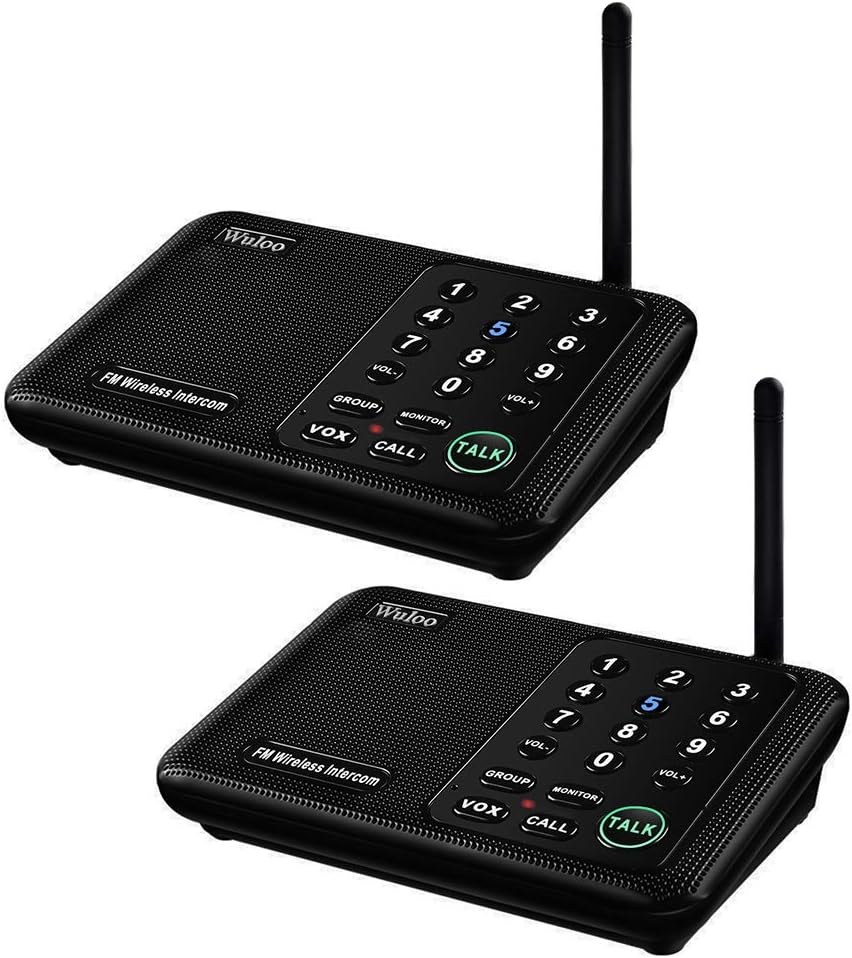
Figure 1: Wuloo WL666 Wireless Intercom System (2 Units)
Safety Information
To ensure safe operation and prevent damage, observe the following precautions:
- In Monitor mode, it is essential to exit this mode to communicate with other units. Failure to do so may prevent two-way communication.
- Do not expose the units to extreme temperatures, direct sunlight, or moisture.
- Use only the provided power adapters and cables.
- Keep the units away from strong electromagnetic fields.
- Do not attempt to disassemble or repair the unit yourself. Contact customer support for assistance.
Package Contents
Verify that all items are present in your package:
- 2 x Wuloo Wireless Intercom Units
- 2 x Power Adapters (5V 1A)
- 2 x USB Cables
- 1 x User Manual (this document)

Figure 2: Package Contents
Note: This device supports power bank supply (5V 1A) for outdoor use, but a power bank is not included. The units do not operate on internal batteries.
Product Overview
Familiarize yourself with the components and controls of your intercom unit.

Figure 3: Intercom Unit Components and Function Keys
- ANT (Antenna): For wireless signal transmission and reception.
- Digital Code (A/B/C): Switches to set the digital code for communication.
- Power Port (DC 5V): Connects to the power adapter or a compatible power bank.
- Speaker: Outputs audio.
- Channel Number (0-9): Buttons to select the communication channel.
- VOL+/VOL-: Adjusts speaker volume.
- Function Keys:
- GROUP: Press to talk with all devices simultaneously on the same channel and code.
- MONITOR: Activates monitoring mode. This station will monitor another station. The monitored station will hear the voice from this unit. Exit this mode to communicate.
- VOX (Voice Operated Exchange): Press VOX to enable hands-free communication. Another station can reply by pressing TALK. The VOX function activates when sound is detected.
- CALL: Press to send a call alert (beep) to another station, then press TALK to speak.
- TALK: Press and hold to speak to another station. Release to listen.
- MIC (Microphone): Captures your voice.
- Indicator Light: Shows unit status.
- Back Hole for Wall Mounting: Allows for wall installation.
Setup Instructions
Follow these steps to set up your Wuloo Wireless Intercom System.
1. Powering the Units
- Connect the USB cable to the Power Port (DC 5V) on the back of each intercom unit.
- Plug the other end of the USB cable into the provided power adapter.
- Plug the power adapter into a standard electrical outlet. The unit will power on.
2. Setting Channels and Codes
For effective communication, all intercom units must be set to the same digital code and a unique channel for each user or location.

Figure 4: Intercom System Setup Steps
- Set Digital Code: On the back of each unit, select one of the three digital codes (A, B, or C) using the switch. All units intended to communicate with each other must use the same digital code.
- Set Channel:
- To set your unit's channel: Long press the desired channel number key (0-9) until you hear a confirmation tone or see the display change.
- To call another intercom: Short press the channel key of the unit you wish to call. The system will automatically revert to its original channel after approximately one minute. You do not need to reset the code every time you call a different user.
- Distribution: After setting a different channel for each user, distribute the intercoms. Ensure units are placed at least 16.5 feet (5 meters) apart to avoid interference during setup.
Recommendation: For optimal performance and to avoid interference, it is recommended to set all units to the same digital code and assign unique channels to each unit. This allows for direct calling between specific units.
Operating Instructions
Basic Communication (Talk)
- To speak, press and hold the TALK button. Speak clearly into the microphone.
- Release the TALK button to listen for a reply.
- Important: There may be a slight delay (1-2 seconds) between pressing the TALK button and the transmission beginning. Wait briefly after pressing TALK before speaking to ensure the beginning of your message is not clipped.
Calling Another Unit
- To call a specific unit, short press the channel number (0-9) assigned to that unit.
- The receiving unit will emit a call alert (beep).
- After the call alert, press the TALK button to initiate conversation.
Group Call
- To broadcast a message to all units on the same digital code and channel, press the GROUP button.
- Then, press and hold the TALK button to speak. All units will receive the message.
Monitor Mode
- Press the MONITOR button to activate monitoring mode. This unit will listen to the designated channel.
- The monitored station will hear your voice.
- To exit Monitor mode and resume normal communication, press the MONITOR button again.
- Caution: While in Monitor mode, two-way communication is not possible.
VOX (Voice Operated Exchange) Mode
- Press the VOX button to enable hands-free communication.
- When VOX is active, the unit will automatically transmit when it detects sound above a certain threshold.
- Another station can reply by pressing their TALK button.
- Press the VOX button again to deactivate VOX mode.
Volume Adjustment
- Press VOL+ to increase the speaker volume.
- Press VOL- to decrease the speaker volume.
Maintenance
Proper care ensures the longevity of your intercom system.
- Clean the units with a soft, dry cloth. Do not use liquid cleaners or abrasive materials.
- Keep the units free from dust and debris.
- Store the units in a cool, dry place when not in use for extended periods.
- Ensure the antenna is not bent or damaged.
Troubleshooting
If you encounter issues, refer to the following common solutions:
| Problem | Possible Cause | Solution |
|---|---|---|
| No power | Power adapter not connected or faulty outlet. | Ensure the power adapter is securely plugged into both the unit and a working electrical outlet. Try a different outlet. |
| Cannot communicate with another unit | Different digital code or channel settings; unit in Monitor mode; out of range. |
|
| Distorted or unclear audio | Interference; incorrect channel setting; low volume. |
|
| Beginning of message is cut off | Speaking too quickly after pressing TALK. | Press the TALK button and wait for approximately 1-2 seconds before speaking to allow the transmission to initiate fully. |
Specifications
| Feature | Detail |
|---|---|
| Model Number | WL666 (WUL-WIS-666P2) |
| Brand | Wuloo |
| Product Dimensions | 6.5 x 4.3 x 1.5 inches |
| Item Weight | 1.72 pounds (for the set) |
| Number of Channels | 10 |
| Digital Codes | 3 (A, B, C) |
| Talking Range Maximum | Up to 1 mile (approx. 5280 feet) in open areas |
| Voltage | 5 Volts (DC) |
| Power Supply | Adapter (included) or 5V 1A Power Bank (not included) |
| Special Features | 1 Mile Range, 10 Channels, 3 Codes, VOX, Monitor, Group Call, Power Bank Support |
| Water Resistance Level | Water Resistant (Note: Not waterproof, avoid direct exposure to water) |
Warranty and Support
Wuloo is committed to providing quality products and customer satisfaction. For warranty information or technical support, please refer to the contact details provided with your purchase or visit the official Wuloo website.
Wuloo specializes in FM/ASK/FSK wireless technology and has over 20 years of experience in designing and manufacturing wireless products.
For further assistance, you may contact Wuloo customer service directly.
Related documentsWL666


Ask a question about this manual
Ask about setup, troubleshooting, compatibility, parts, safety, or missing instructions. Manuals+ will review the question and use this page’s manual context to help answer it.