
1. Introduction
The BTMETER BT-770T is a True RMS 6000 counts digital multimeter designed for precise measurements in various electrical and electronic applications. It offers a wide range of functions including AC/DC voltage, AC/DC current up to 20A, resistance, continuity, capacitance, frequency, transistor hFE, diode testing, and temperature measurement. This manual provides essential information for safe and effective operation of your BT-770T multimeter.

Image: The BTMETER BT-770T Digital Multimeter, showcasing its large display and overall design. The display measures 2.36 inches (60mm) in width and 1.18 inches (30mm) in height.
2. Safety Information
Always adhere to safety precautions when using the multimeter to prevent electric shock or damage to the instrument. This device is rated IEC CAT III 1000V and CAT IV 600V, providing high-voltage protection across all ranges. It features dual fuses (800mA/250V and 20A/250V) for enhanced safety.
- Do not exceed the maximum input values specified for each range.
- Ensure test leads are in good condition and properly connected before making measurements.
- Never measure voltage on circuits with power exceeding 1000V DC or 750V AC.
- Exercise extreme caution when working with live circuits.
- Replace the battery when the low battery indicator appears to ensure accurate readings.
- Do not operate the meter if it appears damaged or if the rubber sleeve is removed.
3. Product Overview
Familiarize yourself with the components of your BT-770T multimeter for optimal use.

Image: A detailed diagram of the BTMETER BT-770T Multimeter, highlighting its key functional components.
- Red light indicator: Illuminates for certain functions like NCV detection.
- CDS sensor: Detects ambient light for automatic backlight control.
- Green light indicator: Illuminates for certain functions.
- Large LCD screen: Displays measurement readings and function indicators.
- Transistor hFE test socket: For testing transistor gain.
- Dial indicator lamp: Illuminates the function dial in low light.
- 20A Max input jack: For high current measurements.
- 600mA/600uA Max input jack: For low current measurements.
- Detachable rubber sleeve: Provides protection against drops and impacts.
- Continuity, LED, and Diode test input jack: For these specific functions.
- COM T- Port: Common terminal for all measurements.
The multimeter also features a 180° rotatable kickstand and a strong magnet on the back for hands-free operation.

Image: Close-up views of the BTMETER BT-770T, illustrating its protective rubber sleeve, the battery compartment for a 9V battery, and the integrated 180° rotatable kickstand.
4. Setup
4.1 Battery Installation
The BT-770T multimeter requires one 9V battery (included). To install or replace the battery:
- Ensure the multimeter is turned OFF.
- Locate the battery compartment on the back of the device.
- Use a slim Phillips head screwdriver to open the battery cover.
- Insert the 9V battery, observing correct polarity.
- Replace the battery cover and secure it with the screw.
4.2 Connecting Test Leads
Connect the black test lead to the COM terminal. Connect the red test lead to the appropriate input jack based on the measurement function:
- VΩHzCapTemp: For voltage, resistance, frequency, capacitance, and temperature measurements.
- mAµA: For low current measurements (up to 600mA).
- 20A: For high current measurements (up to 20A).
5. Operating Instructions
Turn the rotary switch to select the desired measurement function. The multimeter features an automatic backlight that activates in low light conditions via a CDS sensor, illuminating both the screen and the dial indicator.

Image: The BTMETER BT-770T Multimeter in use, demonstrating live wire identification with a single test lead and the automatic backlight feature activating in a dark environment.
5.1 Voltage Measurement (AC/DC)
- Set the rotary switch to the V~ (AC Voltage) or V- (DC Voltage) position.
- Connect the test leads in parallel to the circuit or component under test.
- Read the voltage value on the LCD screen.
5.2 Current Measurement (AC/DC)
Caution: Always connect the multimeter in series with the circuit when measuring current. Ensure the circuit is de-energized before connecting the leads.
- Set the rotary switch to the A~ (AC Current) or A- (DC Current) position.
- Select the appropriate input jack (mAµA or 20A) based on the expected current.
- Connect the test leads in series with the circuit.
- Apply power to the circuit and read the current value.
5.3 Resistance Measurement
- Set the rotary switch to the Ω (Resistance) position.
- Ensure the circuit is de-energized before measuring resistance.
- Connect the test leads across the component.
- Read the resistance value.
5.4 Continuity Test
- Set the rotary switch to the Continuity position.
- Connect the test leads across the circuit or component.
- An audible beep and a green indicator light will confirm continuity (low resistance).
5.5 Diode Test
- Set the rotary switch to the Diode position.
- Connect the red lead to the anode and the black lead to the cathode of the diode.
- The forward voltage drop will be displayed. Reverse the leads to check for open circuit.
5.6 Capacitance Measurement
- Set the rotary switch to the Capacitance position.
- Ensure the capacitor is fully discharged before testing.
- Connect the test leads across the capacitor.
- Read the capacitance value.
5.7 Frequency Measurement
- Set the rotary switch to the Hz (Frequency) position.
- Connect the test leads to the signal source.
- Read the frequency value.
5.8 Temperature Measurement
The BT-770T includes an extensible thermocouple for temperature measurements.
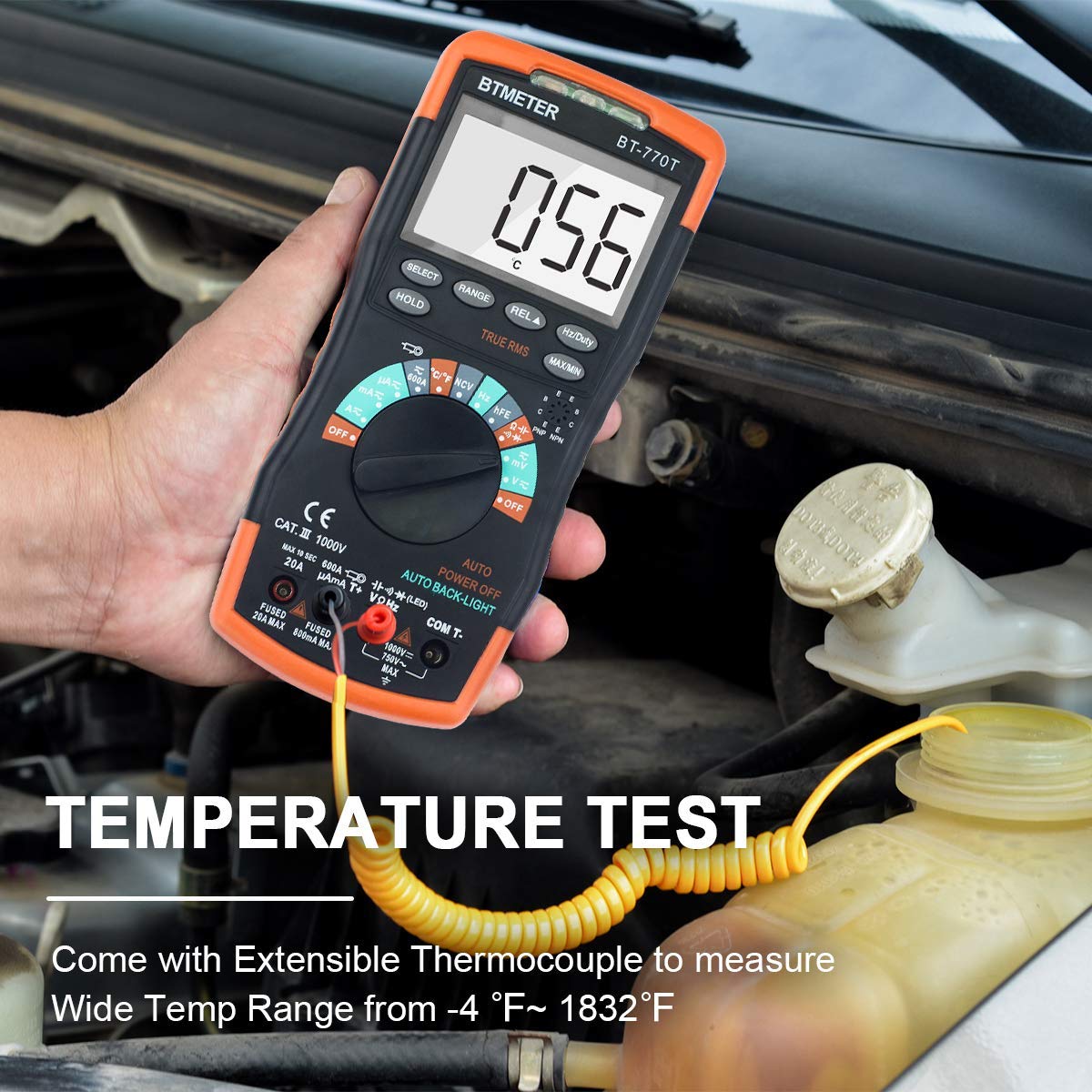
Image: The BTMETER BT-770T Multimeter being used to measure temperature with its extensible thermocouple, shown in an automotive engine bay.
- Set the rotary switch to the Temp position (°C/°F).
- Connect the thermocouple to the appropriate input jacks.
- Place the thermocouple tip on or in the object whose temperature is to be measured.
- Read the temperature on the display.
5.9 Non-Contact Voltage (NCV) Detection
The NCV function allows for detection of AC voltage without direct contact.
- Set the rotary switch to the NCV position.
- Move the top of the multimeter near the conductor.
- An audible beep and a red indicator light will signal the presence of AC voltage.
5.10 Data Hold, Max/Min, Auto Power Off
- HOLD: Press the HOLD button to freeze the current reading on the display. Press again to release.
- MAX/MIN: Press the MAX/MIN button to record the maximum or minimum measured value. Press again to cycle through MAX, MIN, and normal modes.
- Auto Power Off: The multimeter will automatically power off after a period of inactivity to conserve battery life.
6. Specifications
The following tables detail the measurement ranges, resolutions, and accuracies of the BTMETER BT-770T.

Image: Comprehensive tables outlining the ranges, resolutions, and accuracies for DC Voltage, AC Voltage (True RMS), DC Current, AC Current (True RMS), Resistance, and Temperature measurements of the BTMETER BT-770T Multimeter.
6.1 General Specifications
- Display: 6000 Counts, True RMS
- Safety Rating: IEC CAT III 1000V, CAT IV 600V
- Power Source: 9V Battery (Alimenté par batterie)
- Item Weight: 1 Pound (453.59 grams)
- Dimensions: 22.71 x 14.6 x 6.81 cm (Package)
- Model Number: BT-770T
- UPC: 778469100592
6.2 Temperature Measurement
| Range | Accuracy | Resolution |
|---|---|---|
| -20~150 °C | ± (3 °C + 1 digit) | 1 °C |
| 150~1000 °C | ± (3% of rdg + 2 digits) | 1 °C |
| -4~302 °F | ± (5 °F + 2 digits) | 1 °F |
| 302~1832 °F | ± (3% of rdg + 3 digits) | 1 °F |
6.3 DC Voltage
| Range | Resolution | Accuracy |
|---|---|---|
| 60mV | 0.01mV | ±(0.8% of rdg + 2 digits) |
| 600mV | 0.1mV | ±(0.8% of rdg + 2 digits) |
| 6V | 1mV | ±(0.5% of rdg + 2 digits) |
| 60V | 10mV | ±(0.5% of rdg + 2 digits) |
| 600V | 100mV | ±(0.5% of rdg + 2 digits) |
| 1000V | 1V | ±(0.8% of rdg + 2 digits) |
6.4 AC Voltage (True RMS)
| Range | Resolution | Accuracy |
|---|---|---|
| 60mV | 0.01mV | ±(1.5% of rdg + 3 digits) |
| 600mV | 0.1mV | ±(1.5% of rdg + 3 digits) |
| 6V | 1mV | ±(1.0% of rdg + 3 digits) |
| 60V | 10mV | ±(1.0% of rdg + 3 digits) |
| 600V | 100mV | ±(1.0% of rdg + 3 digits) |
| 750V | 1V | ±(1.5% of rdg + 3 digits) |
6.5 DC Current
| Range | Resolution | Accuracy |
|---|---|---|
| 600µA | 0.1µA | ±(1.2% of rdg + 2 digits) |
| 6000µA | 1µA | ±(1.2% of rdg + 2 digits) |
| 60mA | 10µA | ±(1.2% of rdg + 2 digits) |
| 600mA | 100µA | ±(1.2% of rdg + 2 digits) |
| 6A | 1mA | ±(2.0% of rdg + 3 digits) |
| 20A | 10mA | ±(2.0% of rdg + 3 digits) |
| 600A (with clamp adapter) | 100mA | ±(2.5% of rdg + 5 digits) |
6.6 AC Current (True RMS)
| Range | Resolution | Accuracy |
|---|---|---|
| 600µA | 0.1µA | ±(1.5% of rdg + 5 digits) |
| 6000µA | 1µA | ±(1.5% of rdg + 5 digits) |
| 60mA | 10µA | ±(1.5% of rdg + 5 digits) |
| 600mA | 100µA | ±(1.5% of rdg + 5 digits) |
| 6A | 1mA | ±(2.5% of rdg + 5 digits) |
| 20A | 10mA | ±(2.5% of rdg + 5 digits) |
| 600A (with clamp adapter) | 100mA | ±(3.0% of rdg + 5 digits) |
6.7 Resistance
| Range | Resolution | Accuracy |
|---|---|---|
| 600Ω | 0.1Ω | ±(1.0% of rdg + 2 digits) |
| 6kΩ | 1Ω | ±(1.0% of rdg + 2 digits) |
| 60kΩ | 10Ω | ±(1.0% of rdg + 2 digits) |
| 600kΩ | 100Ω | ±(1.0% of rdg + 2 digits) |
| 6MΩ | 1KΩ | ±(1.5% of rdg + 3 digits) |
| 60MΩ | 10KΩ | ±(1.5% of rdg + 3 digits) |
7. Maintenance
7.1 Cleaning
Wipe the meter with a damp cloth and mild detergent. Do not use abrasives or solvents.
7.2 Battery Replacement
Replace the 9V battery when the low battery indicator appears on the display. Refer to section 4.1 for instructions.
7.3 Fuse Replacement
If the current measurement functions stop working, the fuses may need replacement. The BT-770T uses two fuses: 800mA/250V and 20A/250V. Consult a qualified technician for fuse replacement to ensure proper safety and functionality.
8. Troubleshooting
- No display: Check battery installation and charge. Replace if necessary.
- Incorrect readings: Ensure test leads are properly connected and the correct function range is selected. Check for damaged leads.
- Current measurement not working: Check the fuses. Refer to section 7.3.
- "OL" on display: Indicates an overload or out-of-range measurement. Select a higher range or ensure the component is within the meter's capabilities.
9. Warranty and Support
The BTMETER BT-770T Digital Multimeter comes with a 12-month warranty from the date of purchase, covering manufacturing defects. For technical support or warranty claims, please contact BTMETER customer service through their official website or your retailer.


