
Argo ARGO RELAX STYLE
Argo Relax Style Portable Air Conditioner User Manual
Model: ARGO RELAX STYLE
Introduction
The Argo Relax Style portable air conditioner is designed for efficient and compact cooling. Featuring a vertical design concept (VDC), this unit offers powerful performance in a sleek, modern form factor. It combines a high-gloss front finish with matte side panels for an ergonomic grip and contemporary aesthetic.
This appliance provides three primary functions: cooling, ventilation, and dehumidification. It also offers three fan speeds, including an automatic speed setting, to suit various comfort needs. The unit incorporates automatic condensation vaporization during cooling operation and allows for continuous condensate drainage in dehumidification mode. It utilizes a refrigerant gas with a Global Warming Potential (GWP) close to zero, reflecting an environmentally conscious design.

Figure 1: Front view of the Argo Relax Style Portable Air Conditioner.
Safety Information
Please read all safety instructions carefully before operating the appliance. Failure to follow these instructions may result in electric shock, fire, or serious injury.
- Ensure the power supply voltage matches the rating label on the unit.
- Do not operate the unit with a damaged power cord or plug.
- Do not block the air inlets or outlets. Maintain adequate clearance around the unit for proper airflow.
- Do not insert objects into the air outlets.
- Keep the unit away from flammable materials and heat sources.
- Always unplug the unit before cleaning or performing any maintenance.
- This appliance is not intended for use by persons (including children) with reduced physical, sensory or mental capabilities, or lack of experience and knowledge, unless they have been given supervision or instruction concerning use of the appliance by a person responsible for their safety.
- Children should be supervised to ensure that they do not play with the appliance.
Product Components
The Argo Relax Style portable air conditioner comes with several components necessary for its operation and installation. Familiarize yourself with these parts before setup.
- Main Air Conditioner Unit
- Flexible Exhaust Hose
- Window Adapter Kit (for exhaust hose)
- Multi-function Remote Control with LED screen
- Drainage Hose (for continuous dehumidification)
- Air Filter (removable for cleaning)
- Multi-directional Wheels and Handle for portability

Figure 2: Included components: flexible hose, window adapter, remote control, and drainage hose.
Setup
1. Unpacking
Carefully remove the air conditioner and all accessories from the packaging. Retain the original packaging for future storage or transport.
2. Placement
Place the unit on a flat, stable surface. Ensure there is at least 30 cm (12 inches) of space around the unit for proper air circulation. Position the unit near a window or opening where the exhaust hose can be vented to the outside.

Figure 3: Example placement of the air conditioner in a room.
3. Exhaust Hose Installation
- Attach one end of the flexible exhaust hose to the air outlet on the back of the unit.
- Connect the window adapter to the other end of the exhaust hose.
- Open a window or sliding door and place the window adapter securely in the opening to vent hot air outside. For fixed glass installations, use the provided kit. Ensure the hose is as straight and short as possible to maximize efficiency.
4. Drainage (Dehumidification Mode)
For continuous dehumidification, connect the drainage hose to the continuous drainage port on the unit and direct the other end to a suitable drain or container. In cooling mode, condensation is automatically vaporized.
5. Power Connection
Plug the power cord into a grounded electrical outlet. Ensure the outlet meets the electrical requirements specified in the 'Specifications' section.
Operating Instructions
Control Panel Overview
The control panel is located on the top of the unit and features an LED display and various buttons for operation.

Figure 4: Top control panel of the unit.
- On/Off Button: Powers the unit on or off.
- Mode Button: Cycles through Cooling, Fan, and Dehumidification modes.
- Temperature/Timer Adjustment Buttons (+/-): Adjusts desired temperature or sets timer duration.
- Fan Speed Button: Selects fan speed (Low, Medium, High, Auto).
- Swing Button: Activates or deactivates the automatic oscillation of the motorized louvers.
- Sleep Button: Activates sleep mode for quieter operation and gradual temperature adjustment.
- Timer Button: Sets the 24-hour programmable timer for automatic on/off.
Remote Control
The unit can be operated using the included multi-function remote control, which mirrors the functions of the control panel.
Operating Modes
- Cooling Mode: Reduces room temperature. Set desired temperature using the +/- buttons. The unit will cool until the set temperature is reached.
- Fan Mode: Circulates air without cooling. Select desired fan speed.
- Dehumidification Mode: Removes excess moisture from the air. Connect the continuous drainage hose for optimal performance in this mode.
Special Functions
- 24-Hour Programmable Timer: Allows you to set a specific time for the unit to turn on or off automatically.
- Sleep Function: Optimizes operation for nighttime comfort, typically by gradually increasing the set temperature and reducing fan speed.
- Memory Function: The unit retains your last settings when powered off and on.
- Auto-Diagnosis: The unit can perform self-diagnosis to identify potential issues.
- Motorized Louvers: The discharge fins are motorized and can be oriented horizontally and vertically with automatic oscillation for better air distribution.
Maintenance
Regular maintenance ensures optimal performance and extends the lifespan of your air conditioner. Always unplug the unit before cleaning or maintenance.
1. Air Filter Cleaning
The air filter should be cleaned regularly, typically every two weeks, or more frequently depending on usage and air quality. A dirty filter can reduce cooling efficiency and airflow.
- Locate the air filter, usually on the back or side of the unit. It is easily removable.
- Gently pull out the filter.
- Clean the filter using a vacuum cleaner to remove dust, or wash it with lukewarm water and a mild detergent.
- Rinse thoroughly and allow the filter to air dry completely before reinserting it into the unit.

Figure 5: Side view indicating air intake vents where the filter is located.
2. Condensate Drainage
While the unit features automatic condensation vaporization in cooling mode, it's important to be aware of drainage for dehumidification or if the internal tank fills up.
- Automatic Vaporization: In cooling mode, most condensation is evaporated and expelled with the hot air.
- Continuous Drainage: For prolonged dehumidification or in very humid conditions, connect the provided drainage hose to the continuous drainage port to allow water to drain directly.
- Manual Drainage: If the internal tank becomes full (indicated by an error code or indicator light), turn off the unit, unplug it, and carefully move it to a location where water can be drained from the bottom drainage plug into a shallow pan.
3. Unit Cleaning
Wipe the exterior of the unit with a soft, damp cloth. Do not use harsh chemicals, abrasives, or solvents, as these can damage the surface.
4. Storage
Before storing the unit for an extended period (e.g., off-season):
- Ensure all water has been drained from the unit.
- Clean the air filter.
- Unplug the power cord and coil it neatly.
- Store the unit in a cool, dry place, preferably in its original packaging, to protect it from dust and damage.
- If the unit has been stored horizontally, allow it to stand upright for at least 4 hours before restarting operation.
Troubleshooting
Before contacting customer support, please refer to the following common issues and their solutions:
| Problem | Possible Cause | Solution |
|---|---|---|
| Unit does not turn on. | No power, power cord unplugged, circuit breaker tripped. | Check power connection, ensure outlet is functional, reset circuit breaker. |
| Unit is running but not cooling. | Exhaust hose not properly vented, room too large, windows/doors open, dirty air filter, temperature setting too high. | Ensure exhaust hose is vented outside, close windows/doors, clean air filter, lower temperature setting. |
| Unit is noisy. | Normal operating noise (fan/compressor), unit not on a level surface, internal components vibrating. | Ensure unit is on a flat, stable surface. Some operating noise is normal for portable units. |
| Water leakage. | Drainage plug not secured, continuous drainage hose blocked or disconnected, internal water tank full. | Check drainage plug, ensure hose is properly connected and clear, drain internal tank if full. |
| Remote control not working. | Batteries dead or incorrectly inserted, obstruction between remote and unit. | Replace batteries, ensure clear line of sight to the unit's receiver. |
If the problem persists after attempting these solutions, please contact customer support.
Specifications
The following table provides detailed technical specifications for the Argo Relax Style portable air conditioner:
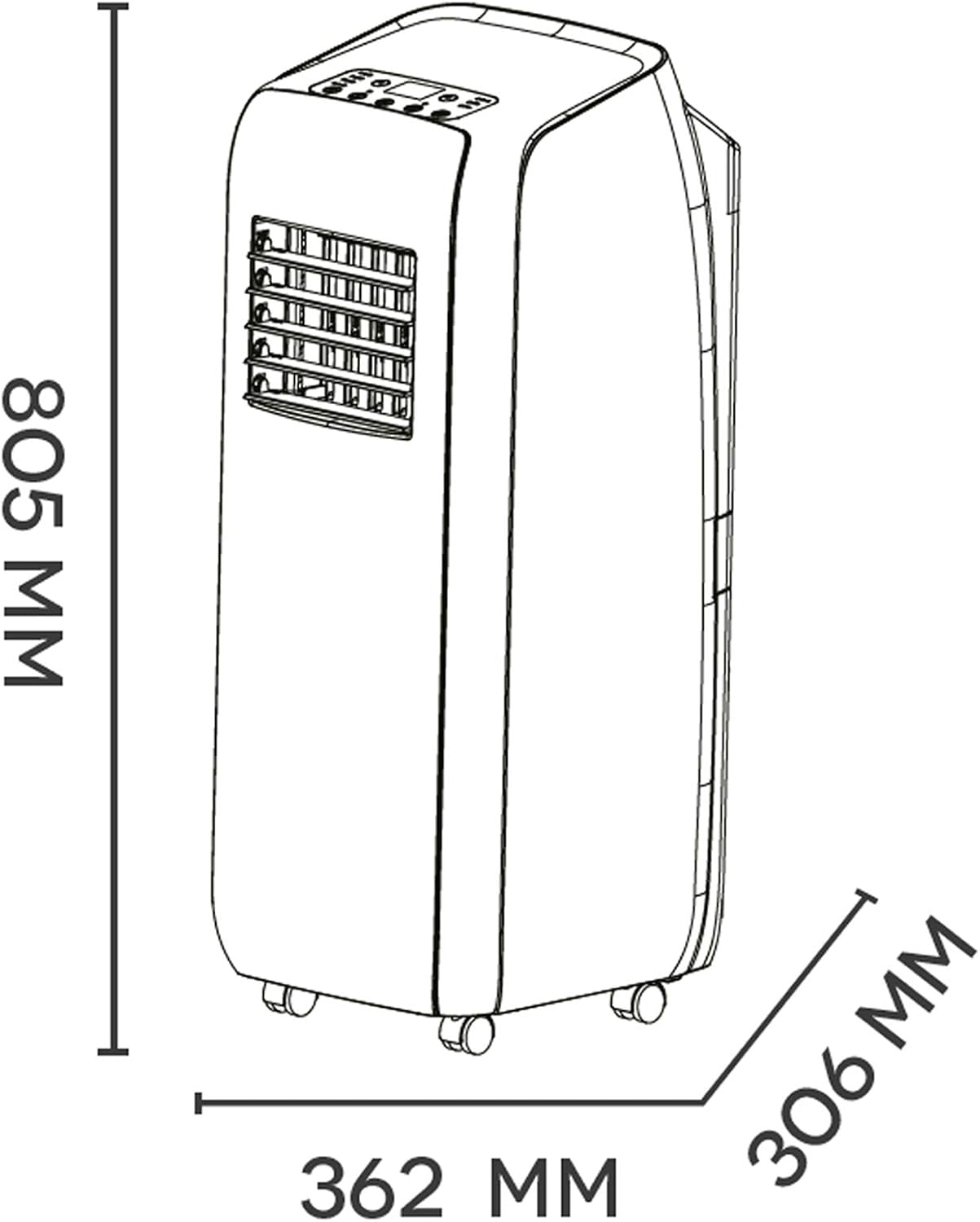
Figure 6: Dimensions of the unit.
| Feature | Specification |
|---|---|
| Brand | Argo |
| Model Number | RELAX STYLE |
| Product Dimensions (L x W x H) | 36.2 x 30.6 x 80.5 cm (14.25 x 12.05 x 31.69 inches) |
| Weight | 28 kg (61.7 lbs) |
| Energy Efficiency Class | A |
| Cooling Capacity | 10000 BTU/H (2.6 kW) |
| Noise Level | 64 dB |
| Voltage | 230 Volts |
| Power Consumption | 2600 Watts |
| Installation Type | Portable |
| Included Components | Product, manual, remote control, warranty, flexible hose, window adapter, fixed glass installation kit |
Warranty and Support
For warranty information, please refer to the warranty card included with your product or visit the official Argo website. Keep your purchase receipt as proof of purchase.
For technical support, spare parts, or service inquiries, please contact Argo customer service. Contact details can typically be found in the product packaging or on the manufacturer's official website.
Important: Do not attempt to repair the unit yourself. Unauthorized repairs will void the warranty and may pose safety risks.
Related documentsARGO RELAX STYLE


Ask a question about this manual
Ask about setup, troubleshooting, compatibility, parts, safety, or missing instructions. Manuals+ will review the question and use this page’s manual context to help answer it.