
Introduction
This manual provides comprehensive instructions for the ZdalaMit NC262UH replacement remote control. Designed to be compatible with various Magnavox Blu-ray Disc DVD Players, this remote offers a straightforward, ready-to-use solution without the need for complex programming or pairing.
Please read this manual carefully to ensure proper use and longevity of your remote control.
Package Contents
- 1 x ZdalaMit NC262UH Replacement Remote Control
Note: Batteries and additional manuals are not included in the package.
Setup
Battery Installation
The NC262UH remote control requires two (2) 1.5V AAA alkaline batteries for operation.
- Locate the battery compartment on the back of the remote control.
- Slide the battery compartment cover downwards or in the direction indicated by an arrow to open it.
- Insert two AAA batteries, ensuring the positive (+) and negative (-) terminals align correctly with the markings inside the compartment.
- Close the battery compartment cover by sliding it back into place until it clicks securely.
Caution:
- Do not mix old and new batteries.
- Do not mix alkaline, standard (carbon-zinc), or rechargeable (nickel-cadmium) batteries.
- Remove batteries if the remote control will not be used for an extended period to prevent leakage.

Figure 1: Back view of the remote control, highlighting the battery compartment.
Operating Instructions
The ZdalaMit NC262UH remote control is designed for immediate use with compatible Magnavox Blu-ray Disc DVD Players without any programming or pairing steps.
Compatibility
This remote is compatible with the following Magnavox Blu-ray Disc DVD Player models:
- MBP5320F
- MBP5320F/7F
- MBP5320
- MBP5320/F7
- MBP5320/F7F
- MBP5320/F7G
- MBP5320/F7H
- NB991
- NB991UD
Basic Operation
Once batteries are installed, point the remote control directly at your Magnavox Blu-ray Disc DVD Player. The remote functions identically to the original remote control for these models.

Figure 2: Front view of the remote control, displaying all functional buttons.
Key functions include:
- Power Button: Turns the player on or off.
- Navigation Pad (Up, Down, Left, Right, OK): Used to navigate menus and confirm selections.
- Play/Pause, Stop, Fast Forward, Rewind, Skip: Standard media playback controls.
- Number Buttons (0-9): For direct input or channel selection.
- TOP MENU / HOME: Accesses the main menu or home screen of the player.
- POP MENU / MENU: Accesses pop-up menus or disc menus.
- MODE: Switches between different modes or inputs if applicable.
- RETURN: Goes back to the previous screen or menu.
- AUDIO: Selects audio tracks.
- SUBTITLE: Toggles or selects subtitle options.
- ANGLE: Changes camera angles on compatible discs.
- NETAPP / DISPLAY / REPEAT: Specific function buttons for network applications, display information, or repeat playback.
- NETFLIX / VUDU: Dedicated buttons for direct access to streaming services (requires player to be connected to internet).
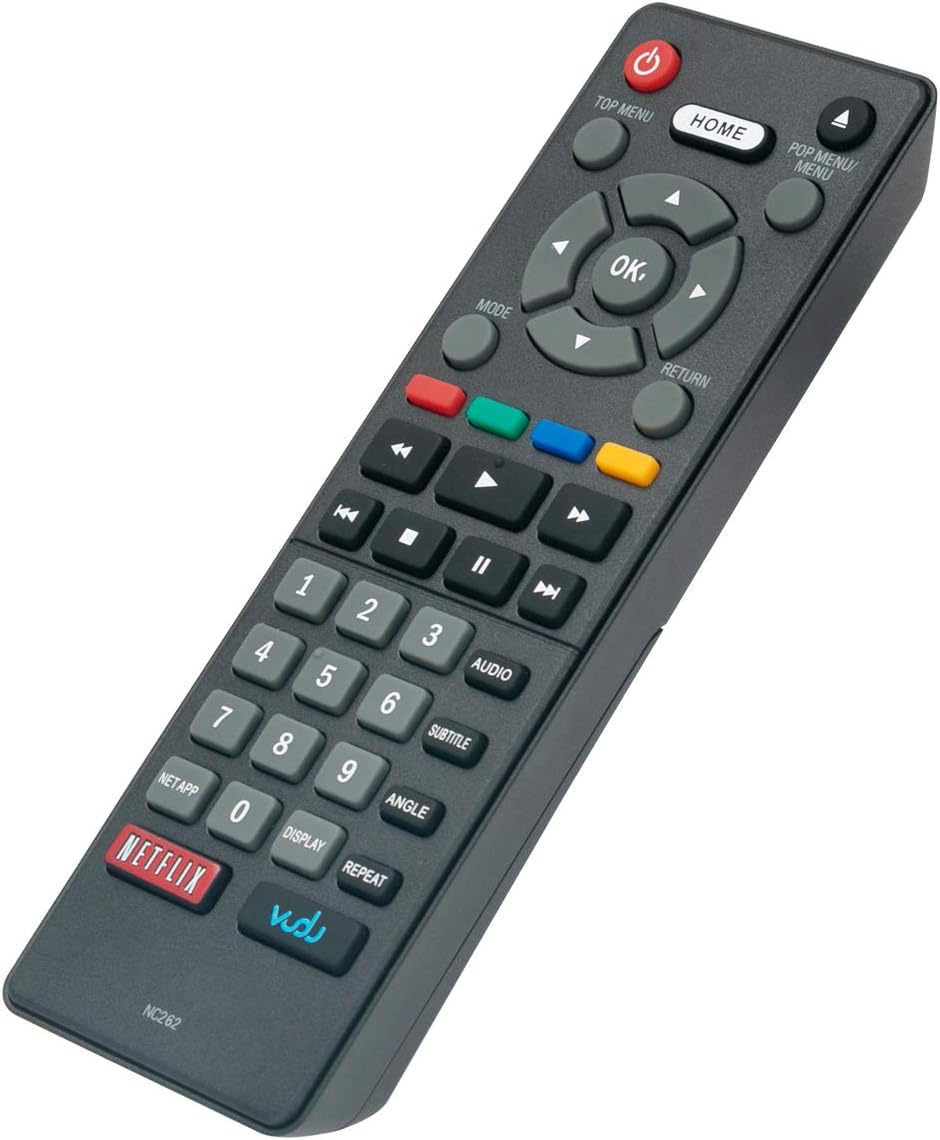
Figure 3: Angled view of the remote control, illustrating its form factor.
Maintenance
- Cleaning: Use a soft, dry cloth to clean the remote control. Do not use liquid cleaners or abrasive materials.
- Storage: Store the remote in a cool, dry place away from direct sunlight and extreme temperatures.
- Battery Replacement: Replace batteries promptly when the remote's performance degrades. Always replace both batteries at the same time.
- Avoid Drops: Protect the remote from physical shocks and drops, which can damage internal components.
Troubleshooting
| Problem | Possible Cause | Solution |
|---|---|---|
| Remote is not working. | Batteries are dead or incorrectly inserted. | Replace batteries with new 1.5V AAA alkaline batteries, ensuring correct polarity (+/-). |
| Remote has limited range or intermittent response. | Low battery power; Obstruction between remote and player; Infrared sensor on player is blocked. | Replace batteries. Ensure a clear line of sight between the remote and the player. Remove any objects blocking the player's infrared sensor. |
| Specific buttons are not responding. | Button malfunction; Player not compatible with specific function. | Ensure the remote is compatible with your specific player model. If other buttons work, the specific button might be faulty. |
| Remote battery cover does not stay on. | Manufacturing defect or wear and tear. | Secure with tape if necessary, or contact customer support for assistance. |
Specifications
- Model: NC262UH / NC262
- Power Supply: 2 x 1.5V AAA Alkaline Batteries (not included)
- Connectivity Technology: Infrared (IR)
- Compatible Devices: Magnavox Blu-ray Disc DVD Players (MBP5320F, MBP5320F/7F, MBP5320, MBP5320/F7, MBP5320/F7F, MBP5320/F7G, MBP5320/F7H, NB991, NB991UD)
- Dimensions: Approximately 5.5 x 2 x 0.65 inches (13.97 x 5.08 x 1.65 cm)
- Weight: Approximately 1.41 ounces (40 grams) without batteries
- Special Feature: Ergonomic design
Warranty and Support
For any questions or concerns regarding your ZdalaMit NC262UH replacement remote control, please refer to the retailer's return policy or contact the seller directly for support.
As a replacement product, specific warranty details may vary. Please retain your proof of purchase for any warranty claims.

